logo-darklogo-darklogo-darklogo-dark
  • Home
  • Browse
    • Assistant
    • Coding
    • Image
    • Productivity
    • Video
    • Voice
    • Writing
    • All Categories
    • AI Use Cases
  • My Favorites
  • Suggest a Tool
✕
Home › Music & Audio›
Published by Dusan Belic on August 30, 2023

Melody ML

Melody ML Homepage
Categories Music & Audio

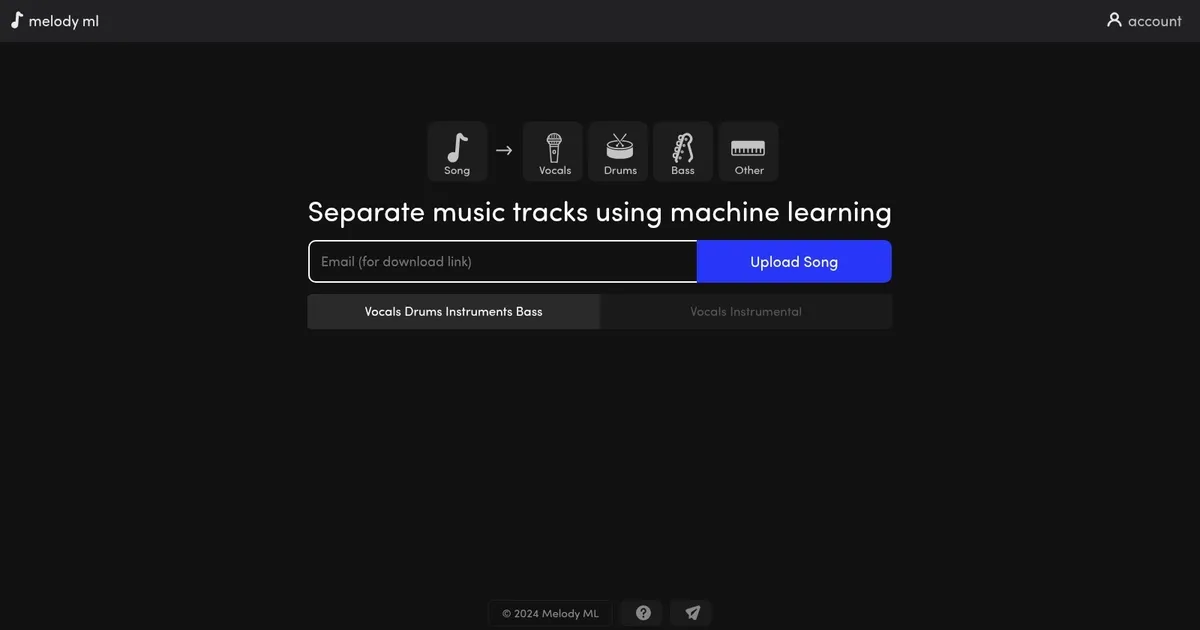
Melody ML - screenshot

Separates uploaded songs into isolated vocals, drums, bass, and other stems using AI

Melody ML

Melody ML is an innovative web-based platform designed to separate music tracks using advanced machine learning techniques. It caters to users who wish to isolate specific song components, such as vocals, drums, bass, and other instruments — making it a valuable tool for music producers, DJs, and enthusiasts looking to remix or analyze songs in depth.

Melody ML offers an easy-to-grasp user interface where users can upload their song files, and — utilizing the Demucs model for processing — the platform separates the chosen elements. The service provides two free songs for new users, after which a fee is charged based on the number of songs users wish to process.

Supported audio formats include MP3, WAV, FLAC, and Ogg/Vorbis, with a maximum file size of 100 MB and a song length limit of 10 minutes. Processed files are available for download for one month.

Lastly, we should add that Melody ML is committed to user privacy and data security, storing only email addresses for basic functionality, while payment details are handled by Stripe and PayPal. It clearly states that users retain copyright and are responsible for their uploads, emphasizing that it does not claim authorship, share, or distribute uploaded songs.

Melody ML Homepage
Categories Music & Audio

What are the key features? ⭐

  • AI Audio Separation: Uses Demucs model to split songs into vocals, drums, bass, and other instruments automatically.
  • Browser-Based Upload: Simple drag-and-drop interface for processing audio files up to 10 minutes and 100MB without software installation.
  • Multiple Format Support: Accepts MP3, WAV, FLAC, and Ogg/Vorbis files for flexible input options.
  • Stem Downloads: Provides individual downloadable stems after processing, available for 1 month.
  • Pay-Per-Use Credits: Offers two free songs then charges credits per track with bulk pack options for frequent users.

Who is it for? 🤔

Melody.ml suits music producers, remixers, DJs, content creators, and hobbyists who want to isolate elements from existing songs without complex software. It's especially useful for beatmakers needing acapellas or drum loops, YouTubers creating mashups or reaction videos, karaoke enthusiasts extracting vocals, and anyone experimenting with sampling or remixing on a budget. People who prefer quick browser tools over desktop apps or who only need occasional separations will find it particularly handy.

Examples of what you can use it for 💭

  • Producer: Uploads a track to extract clean vocals for layering over an original beat or remix.
  • Remixer: Isolates drums and bass to rebuild or mash up sections of popular songs.
  • Content Creator: Separates instrumentals to create karaoke versions or backing tracks for covers.
  • Sample Hunter: Pulls specific elements like a guitar riff or synth pad for use in new compositions.
  • DJ: Creates custom acapellas or stem packs to blend tracks live or in sets.

Pros & Cons ⚖️

  • Super easy browser use
  • Fast processing times
  • Two free trials
  • Clean results on pop
  • File size & length limits
  • Some bleed on dense mixes

FAQs 💬

What file formats does Melody.ml accept?
It supports MP3, WAV, FLAC, and Ogg/Vorbis audio files.
How long can my uploaded song be?
Songs up to 10 minutes long and 100MB in size are allowed.
How many free separations do I get?
You receive 2 free song separations before needing to purchase credits.
How much does it cost after the free trials?
Each additional song costs credits, roughly equivalent to $0.50, with bulk packs available for better value.
How good is the stem separation quality?
It performs well on modern clear mixes but may have some bleed on older or dense tracks.
How long are processed files available?
Stems remain available for download for 1 month after processing.
Is there a desktop app or is it only web-based?
Melody.ml is fully browser-based with no download or installation required.
Can I use the separated stems commercially?
You are responsible for copyright and usage rights; the tool does not grant licenses.
What model powers the separation?
It uses the Demucs model developed by Facebook Research for high-quality source separation.
What if I need better quality or more features?
Consider alternatives like Lalal.ai for sharper vocals or Moises.ai for extra editing tools.
Visit Melody ML

Related tools ↙️

  1. LANDR LANDR Offers AI mastering, music distribution, samples, plugins, and courses for creators
  2. PodLM PodLM Transforms URLs, texts, and documents into professional podcasts using AI
  3. StockmusicGPT StockmusicGPT Generates royalty-free stock music, sound effects, and song covers using AI from text or images
  4. Noise Eraser Noise Eraser Removes background noise from audio and video using AI to isolate specific sounds like vocals
  5. ecrett music ecrett music Generates customizable royalty-free music for videos and games using AI
  6. SoundBoost SoundBoost Master music tracks instantly with AI-driven customization.
Last update: March 11, 2026
Share
Promote Melody ML
light badge
Copy Embed Code
dark badge
Copy Embed Code
neutral badge
Copy Embed Code
About Us | Contact Us | Suggest an AI Tool | Privacy Policy | Terms of Service

Copyright © 2026 Best AI Tools
415 Mission Street, 37th Floor, San Francisco, CA 94105