logo-darklogo-darklogo-darklogo-dark
  • Tool Categories
    • 🎨Art & Creative Design505
    • 🏢Business Management644
    • 💻Coding & Development515
    • 👮Detection83
    • 🧠General Use727
    • 🏥Health & Wellness55
    • 📷Image & Photo Analysis100
    • 🖼️Image Generation & Editing618
    • 📐Interior & Architectural Design37
    • 🎓Learning & Education483
    • ⚖️Legal & Finance90
    • 🎭Lifestyle & Entertainment236
    • 📢Marketing & Advertising627
    • 🎧Music & Audio138
    • 👔Office & Workplace1,014
    • 🔬Research & Data Analysis372
    • 👥Social Media245
    • 🎥Video Generation & Editing426
    • 👧🏻Virtual Companion135
    • 🎤Voice Generation & Editing381
    • ✍️Writing & Editing808
    • All Categories
    • AI Use Cases
  • News
  • Events
    • Academic Conferences
    • Developer Conferences
    • Expos / Trade Shows
    • Industry Summits
    • Workshops / Training
    • All Events
    • Past Events
  • Saved Tools
  • Suggest a Tool
✕
Home › Video Generation & Editing › Video Summarizer› Video Highlight
Video Highlight

Video Highlight

Summarizes videos instantly with timestamped transcripts, insights, and interactive chat

Video Highlight is designed to significantly streamline working with video content, especially for students and researchers. By allowing users to paste any YouTube URL, it provides AI-powered, timestamped summaries and transcripts of the video content. This then eliminates the need for manual transcribing, pausing, and rewinding, saving users hours of research time.

Video Highlight enables users to quickly locate key information within videos, enhancing efficiency in exploring, analyzing, and absorbing content. In addition, the tool offers features like interactive chats with video content, allowing for instant answers to complex questions.

Further enhancing its utility, Video Highlight integrates seamlessly with productivity tools such as Notion — permitting the direct export of summaries, timestamps, and highlights for effective note-taking. It also supports highlight functionalities, smart search within summaries and transcripts, and the capturing of key moments through screenshots via a Beta Chrome Extension.

Finally, for those looking to supercharge their productivity in tasks like market research or analysis, Video Highlight offers features engineered to minimize transcription efforts and sharpen analytical focus — making it a robust aid in managing video content efficiently.

Visit Video Highlight ↗
Categories
🎥 Video
📋 Video Summarizer 🔍 Video Search
👥 Social
📺 YouTube Summary ▶️ YouTube
🎤 Voice
📝 Transcriber
✍️ Writing
📝 Summarizer
🎓 Education
📰 Article Summarization
👔 Work
🗒️ Note Taking

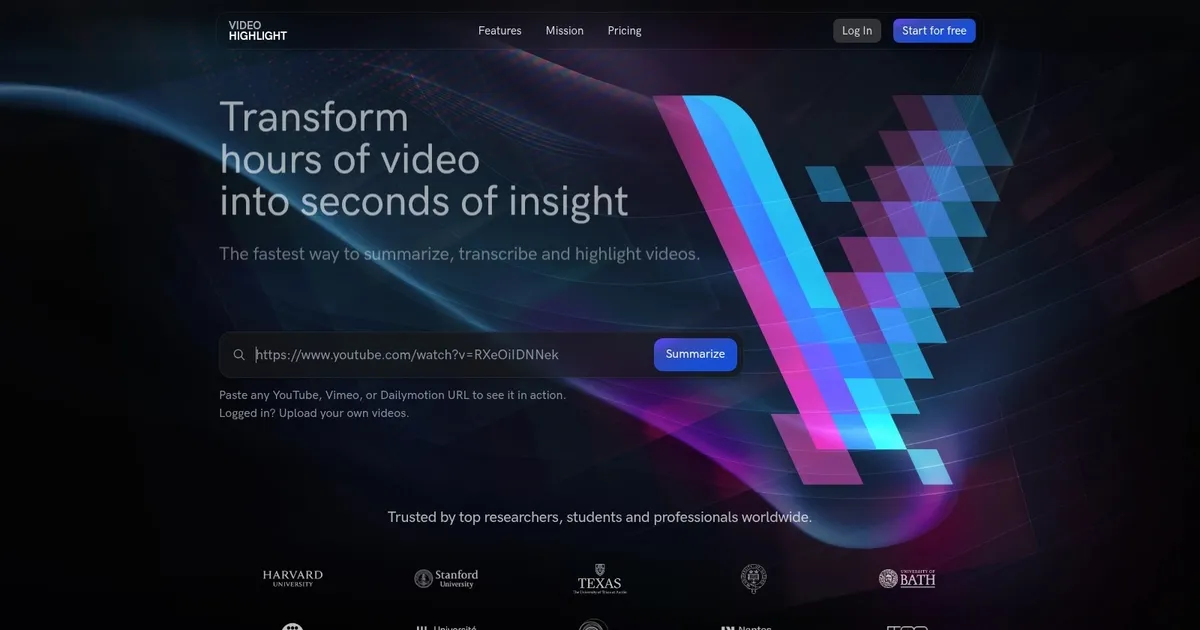
Homepage Screenshot 📸

Video Highlight screenshot

What are the key features? ✨

  • AI Video Summarization: Generates concise, timestamped key insights from any video in seconds.
  • Accurate Transcripts: Produces searchable transcripts in 37+ languages with high accuracy.
  • Chat with Video: Allows users to ask questions and receive precise, timestamped answers from the content.
  • Highlights & Notes: Enables bookmarking sections, adding notes, and capturing screenshots like a document.
  • Cross-Video Search & Playlists: Searches across video collections and organizes content into syncable playlists.

Who is it for? 🤔

Video Highlight suits researchers who review long lectures or webinars, students condensing course videos for study, professionals extracting insights from meetings or industry talks, content creators analyzing reference material, and teams that share and annotate video libraries for collaborative projects.

Examples of what you can use it for 💡

  • Student: Summarizes hour-long lecture videos into timestamped key points and chats to clarify specific concepts without rewatching.
  • Researcher: Uploads private interview recordings or conference talks, highlights important findings, and searches across multiple videos for recurring themes.
  • Professional: Processes team meeting recordings or webinars, takes notes on action items, and exports summaries directly to Notion for project tracking.
  • Content Creator: Analyzes competitor or tutorial videos quickly, bookmarks techniques, and builds playlists of reference material.
  • Non-Native Speaker: Uses multilingual transcripts and summaries to understand English-language videos in their preferred language.

Pros & Cons ⚖️

  • Fast timestamped summaries
  • Strong multilingual transcripts
  • Useful video chat feature
  • Private upload support
  • Free tier limits uploads
  • Long videos take longer

FAQs 💬

What types of videos can Video Highlight process?
It handles YouTube, Vimeo, and Dailymotion URLs plus uploaded MP4, MOV, MKV, AVI videos and MP3, WAV, M4A audio files including WhatsApp voice messages.
Does it support languages other than English?
Yes, transcripts and summaries work in over 37 languages.
Can I use it for private or unlisted videos?
Absolutely, upload private video files directly for summarization and transcription.
Is there a free version available?
It offers a free tier to start with basic summarization, though advanced features and higher limits require a paid plan.
How does the chat with video feature work?
Ask questions in natural language about the video content, and it returns answers with exact timestamps and quotes from the transcript.
Can I export summaries to other apps?
Summaries and highlights export seamlessly to Notion and Readwise, with options to copy as Markdown, Word, or CSV.
Does it work on mobile devices?
The web-based tool is accessible on mobile browsers, though the experience optimizes best on desktop for detailed note-taking.
How accurate are the transcripts?
Transcripts are generally accurate on clear audio but may have minor errors with heavy accents, noise, or overlapping speakers.

Ready to try Video Highlight?

Summarizes videos instantly with timestamped transcripts, insights, and interactive chat

Visit Video Highlight ↗

Video Highlight alternatives 🔗

  1. Loom AI Loom AI Record better video messages with automatic titles, summaries, share messages, and more
  2. NoteGPT NoteGPT Summarizes content, creates notes, and boosts learning with AI-powered tools
  3. Kapwing Kapwing Transforms text or images into edited videos with AI-driven features
  4. VidIQ VidIQ Boosts YouTube channel growth with AI-driven analytics and optimization tools
  5. Read AI Read AI AI-generated summaries, transcripts, playback, and highlights to improve your meetings
  6. Fathom Fathom An AI assistant for recording, transcribing, highlighting, and summarizing your meetings
Share
Video Highlight screenshot enlarged
Promote Video Highlight
light badge
Copy Embed Code
dark badge
Copy Embed Code
neutral badge
Copy Embed Code
Best AI Tools

Discover the best AI tools for any use case

Explore
  • Tool Categories
  • AI Use Cases
  • AI Events
  • AI News
  • Saved Tools
Company
  • About Us
  • Contact Us
  • Media & Partnerships
  • Suggest a Tool
Legal
  • Privacy Policy
  • Terms of Service
Copyright © 2026 Best AI Tools 415 Mission Street, 37th Floor, San Francisco, CA 94105