Mockey
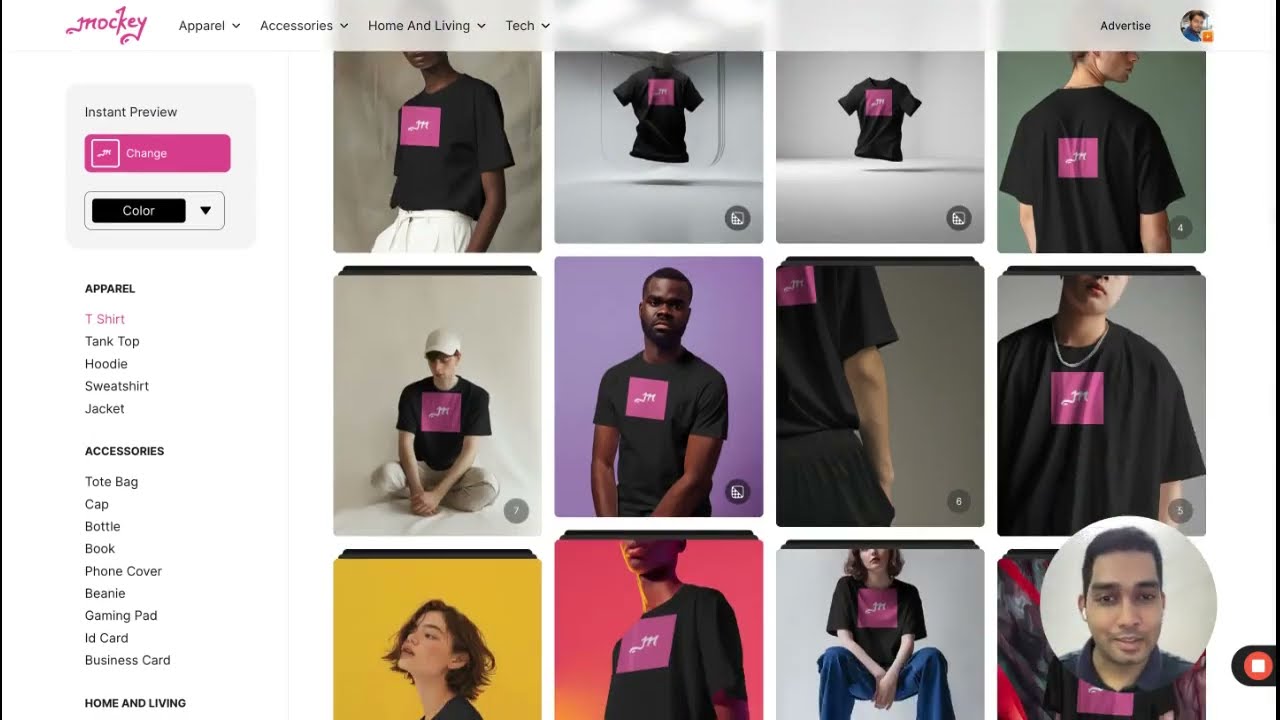
Mockey.ai is an AI-powered online mockup generator, designed to streamline the process of creating professional-looking mockups for a variety of products — including apparel and accessories. In that sene, the platform is particularly beneficial for designers, entrepreneurs, marketers, and hobbyists looking to present their work in a visually appealing manner or validate product ideas without investing heavily in production.
Mockey’s AI capabilities are adept at adjusting lighting, perspective, shadows, and color nuances to ensure that designs appear as authentic as possible in a real-world context.
Mockey comes with an extensive library of over 1000 templates, covering a range of products from t-shirts to books and posters. It offers an easy creation process where users can upload their design, choose a template, and generate a mockup with options to preview before downloading.
The platform allows for significant customization, including altering backgrounds, modifying model appearances, and adjusting product placements. Furthermore, it offers high-quality output in JPG or PNG formats — catering to both print and digital uses. Plus, it also provides a mobile app for Android users, making it accessible on the go.
Mockey is (obviously) lauded for its quick delivery of multiple images and the active support from its Discord community. It offers extensive customization possibilities and diverse artwork generation options, making it a robust tool for creating varied visuals.
However, there are some potential drawbacks, such as the requirement to use Discord for access and a lack of integration with third-party platforms. Still, Mockey is free to use, with premium plans available for users who wish to support the platform and access advanced features.
Video Overview ▶️
What are the key features? ⭐
- AI Mockup Templates: Access over 12,500 unique AI-generated templates across 45+ categories for quick professional visuals.
- 3D Mockup Generator: Create multiple variations with different colors, textures, and angles, exportable as images or animations.
- Video Mockup Generator: Produce short 5-second realistic video clips featuring models and dynamic product presentations.
- AI Editing Tools: Use features like background remover, blur, AI Photoshoot, and style application for enhanced customization.
- Free Watermark-Free Downloads: Enjoy no-watermark outputs on the free plan, with daily limits and upgrades for unlimited use.
Who is it for? 🤔
Examples of what you can use it for 💭
- Print-on-Demand Seller: Quickly generates high-quality t-shirt and hoodie mockups to showcase designs on online stores and attract buyers.
- E-commerce Entrepreneur: Creates lifestyle visuals for accessories and packaging to improve product pages and increase conversion rates.
- Social Media Marketer: Produces engaging video and 3D mockups for ads, posts, and stories to capture attention with dynamic content.
- Graphic Designer: Tests multiple variations of logos or artwork on realistic templates without manual editing in heavy software.
- Content Creator: Builds professional-looking product shots for blogs, YouTube thumbnails, or portfolios using AI-enhanced backgrounds.
Pros & Cons ⚖️
- Generous free tier
- Huge template variety
- AI editing tools
- Video & 3D options
- Daily download limits
- Occasional low-res free