logo-darklogo-darklogo-darklogo-dark
  • Home
  • Browse
    • Assistant
    • Coding
    • Image
    • Productivity
    • Video
    • Voice
    • Writing
    • All Categories
    • AI Use Cases
  • My Favorites
  • Suggest a Tool
✕
Home › Image Generation & Editing ›

Nero AI Image Upscaler

Published by Dusan Belic on July 10, 2023

Nero AI Image Upscaler

Nero
Nero AI Image Upscaler Homepage
Categories Image Generation & Editing
Upscales low-res images up to 400% with AI for sharp details

Nero AI Image Upscaler

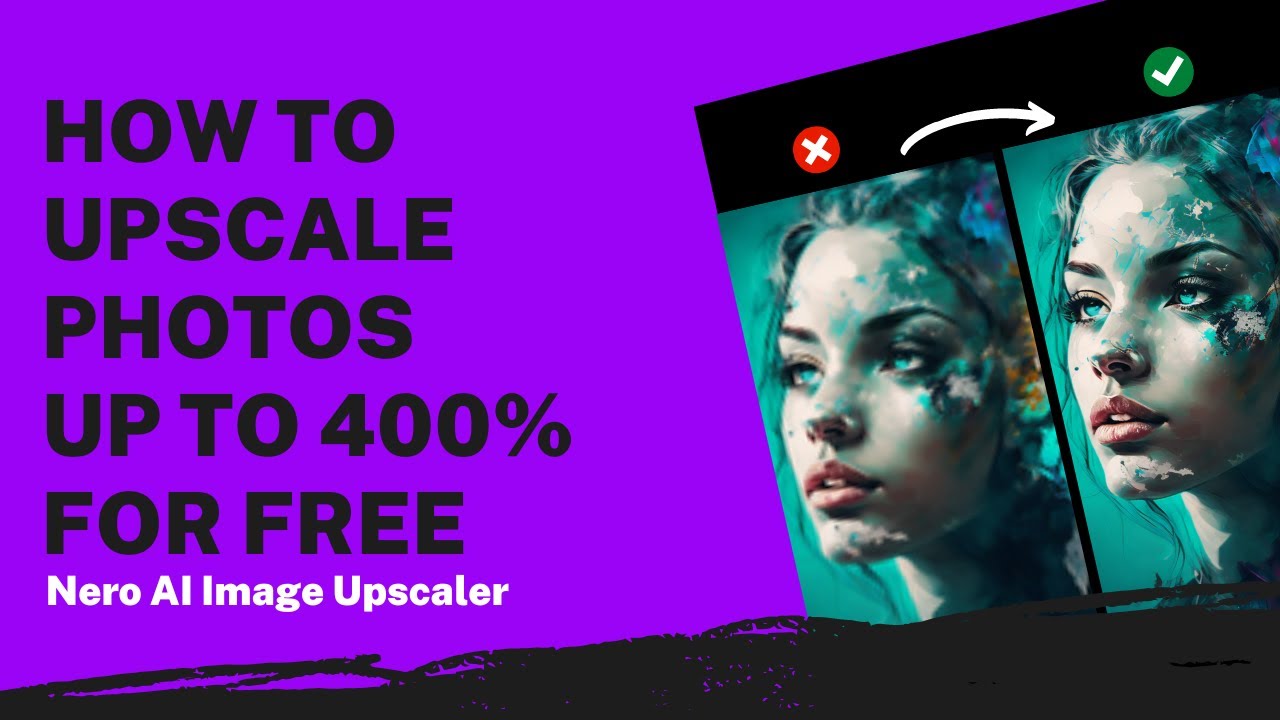
Nero AI Image Upscaler is an AI-powered tool that can enlarge image size and resolution while maintaining high quality.

Free to use, it will make your photos sharper, clearer, and of course – bigger.

As such, it is described as ideal for enhancing product photos, real estate marketing images, and adding details to luxurious art digital paintings. But you can just as easily use it for anything else.

Ultimately, Nero AI Image Upscaler is meant to save you time and money when taking pictures and turning images into high-resolution masterpieces. Or when you need to sharpen blurry or old photos quickly and easily.

Whether you are a designer, a student, a meme lover, a painter, or just someone who wants to play with AI – you may want to check out Nero AI Image Upscaler.

Nero AI Image Upscaler Homepage
Categories Image Generation & Editing

Video Overview ▶️

What are the key features? ⭐

  • One-Click Upscaling: Enlarges images up to 400% while adding sharp, natural details using AI prediction.
  • AI Face Enhancement: Refines facial features in portraits for clearer expressions and skin tones without artificial smoothing.
  • Batch Processing: Handles multiple images simultaneously, up to 20 on pro plans, to streamline editing workflows.
  • Hyper-Large Image Upscaling: Supports massive files with billions of pixels for high-DPI prints like billboards.
  • Noise Reduction: Automatically cleans up compression artifacts and grain for smoother, professional-quality results.

Who is it for? 🤔

Nero AI Image Upscaler suits photographers restoring old prints, e-commerce sellers sharpening product shots for better sales, graphic designers upscaling art for large formats, and hobbyists enhancing personal albums, all benefiting from its quick, accessible AI enhancements that deliver pro-level results without steep learning curves or heavy hardware needs.

Examples of what you can use it for 💭

  • E-commerce seller: Upscales low-res product photos to high-resolution images that boost online conversions and print catalogs.
  • Photographer: Restores faded family portraits with AI Face Enhancement for clear, emotional heirloom prints.
  • Graphic designer: Processes batches of illustrations up to 400% larger for billboard-ready designs without quality loss.
  • Real estate agent: Enhances property images to sharp, detailed visuals that attract more buyer interest online.
  • Artist: Refines AI-generated anime art with noise reduction for crisp textures suitable for merchandise.

Pros & Cons ⚖️

  • Allows anyone to upscale their images
  • Extremely useful for e-commerce websites & marketing materials
  • Also great for enhancing old photos
  • Where's the mobile app?

FAQs 💬

What formats does Nero AI Image Upscaler support?
It handles common formats like JPEG, PNG, WEBP, and BMP for versatile input and output options.
How long does processing take?
Uploads process in about 8.2 seconds on average, with priority faster on paid plans.
Is there a free version?
Yes, the free plan includes 10 credits for initial trials and basic batch processing.
Can it upscale AI-generated images?
Absolutely, it enhances AI art like anime or game assets with specialized modes for better textures.
Does it work offline?
The online tool requires internet, but a desktop app version processes locally on compatible devices.
How does pricing work?
Plans use credits per image, with free starters, monthly pro at 300 credits, and yearly at 3000 for savings.
What if the input is very blurry?
It improves most cases but may over-smooth extremes; test with free credits first.
Can I batch process images?
Yes, up to 5 on free and 20 on pro, ideal for workflows like e-commerce prep.
Is output print-ready?
Yes, Hyper-Large mode supports 300+ DPI for large prints like posters or billboards.
How accurate is face enhancement?
AI Face Enhancement refines details naturally, praised in reviews for portrait restoration.

Related tools ↙️

  1. Cloudbooklet Cloudbooklet Transform text prompts into stunning AI-generated images while editing photos with powerful AI tools
  2. Spline AI Spline AI Generate 3D objects, animations, and textures using prompts
  3. FLORA FLORA Build ideas using text, images, and video in a single visual space - with the help of AI
  4. Radiant Imaging Labs Radiant Imaging Labs Enhances photos with AI-driven color correction and detail optimization
  5. AI Facefy AI Facefy Transforms photos into videos or swaps faces using AI
  6. PhotoTag.ai PhotoTag.ai Automatically generates AI-powered keywords and descriptions for photos and videos
Last update: December 16, 2025
Share
Promote Nero AI Image Upscaler
light badge
Copy Embed Code
light badge
Copy Embed Code
light badge
Copy Embed Code
About Us | Contact Us | Suggest an AI Tool | Privacy Policy | Terms of Service

Copyright © 2026 Best AI Tools
415 Mission Street, 37th Floor, San Francisco, CA 94105