
logo-darklogo-darklogo-darklogo-dark
  • Home
  • Browse
    • Assistant
    • Coding
    • Image
    • Productivity
    • Video
    • Voice
    • Writing
    • All Categories
    • AI Use Cases
  • My Favorites
  • Suggest a Tool
✕
Home › Image Generation & Editing ›

Pixelied

Published by Dusan Belic on August 30, 2023

Pixelied

Pixelied
Pixelied Homepage
Categories Image Generation & Editing
An AI-powered online photo editor with templates, stock photos, mockups, icons, illustrations, and more

Pixelied

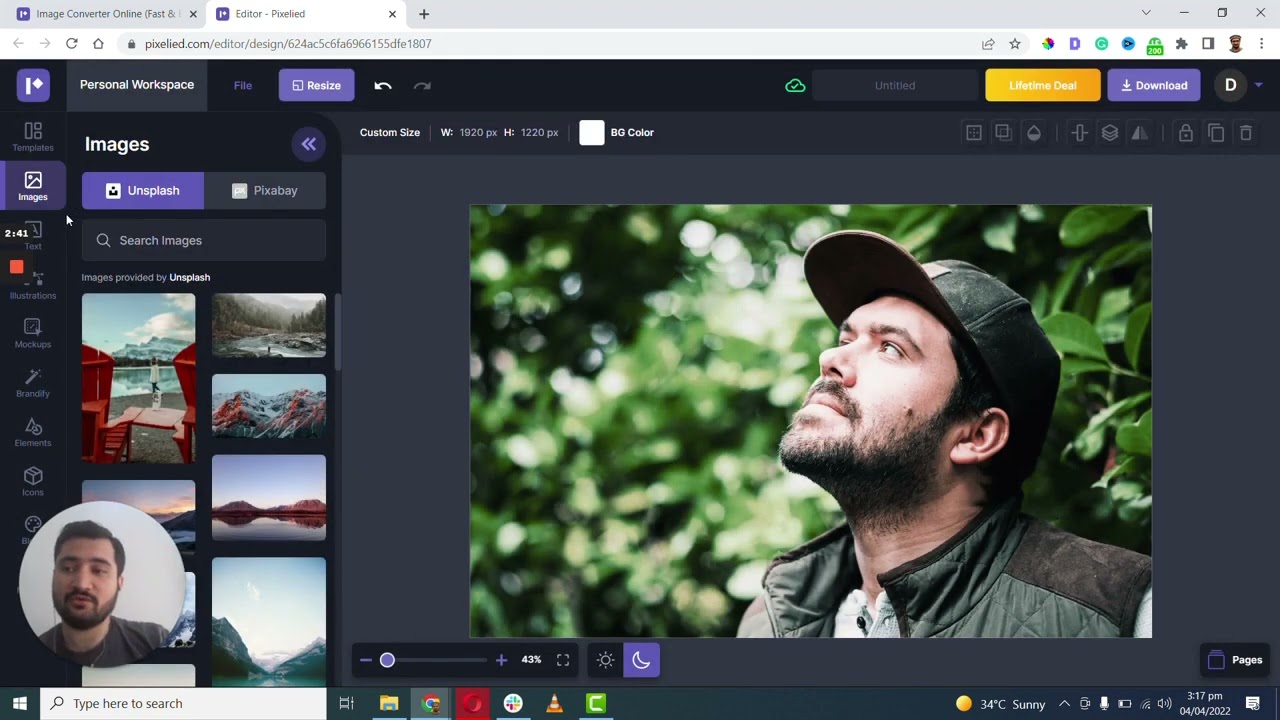
Pixelied is an online graphic design tool designed that provides a range of features for creating various types of digital graphics, such as social media posts, banners, and thumbnails. The platform offers a wide selection of templates, making it easy for users to start their designs. Additionally, it includes various photo editing tools and effects to enhance images.

Pixelied also includes a big library of stock photos and icons that can be incorporated into your designs. In other words, there is no need to pay for a separate service to get high-quality images for your designs.

Also included is a background removal tool, which lets you easily isolate subjects from their backgrounds in photos.

We should also mention that Pixelied is super-easy to use and doesn’t require any skills with image-editing software. That, after all, is what we expect from modern AI-powered tools – to do part of the thinking on our behalf. Check it out.

Pixelied Homepage
Categories Image Generation & Editing

Video Overview ▶️

What are the key features? ⭐

  • Template library: Pixelied offers a wide range of customizable templates for various design needs, such as social media posts, banners, and more.
  • Photo editing tools: It also offers comprehensive editing options including filters, effects, and resizing tools to enhance images.
  • Stock photos and icons: As part of the "deal," you get access to a large collection of high-quality stock images and icons for use in designs.
  • Background removal tool: It packs the ever-handy feature to remove backgrounds from images.
  • Easy to use: You don't need to be a Photoshop pro in order to use Pixelied - it's suitable to beginners and experienced graphic designers alike.

Who is it for? 🤔

Pixelied targets small business owners, marketers, and content creators who need quick and effective graphic design solutions. It's particularly appealing to those without extensive design skills, offering an easy way to create professional-looking visuals for various online platforms and marketing materials. This makes Pixelied a go-to resource for individuals and organizations seeking to enhance their digital presence with minimal design effort.

Examples of what you can use it for 💭

  • Design eye-catching posts and banners for platforms like Facebook, Instagram, and Twitter
  • Create flyers, brochures, and other promotional materials
  • Enhance your blog with custom graphics, infographics, and featured images
  • Develop product images and banners for online shops
  • Craft invitations, greeting cards, or personal branding materials like logos and letterheads

Pros & Cons ⚖️

  • Great for all kinds of social media graphics
  • Access to stock photos alone are worth it
  • You can also use it for quick background removals
  • There are better AI-powered image-editing tools out there

FAQs 💬

What is Pixelied mainly used for?
Pixelied helps create social media graphics, blog featured images, ads, thumbnails, product mockups, and other branded visuals quickly using templates, stock assets, and editing tools.
Does Pixelied have AI features?
Yes, it includes AI-powered background removal, image generation from text prompts, photo enhancement like sharpening or depixelating, and tools for effects such as uncensoring blurred areas.
Is Pixelied beginner-friendly?
Absolutely, its drag-and-drop editor and ready-made templates make it accessible for people with no design experience, though it offers enough depth for more advanced tweaks.
Can I collaborate with a team on Pixelied?
Yes, workspaces let you invite team members like designers or marketers to work together on projects in real time.
What file types can I upload and edit?
You can upload JPG, PNG, and vector files like SVG, then edit them with layers, color changes, backgrounds, or other adjustments.
Does Pixelied offer stock photos and icons?
It provides millions of royalty-free stock photos, thousands of searchable SVG icons, and customizable hand-drawn illustrations.
How does the background remover work?
The AI tool removes backgrounds in one click with good accuracy on people or objects, creating transparent images ready for designs or mockups.
Can I create product mockups easily?
Yes, built-in realistic mockup templates let you place products or graphics quickly for ecommerce listings or presentations.
Is Pixelied available only in the browser?
It runs entirely online in your browser, so there's no software to download or install.
What makes Pixelied different from similar tools?
It focuses on fast loading, fresh template styles, strong icon and illustration libraries, and integrated AI editing that helps avoid generic designs.

Related tools ↙️

  1. Cloudinary Cloudinary Manages, transforms, optimizes, and delivers images and videos with AI-powered features
  2. DeepSwapper DeepSwapper Face-swapping tool that allows users to swap faces in images, videos, and GIFs
  3. YesChat.ai YesChat.ai An online platform that integrates multiple AI models, including GPT, Dalle, and Claude
  4. DreamFace DreamFace An AI-powered photo animation app that can bring your images to life with just a few taps
  5. Meshcapade Meshcapade An online tool that converts images, videos, and words into lifelike digital humans
  6. Unstability.ai Unstability.ai Easily generate and manipulate images using deep learning algorithms
Last update: December 28, 2025
Share
Promote Pixelied
light badge
Copy Embed Code
light badge
Copy Embed Code
light badge
Copy Embed Code
About Us | Contact Us | Suggest an AI Tool | Privacy Policy | Terms of Service

Copyright © 2026 Best AI Tools
415 Mission Street, 37th Floor, San Francisco, CA 94105