logo-darklogo-darklogo-darklogo-dark
  • Home
  • Browse
    • Assistant
    • Coding
    • Image
    • Productivity
    • Video
    • Voice
    • Writing
    • All Categories
    • AI Use Cases
  • My Favorites
  • Suggest a Tool
✕
Home › Design Generator ›

ReRender AI

Published by Dusan Belic on February 5, 2025

ReRender AI

ReRender
ReRender AI Homepage
Categories Design Generator
Transform your ideas into stunning, photorealistic renders with the power of AI

ReRender AI

When it comes to architectural design, bringing concepts to life can be a daunting task. However, with ReRender AI, transforming your ideas into stunning, photorealistic renders becomes a seamless experience. This AI-powered tool is designed to assist architects and designers in creating realistic visualizations from sketches, photos, or 3D models in mere seconds.

Imagine sketching a rough outline and, within moments, viewing a lifelike representation of your vision. That’s what ReRender AI is all about…

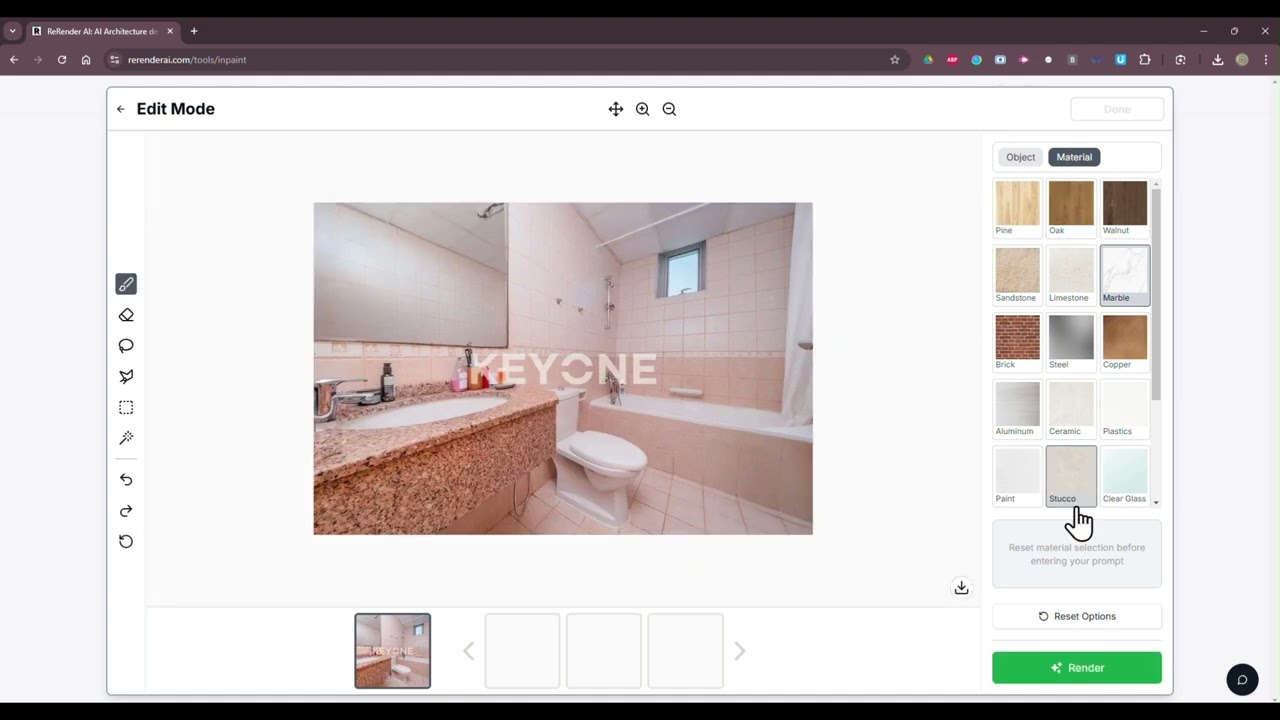
ReRender AI boasts an intuitive interface that is easy for anyone to use. By uploading your project images, you can explore over 20 unique design styles — each offering a distinct aesthetic to suit different project needs. The platform’s rapid rendering capabilities mean you can generate photorealistic images in approximately 15 seconds to significantly enhance productivity. This speed doesn’t compromise quality; the renders are detailed and lifelike — providing a clear visualization of the final product.

Whether you’re working with AutoCAD, Blender, SketchUp, or even hand-drawn sketches – ReRender AI can seamlessly integrate to enhance your designs. This flexibility ensures that, regardless of your preferred design software or method, ReRender AI can elevate your work to new heights. Moreover, the platform offers a variety of lighting styles and themes, allowing for further customization to match the specific mood or context of your project.

However, as that’s usually the case, ReRender AI has its limitations. Some users have reported that the AI struggles with complex geometries, occasionally requiring manual adjustments to achieve the desired outcome. Furthermore, while the platform offers a free plan with limitations, access to enhanced features such as improved image quality and private mode requires a subscription. Guess that makes sense, as those renders take significant computing resources. Check it out.

ReRender AI Homepage
Categories Design Generator

Video Overview ▶️

What are the key features? ⭐

  • Rapid photorealistic rendering: Generate lifelike images from sketches, photos, or 3D models in approximately 15 seconds.
  • Diverse design styles: Access more than 20 unique design aesthetics to suit different project needs.
  • Compatibility: Seamlessly integrates with AutoCAD, Blender, SketchUp, and other design tools.
  • Easy to use: Designed for users of all expertise levels, making it easy to navigate and utilize its features effectively.
  • Customizable lighting & themes: Offers a variety of lighting styles and themes, allowing for further customization to match the specific mood or context of your project.

Who is it for? 🤔

ReRender AI primarily targets architects, interior designers, and other design professionals looking to enhance their visual presentations. Its user-friendly interface and rapid rendering capabilities make it an invaluable tool for professionals aiming to convey their ideas more effectively. In addition, educators in the field of architecture and design may find it useful for teaching purposes, providing students with a practical tool to visualize their concepts.

Examples of what you can use it for 💭

  • Quickly transform architectural sketches into photorealistic renders
  • Experiment with different design styles and lighting to create stunning interior visuals
  • Rapidly iterate on design concepts by visualizing them in different styles
  • Enhance presentations with high-quality renders that effectively communicate design ideas
  • The tool can serve as a teaching tool for architecture and design students

Pros & Cons ⚖️

  • Significantly reduces rendering time to enhance productivity
  • Offers a variety of design styles to suit different tastes
  • Intuitive interface that welcomes users of all expertise levels
  • This is AI, not magic, and there are certain limits to what ReRender AI can do

FAQs 💬

What does ReRender AI actually do?
ReRender AI turns sketches, 3D model screenshots, or basic renders into photorealistic architectural images in seconds using AI. It specializes in buildings, interiors, exteriors, and renovations.
Which file types or programs work best with ReRender AI?
You upload images (JPG or PNG), so it works with output from AutoCAD, Blender, SketchUp, Revit, or any 3D software. Many users start with simple model exports or even hand sketches.
How fast are the renders?
Most generations finish in seconds to under a minute, which makes it much quicker than traditional rendering engines like Enscape or Lumion.
Does it offer different architectural styles?
Yes, the tool provides over 20 unique design styles (some sources mention 50+), so you can choose modern, brutalist, minimalist, classic, or custom moods to match your vision.
Can I enhance an existing low-quality render?
Absolutely. The Enhance Mode takes draft, clay, or low-sample renders and upgrades them to glossy, high-detail, portfolio-ready results without needing extra hardware.
Is ReRender AI suitable for interior design projects?
Yes, it handles stunning interior renders very well and helps users impress clients with realistic lighting, materials, and atmosphere.
Does it support renovations or before-after transformations?
It excels at renovation visuals. You can upload an old photo or facade and generate a modernized version, which many architects use for client presentations.
Can I organize multiple render variations in one place?
The platform includes Boards, a collaborative canvas where you generate, review, refine, and group AI images without breaking your workflow.
Do I need powerful hardware to use ReRender AI?
No, everything runs in the cloud through your browser, so even basic laptops or tablets work fine without installing heavy software.
Is there a free way to try the tool before committing?
Yes, you get a limited number of free renders each day (commonly reported as 3), and many new users start there to test quality on their own projects.

Related tools ↙️

  1. Spline AI Spline AI Generate 3D objects, animations, and textures using prompts
  2. ColorMagic ColorMagic An AI-powered tool designed to produce color palettes with ease
  3. Flair Flair The AI design tool to create product photography and branded content
  4. Flowstep Flowstep Generates user flows, wireframes, and UI designs from simple text prompts
  5. Bubble AI Bubble AI Builds full-stack web apps using AI prompts and visual no-code tools
  6. Patterned AI Patterned AI Creates seamless, royalty-free patterns from text or images for design projects
Last update: February 1, 2026
Share
Promote ReRender AI
light badge
Copy Embed Code
light badge
Copy Embed Code
light badge
Copy Embed Code
About Us | Contact Us | Suggest an AI Tool | Privacy Policy | Terms of Service

Copyright © 2026 Best AI Tools
415 Mission Street, 37th Floor, San Francisco, CA 94105