logo-darklogo-darklogo-darklogo-dark
  • Home
  • Browse
    • Assistant
    • Coding
    • Image
    • Productivity
    • Video
    • Voice
    • Writing
    • All Categories
    • AI Use Cases
  • My Favorites
  • Suggest a Tool
✕
Home › Design Generator ›

Venngage

Published by Dusan Belic on March 13, 2025

Venngage

Venngage
Venngage Homepage
Categories Design Generator
Easily create professional-quality infographics, reports, and presentations with the help of AI

Venngage

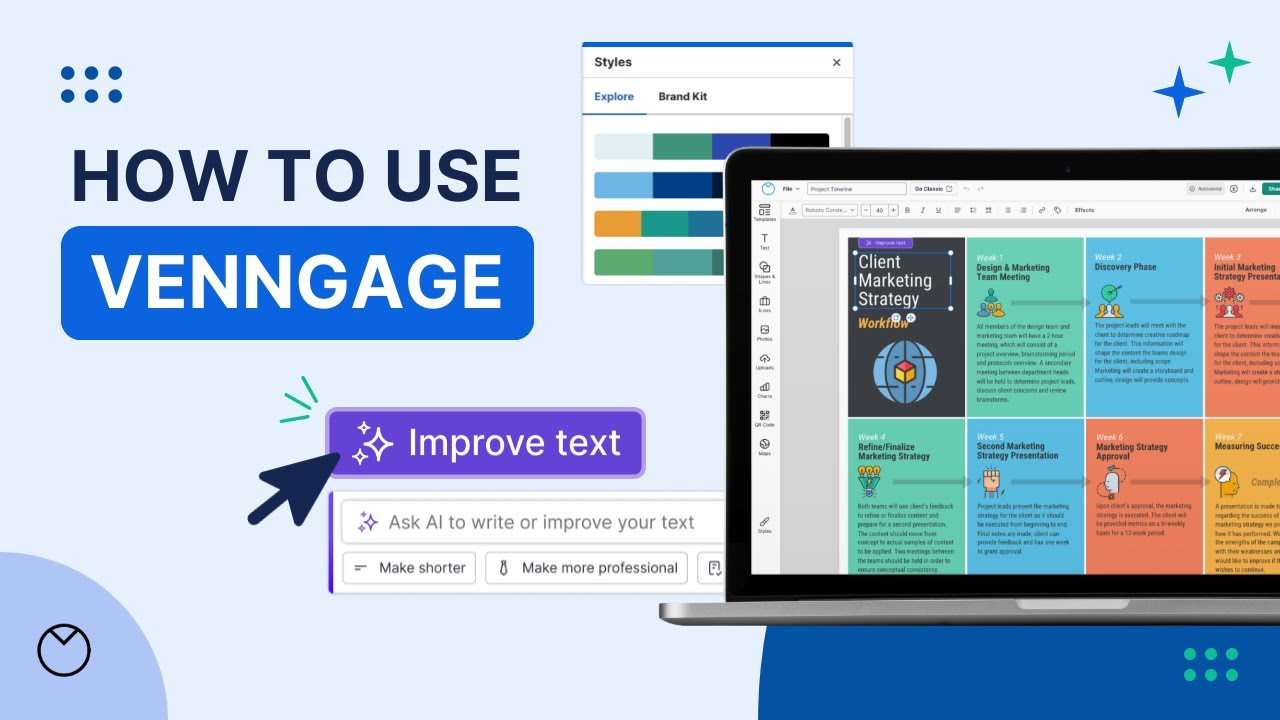
Venngage is an online platform that enables individuals and businesses to easily create professional-quality infographics, reports, and presentations. With a library of templates and an intuitive interface, Venngage makes design accessible to everyone.

The platform offers an extensive collection of more than 10,000 templates that cater to different needs — from marketing materials to educational infographics — ensuring users can find the perfect starting point for their projects. Venngage also offers a user-friendly drag-and-drop editor, allowing for easy customization of templates to match specific branding or personal preferences. In addition, it provides a diverse library of icons, images, and charts.

Another thing worth mentioning is support for real-time collaboration, making it simple to co-create and share designs. Coupled with flexible pricing plans — including a free tier with basic features — and you get a powerful tool for many businesses.

To sum it up, Venngage is a user-friendly design platform that makes it easy to create “impactful visuals” (as they like to say it) with ease. Its extensive resources, collaborative features, and flexible pricing make it a valuable tool for anyone looking to enhance their visual communication.

Venngage Homepage
Categories Design Generator

Video Overview ▶️

What are the key features? ⭐

  • Template library: Access over 10,000 customizable templates suitable for various purposes, ensuring a quick start to any project.
  • User-friendly editor: Utilize the drag-and-drop interface to personalize designs effortlessly, even without prior design experience.
  • Diverse asset collection: Enhance visuals with a rich library of icons, images, and charts, all available within the platform.
  • Real-time collaboration: Work simultaneously with team members on the same project, streamlining the design process and fostering creativity.
  • Flexible plans: Choose from various plans, including a free option and premium subscriptions, catering to different needs and budgets.

Who is it for? 🤔

Venngage is made for different kinds of users. For starters, it targets businesses looking to easily create infographics, promotional materials, and data visualizations. Also, educators could use it to create visuals and presentations that enhance learning experiences. Furthermore, the tool could be used by marketers to create shareable visuals for social media platforms. Lastly, there are students and the general public who may need to create fancy charts for different projects.

Examples of what you can use it for 💭

  • Design eye-catching infographics and promotional materials to boost audience engagement and brand awareness
  • Create informative visuals and presentations that enhance learning experiences for students and educators alike
  • Develop professional reports and data visualizations that effectively communicate insights to stakeholders
  • Produce shareable visuals tailored for various social media platforms
  • Craft compelling visuals that convey the organization's mission and impact

Pros & Cons ⚖️

  • Built for users of all skill levels
  • A vast array of templates and assets
  • Support for real-time collaboration
  • Limited free plan features (kinda expected)

FAQs 💬

What is Venngage, and who is it best for?
Venngage is an online platform for building infographics, presentations, posters, and data visuals using AI tools and thousands of templates. It suits beginners without design skills, like marketers crafting reports, teachers making lesson aids, or small teams needing quick branded graphics. Users on Product Hunt praise it for busy professionals who want polished results fast.
How does Venngage incorporate AI into design creation?
AI features include the DesignAI Generator, which turns text prompts into layouts, charts, or full infographics; automatic branding that applies colors and logos; and tools for generating icons, rewriting copy, or checking accessibility. For instance, you input data, and it suggests visuals. Reviews on G2 highlight how this speeds up workflows by 50% or more for non-designers.
Is Venngage easy to use for someone new to graphic design?
Yes, its drag-and-drop editor and pre-built templates make it intuitive, much like Canva but with stronger data viz focus. Capterra users say even novices create pro-level work in minutes, though advanced tweaks might take practice. I think the learning curve stays gentle, especially with AI suggestions guiding you.
What types of templates and assets does Venngage offer?
Over 10,000 customizable templates cover infographics, timelines, mind maps, flyers, and reports, plus millions of royalty-free icons, photos, and charts from sources like Pixabay. AI recommends assets based on your topic. Recent X posts show users loving the diverse, inclusive icons for marketing visuals.
Can teams collaborate on designs in Venngage?
Absolutely, with real-time editing, shared folders, and team templates to enforce branding. Invite members via email for feedback. Zapier notes it's great for remote teams, though free plans limit this. Business users on Trustpilot call it a game-changer for consistent client work.
Does Venngage support data visualization and imports?
It excels here: upload CSV or XLSX files to auto-generate charts, maps, or interactive diagrams. AI handles smart layouts for accuracy. G2 reviewers in marketing say it turns raw stats into engaging stories effortlessly, ideal for reports.
How does Venngage handle accessibility in designs?
Built-in WCAG checks scan for contrast, alt text, and readability, plus simulators for color blindness. Export tagged PDFs for screen readers. Reddit's r/accessibility community confirms outputs are navigable with assistive tech, though the editor could improve keyboard navigation.
What export formats are available in Venngage?
Options include PNG, PDF, PPTX, HTML, and accessible PDF/UA. High-res exports work for print or web. Users on Software Advice appreciate the flexibility for presentations or social shares, with no watermarks on paid plans.
Are there integrations with other tools in Venngage?
It supports data imports from spreadsheets and basic embeds, but deeper ties like Zapier for workflows or Google Drive for storage come on higher plans. Capterra feedback suggests it's solid for solo use but pairs well with tools like Google Sheets for teams.
How does Venngage compare to tools like Canva?
Venngage focuses more on data-heavy visuals and AI automation, while Canva offers broader social media templates. Product Hunt users prefer Venngage for infographics and accessibility, but switch to Canva for videos. It might suit analytical creators better.

Related tools ↙️

  1. Typeset Typeset Automates design and writing for ebooks, presentations, and social graphics quickly
  2. Jeda.ai Jeda.ai Generates visual content and insights from ideas and data
  3. HomeGPT HomeGPT Redesigns homes using AI to transform spaces with style
  4. Architechtures Architechtures Generates optimal residential building designs in real-time using AI
  5. Rendair Rendair Transforms sketches and images into photorealistic architectural renders in seconds
  6. VModel AI VModel AI An efficient and cost-effective solution for on-model fashion photography
Last update: December 1, 2025
Share
Promote Venngage
light badge
Copy Embed Code
light badge
Copy Embed Code
light badge
Copy Embed Code
About Us | Contact Us | Suggest an AI Tool | Privacy Policy | Terms of Service

Copyright © 2026 Best AI Tools
415 Mission Street, 37th Floor, San Francisco, CA 94105