logo-darklogo-darklogo-darklogo-dark
  • Tool Categories
    • ๐ŸŽจArt & Creative Design505
    • ๐ŸขBusiness Management644
    • ๐Ÿ’ปCoding & Development515
    • ๐Ÿ‘ฎDetection83
    • ๐Ÿง General Use727
    • ๐ŸฅHealth & Wellness55
    • ๐Ÿ“ทImage & Photo Analysis100
    • ๐Ÿ–ผ๏ธImage Generation & Editing618
    • ๐Ÿ“Interior & Architectural Design37
    • ๐ŸŽ“Learning & Education483
    • โš–๏ธLegal & Finance90
    • ๐ŸŽญLifestyle & Entertainment236
    • ๐Ÿ“ขMarketing & Advertising627
    • ๐ŸŽงMusic & Audio138
    • ๐Ÿ‘”Office & Workplace1,014
    • ๐Ÿ”ฌResearch & Data Analysis372
    • ๐Ÿ‘ฅSocial Media245
    • ๐ŸŽฅVideo Generation & Editing426
    • ๐Ÿ‘ง๐ŸปVirtual Companion135
    • ๐ŸŽคVoice Generation & Editing381
    • โœ๏ธWriting & Editing808
    • All Categories
    • AI Use Cases
  • News
  • Events
    • Academic Conferences
    • Developer Conferences
    • Expos / Trade Shows
    • Industry Summits
    • Workshops / Training
    • All Events
    • Past Events
  • Saved Tools
  • Suggest a Tool
โœ•
Home › Interior & Architectural Design › Interior Design› Architechtures
Architechtures

Architechtures by SmartScapes Studio

Generates optimal residential building designs in real-time using AI

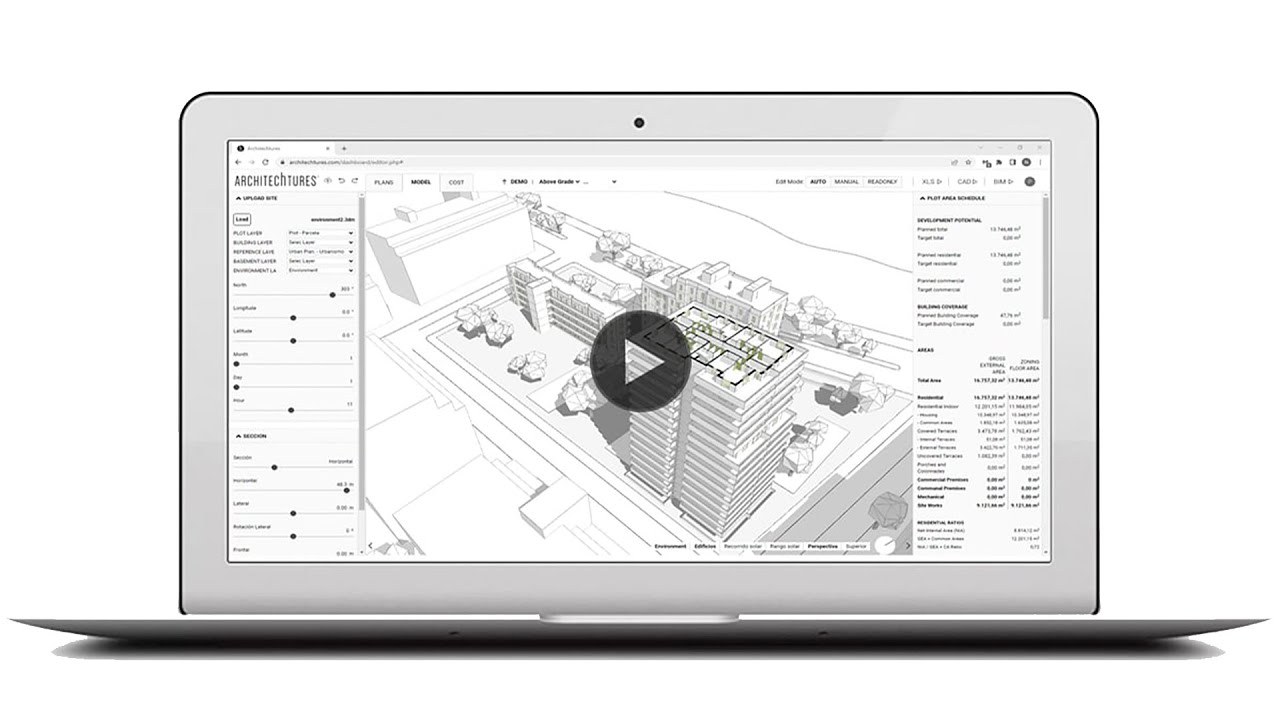
I had a chance to play with Architechtures, it’s pretty cool, and even feels like stepping into a sci-fi version of architectural design. This cloud-based platform, powered by generative AI, feels like a collaborator that’s always one step ahead. I started by inputting basic design criteria — minimum room sizes, building height, and a rough site outline pulled from OpenStreetMap. Within seconds, the system generated a 3D model, complete with floor plans and a breakdown of gross floor areas. It’s fast. Almost too fast. I found myself double-checking the numbers, half-expecting a glitch, but the math held up.

The interface, while not exactly a work of art, gets the job done. The input panel lets you set parameters like net areas or vertical core specs, and the central window shows your design evolving in real-time. I particularly liked the “Model” visualization mode, which lets you toggle between 2D and 3D views. It’s satisfying to see your project take shape instantly, especially when tweaking things like terrace sizes or parking layouts. The real-time cost takeoff feature was a pleasant surprise, updating as I adjusted the design, though I wish it offered more granular cost inputs. Compared to TestFit, which I’ve also dabbled with, Architechtures feels more polished for residential multifamily projects, though TestFit’s interface might be a tad friendlier.

That said, I hit a few snags. The learning curve isn’t steep, but the tutorials could use some love — they’re a bit dry and don’t always explain the “why” behind certain steps. I also found myself wishing for more flexibility outside the residential sector. If you’re designing, say, an office building, you’ll need something like ArchiCAD instead. The cloud-only setup is convenient, but it’s a bummer if your internet’s spotty. I also read some concerning user feedback on Reddit about billing issues post-trial, which made me nervous about committing long-term. Pricing seems to scale with features — Pro for solo users, Business for teams — but exact costs are opaque without contacting their team.

What surprised me most was how intuitive the parking design feature felt. I outlined a basement perimeter, and the AI proposed a layout with ramps and spaces that actually made sense. It’s not perfect, but it’s a huge time-saver. Architechtures shines for quick iterations, which is great for feasibility studies. My advice: give the 10-day trial a spin, focus on a small project to test the AI’s output, and keep an eye on your subscription settings to avoid any billing headaches. It’s a powerful tool, but it’s not a one-size-fits-all solution.

Visit Architechtures ↗
Categories
๐Ÿ“ Architecture
๐Ÿ  Interior Design ๐Ÿ“ Room Planner ๐ŸŒณ Landscape Generation
๐ŸŽจ Art
๐ŸงŠ 3D Modeling ๐Ÿ–ผ๏ธ Design Generation
โš–๏ธ Legal/Finance
๐Ÿก Real Estate

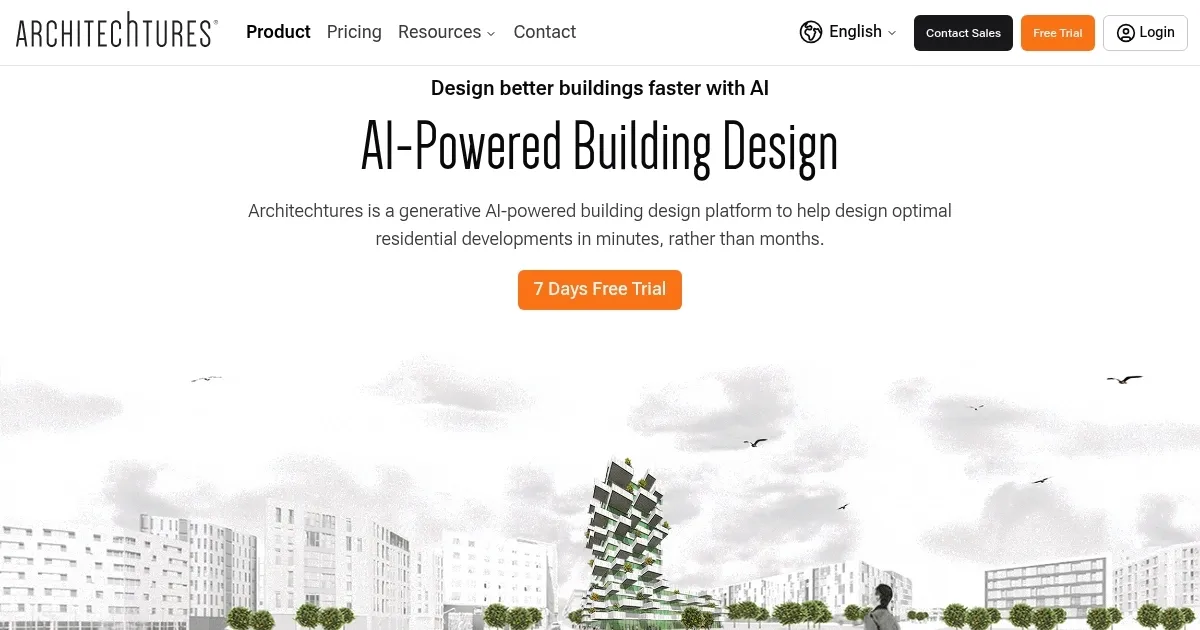
Homepage Screenshot 📸

Architechtures screenshot

Video Overview 🎬

Architechtures - Video Overview

What are the key features? ✨

  • Input Panel: Allows users to define design criteria like room sizes and building heights for real-time model generation.
  • Real-Time BIM Generation: Produces downloadable BIM models in IFC, DXF, and XLSX formats instantly.
  • Automated Parking Design: Generates underground parking layouts based on user-defined parameters.
  • Cost Takeoff: Updates project cost estimates in real-time as designs are modified.
  • OpenStreetMap Integration: Imports site data like topography and roads for accurate project context.

Who is it for? 🤔

ARCHITEChTURES is ideal for architects, real estate developers, and urban planners focused on multifamily residential projects. It suits professionals who need to produce rapid, regulatory-compliant designs during feasibility studies or schematic phases. Small firms, freelancers, and large enterprises benefit from its cloud-based accessibility and time-saving automation, especially those prioritizing efficiency and data-driven decision-making.

Examples of what you can use it for 💡

  • Architect: Uses ARCHITEChTURES to generate compliant floor plans for a multifamily housing project in hours.
  • Real Estate Developer: Iterates building designs to optimize unit counts and costs for a residential complex.
  • Urban Planner: Imports site data to design buildings that align with local topography and regulations.
  • BIM Manager: Downloads BIM models for seamless integration into broader project workflows.
  • Freelance Designer: Tests multiple design options during feasibility studies for a client presentation.

Pros & Cons ⚖️

  • Real-time cost updates
  • BIM model compatibility
  • Cloud-based access
  • Residential-only focus
  • No offline mode

FAQs 💬

What is Architechtures used for?
Architechtures is a cloud-based AI platform for designing multifamily residential buildings, generating BIM models in real-time.
Does it support non-residential projects?
No, itโ€™s currently limited to multifamily residential designs, with no support for commercial or single-family projects.
Is a free trial available?
Yes, Architechtures offers a 10-day free trial with no software installation required.
Can I use it offline?
No, itโ€™s cloud-based and requires a stable internet connection.
What file formats are supported?
BIM models can be downloaded in IFC, DXF, and XLSX formats.
How does it compare to TestFit?
Architechtures is similar to TestFit but focuses more on BIM integration and parking design.
Does it integrate with other tools?
Yes, its BIM files are compatible with tools like Revit and ArchiCAD.
Can I customize designs?
Users can tweak parameters like room sizes and parking layouts for tailored results.
Is it suitable for small firms?
Yes, its Pro plan is designed for freelancers and small teams.
Are there tutorials available?
Yes, video tutorials and a user manual are available, though some users find them lacking.

Ready to try Architechtures?

Generates optimal residential building designs in real-time using AI

Visit Architechtures ↗

Architechtures alternatives 🔗

  1. Zillow 3D Home Zillow 3D Home Creates free virtual 3D home tours and interactive floor plans for real estate listings
  2. Homestyler AI Designer Homestyler AI Designer Choose design style and room type, and let AI design the room for you
  3. Autodraft Autodraft An AI-powered platform that can transform text prompts into vivid visuals
  4. mnml.ai mnml.ai An AI design assistant for architects and interior designers for creating high-quality renders
  5. HomeDesignsAI HomeDesignsAI Transforms photos of rooms, houses, or outdoor spaces into AI-redesigned photorealistic versions
  6. RoomGPT RoomGPT An AI-powered tool that allows users to easily redesign their living spaces
Share
Architechtures screenshot enlarged
Promote Architechtures
light badge
Copy Embed Code
dark badge
Copy Embed Code
neutral badge
Copy Embed Code
Best AI Tools

Discover the best AI tools for any use case

Explore
  • Tool Categories
  • AI Use Cases
  • AI Events
  • AI News
  • Saved Tools
Company
  • About Us
  • Contact Us
  • Media & Partnerships
  • Suggest a Tool
Legal
  • Privacy Policy
  • Terms of Service
Copyright © 2026 Best AI Tools 415 Mission Street, 37th Floor, San Francisco, CA 94105