Skip to content
logo-darklogo-darklogo-darklogo-dark
  • Tool Categories
    • 🎨Art & Creative Design505
    • 🏢Business Management644
    • 💻Coding & Development514
    • 👮Detection83
    • 🧠General Use728
    • 🏥Health & Wellness55
    • 📷Image & Photo Analysis100
    • 🖼️Image Generation & Editing618
    • 📐Interior & Architectural Design37
    • 🎓Learning & Education483
    • ⚖️Legal & Finance90
    • 🎭Lifestyle & Entertainment236
    • 📢Marketing & Advertising627
    • 🎧Music & Audio138
    • 👔Office & Workplace1,014
    • 🔬Research & Data Analysis373
    • 👥Social Media245
    • 🎥Video Generation & Editing426
    • 👧🏻Virtual Companion135
    • 🎤Voice Generation & Editing381
    • ✍️Writing & Editing808
    • All Categories
    • AI Use Cases
  • News
  • Events
    • Academic Conferences
    • Developer Conferences
    • Expos / Trade Shows
    • Industry Summits
    • Workshops / Training
    • All Events
    • Past Events
  • Saved Tools
  • Suggest a Tool
    ✕
    Home › Interior & Architectural Design › Interior Design› HomeGPT
    HomeGPT

    HomeGPT

    Redesigns homes using AI to transform spaces with style

    I tried HomeGPT over a weekend, and it’s like letting a genie loose in your living room — except this genie wields AI and a knack for chic design. I uploaded a photo of my cramped apartment kitchen, picked a “bohemian” style, and in seconds, HomeGPT conjured a vibrant, eclectic space I barely recognized. The Instant Room Transformation feature is a bit like watching your home audition for a design show. It’s fast, it’s fun, and it’s got this knack for making you feel like a design pro, even if your usual decor decisions involve picking between “beige” and “slightly less beige.”

    The platform’s strength is its variety. With over 35 styles, from modern to vintage, I could flip through ideas like swiping through a dating app — except here, every match is a winner. I loved how the AI nailed the textures: woven rugs, earthy tones, and funky light fixtures that screamed boho. The Explore Diverse Interior Design Styles feature lets you mix and match, which is great for indecisive types like me. I also tried the exterior design tool, turning my plain balcony into a lush urban jungle. Sharing designs with my roommate via the Save and Share feature sparked a lively debate — turns out, she’s all about industrial chic. Who knew?

    But it’s not flawless. The free version is more of a teaser, nudging you toward a subscription for the good stuff, which feels a tad stingy compared to Spacely AI, which offers a bit more upfront. My kitchen render had a quirky glitch — a floating cabinet that defied physics — which made me chuckle but also question the AI’s precision. Recent X posts echo this, with some users griping about minor rendering hiccups. Still, the surprise was HomeGPT’s integration with tools like PriceSnap AI, letting me scan items in my render to find deals online. It’s a clever touch I didn’t expect.

    The interface is slick, though I fumbled a bit figuring out how to tweak styles. It’s intuitive once you get the hang of it, but a quick tutorial would’ve helped. Compared to RoomsGPT, HomeGPT feels more polished for quick transformations, though RoomsGPT’s customization runs deeper. The speed is addictive — you’ll lose hours playing with designs. It’s aspirational yet approachable, like a friend who’s just a bit cooler than you.

    My advice? Start small — try a single room and don’t overthink your first style choice. Save multiple designs to compare, and if the AI goofs, laugh it off and try again. HomeGPT’s a playground for your inner designer, so dive in and have fun.

    Visit HomeGPT ↗
    Categories
    📐 Architecture
    🏠 Interior Design 📐 Room Planner 🍳 Kitchen Design 🌳 Landscape Generation
    🖼️ Image
    🖼️ Image Generation

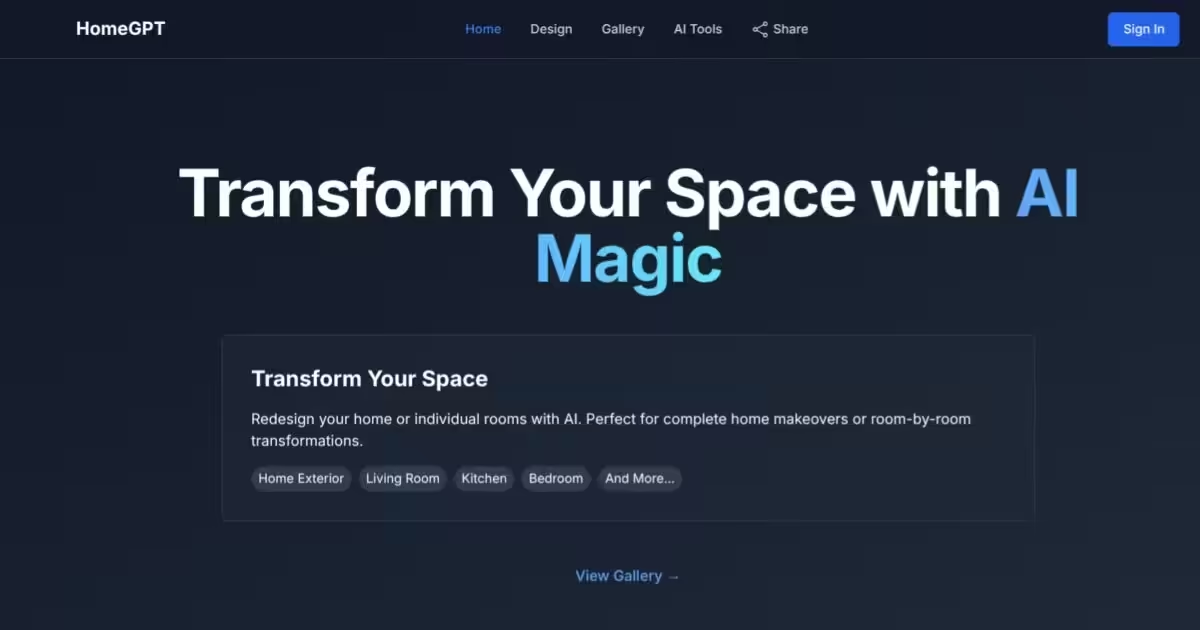
    Homepage Screenshot 📸

    HomeGPT screenshot

    What are the key features? ✨

    • Instant Room Transformation: Generates design concepts from photos in seconds.
    • Explore Diverse Interior Design Styles: Offers over 35 styles for personalized aesthetics.
    • Save and Share: Allows saving and sharing designs for collaboration.
    • Exterior AI Design: Transforms outdoor spaces with AI-driven renderings.
    • PhotoRestore AI Integration: Enhances old photos alongside new designs.

    Who is it for? 🤔

    HomeGPT is a fantastic fit for homeowners eager to refresh their living spaces, real estate agents staging properties, and amateur designers exploring creative ideas. Its intuitive AI makes it accessible for those without design experience, while its robust style options appeal to pros looking for quick inspiration. Whether you’re planning a full home remodel or just curious about a new look for your bedroom, HomeGPT empowers users to visualize transformations effortlessly.

    Examples of what you can use it for 💡

    • Homeowner: Uploads a living room photo to visualize a modern makeover.
    • Real Estate Agent: Transforms a property’s exterior to attract buyers.
    • Amateur Designer: Experiments with minimalist styles for a bedroom.
    • Renter: Redesigns a small apartment space without permanent changes.
    • Renovator: Plans a kitchen overhaul with bold, industrial designs.

    Pros & Cons ⚖️

    • Wide style variety
    • Exterior design support
    • Free tier available
    • Occasional rendering glitches

    FAQs 💬

    What is HomeGPT?
    HomeGPT is an AI tool that transforms home interiors and exteriors using uploaded photos and style selections.
    Is HomeGPT free to use?
    It offers a free tier with limited features, with full access requiring a subscription.
    What devices support HomeGPT?
    It’s available on iOS, Android, and web browsers.
    Can I design outdoor spaces with HomeGPT?
    Yes, the Exterior AI Design feature transforms outdoor areas like balconies or gardens.
    How many design styles are available?
    HomeGPT offers over 35 interior and exterior design styles.
    Does HomeGPT require design experience?
    No, its intuitive interface is beginner-friendly.
    Can I share my designs with others?
    Yes, the Save and Share feature lets you collaborate with friends or professionals.
    How accurate are the design renderings?
    Renderings are highly detailed but may struggle with complex room layouts.
    Does HomeGPT integrate with other tools?
    Yes, it connects with tools like PhotoRestore AI for enhanced functionality.

    Ready to try HomeGPT?

    Redesigns homes using AI to transform spaces with style

    Visit HomeGPT ↗

    HomeGPT alternatives 🔗

    1. RoomGPT RoomGPT An AI-powered tool that allows users to easily redesign their living spaces
    2. Remodeled AI Remodeled AI Visualizes home remodels using AI to transform spaces instantly
    3. RoomsGPT RoomsGPT Create your dream home or room with AI-powered online design tools
    4. Room AI Room AI Transforms rooms with AI-generated interior design visualizations in seconds
    5. Renovate AI Renovate AI Visualizes home renovations using AI for stunning design previews
    6. Homestyler AI Designer Homestyler AI Designer Choose design style and room type, and let AI design the room for you
    Share
    HomeGPT screenshot enlarged
    Best AI Tools

    Discover the best AI tools for any use case

    Explore
    • Tool Categories
    • AI Use Cases
    • AI Events
    • AI News
    • Saved Tools
    Company
    • About Us
    • Contact Us
    • Media & Partnerships
    • Suggest a Tool
    Legal
    • Privacy Policy
    • Terms of Service
    Copyright © 2026 Best AI Tools 415 Mission Street, 37th Floor, San Francisco, CA 94105