logo-darklogo-darklogo-darklogo-dark
  • Tool Categories
    • 🎨Art & Creative Design505
    • 🏢Business Management644
    • 💻Coding & Development515
    • 👮Detection83
    • 🧠General Use727
    • 🏥Health & Wellness55
    • 📷Image & Photo Analysis100
    • 🖼️Image Generation & Editing618
    • 📐Interior & Architectural Design37
    • 🎓Learning & Education483
    • ⚖️Legal & Finance90
    • 🎭Lifestyle & Entertainment236
    • 📢Marketing & Advertising627
    • 🎧Music & Audio138
    • 👔Office & Workplace1,014
    • 🔬Research & Data Analysis372
    • 👥Social Media245
    • 🎥Video Generation & Editing426
    • 👧🏻Virtual Companion135
    • 🎤Voice Generation & Editing381
    • ✍️Writing & Editing808
    • All Categories
    • AI Use Cases
  • News
  • Events
    • Academic Conferences
    • Developer Conferences
    • Expos / Trade Shows
    • Industry Summits
    • Workshops / Training
    • All Events
    • Past Events
  • Saved Tools
  • Suggest a Tool
✕
Home › Interior & Architectural Design › Interior Design› Renovate AI
Renovate AI

Renovate AI

Visualizes home renovations using AI for stunning design previews

I spent some time playing around with Renovate AI, and it’s like stepping into a sci-fi movie where your home gets a makeover with a snap. I uploaded a photo of my bland living room, hit the Renovate button, and bam — within seconds, the app churned out a sleek, modern version with new furniture and a fresh coat of paint. The Virtual Staging Tool is a standout, letting me drag in 3D sofas or swap wall colors with a tap. It’s fast, intuitive, and honestly, a bit addictive. The AI’s ability to detect walls or floors and apply changes feels like wizardry, especially when you see your space transform in real-time.

The app’s design is clean, with a user interface that doesn’t overwhelm. I tried the Style Transfer feature, picking a minimalist vibe, and the results were impressively close to what I’d envisioned. Syncing between my phone and laptop worked flawlessly, which is great for tweaking designs on the fly. The community boards, where users share their projects, gave me ideas I hadn’t even considered, like adding a bold accent wall. Compared to Homestyler or Remodel AI, Renovate AI feels snappier for quick visualizations, though Homestyler offers more furniture options, and Cedreo caters to pros with detailed architectural tools.

But it’s not all smooth sailing. I hit a glitch when I tried editing a render too many times — the app froze, and my image didn’t load. Frustrating, but a quick restart fixed it. The free trial’s 10 daily renders are generous, but I burned through them fast, and the Pro plan’s pricing feels steep for casual users. Some reviews on Reddit mention similar gripes, with a few users calling out inconsistent renders for complex spaces like kitchens. Still, the app’s support team seems active, responding to emails in a matter of hours.

A delightful surprise was the landscaping tool. I tested it on my backyard photo, and the AI suggested garden layouts I’d never have dreamed up. It’s not perfect — sometimes the greenery looked a bit too polished — but it’s a great starting point. For anyone dabbling in home design, Renovate AI is a solid pick, especially if you value speed and simplicity.

Grab a clear photo of your space and start with the free trial. Play with different styles, but don’t over-edit in one session to avoid crashes. If you’re renovating or just dreaming, this app’s a fun way to see what’s possible.

Visit Renovate AI ↗
Categories
📐 Architecture
🏠 Interior Design 📐 Room Planner 🌳 Landscape Generation 🍳 Kitchen Design
🖼️ Image
🖼️ Image Generation

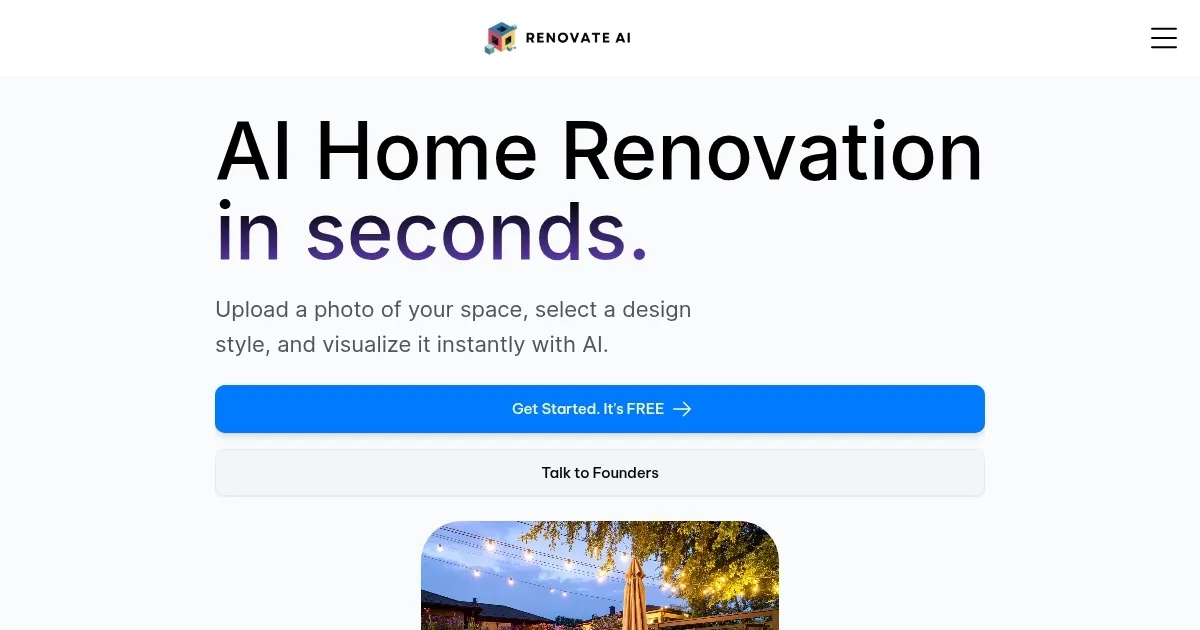
Homepage Screenshot 📸

Renovate AI screenshot

Video Overview 🎬

Renovate AI - Video Overview

What are the key features? ✨

  • Virtual Staging Tool: Adds 3D furniture and decor to photos for realistic previews.
  • Style Transfer: Applies design styles like modern or rustic to uploaded images.
  • Renovate Mode: Auto-detects walls and floors for quick color or texture changes.
  • Landscaping Tool: Generates garden or yard design options from photos.
  • Apple Vision Pro Integration: Enables immersive walkthroughs of redesigned spaces.

Who is it for? 🤔

Renovate AI is designed for homeowners, renters, real estate professionals, and contractors who want to visualize home renovations without hiring designers. It’s perfect for those exploring interior or exterior design ideas, from kitchen remodels to backyard makeovers, and suits both novices and pros seeking quick, realistic previews.

Examples of what you can use it for 💡

  • Homeowner: Visualizes a kitchen remodel by uploading a photo and testing modern cabinet styles.
  • Contractor: Shows clients real-time bathroom redesigns to streamline project approvals.
  • Renter: Experiments with virtual furniture placement to personalize a leased space.
  • Real Estate Agent: Enhances property listings with staged 3D renders of vacant rooms.
  • Landscape Enthusiast: Designs a backyard garden layout using AI-generated suggestions.

Pros & Cons ⚖️

  • Fast, realistic 3D renders
  • Free trial with 10 renders
  • Syncs across devices
  • Limited free trial renders

FAQs 💬

Is Renovate AI free to use?
The app offers a free trial with 10 daily renders and up to three saved designs.
What devices support Renovate AI?
It’s available on iOS, Android, web, and Apple Vision Pro.
Can I use Renovate AI without design skills?
Yes, the app is designed for users with no design experience.
Does Renovate AI store my data securely?
Data is stored in the cloud and not used for AI training, per the privacy policy.
How accurate are the renders?
Renders are highly realistic but may struggle with complex elements like cabinets.
Can I share my designs?
Yes, you can share designs via community boards or directly with others.
Does it support exterior renovations?
Yes, tools like House Color and landscaping features cover exteriors.
What styles can I choose?
Options include modern, rustic, minimalist, and more.
How does it compare to competitors?
It’s faster than RoomSketcher and simpler than Planner 5D for quick visualizations.

Ready to try Renovate AI?

Visualizes home renovations using AI for stunning design previews

Visit Renovate AI ↗

Renovate AI alternatives 🔗

  1. Zillow 3D Home Zillow 3D Home Creates free virtual 3D home tours and interactive floor plans for real estate listings
  2. Homestyler AI Designer Homestyler AI Designer Choose design style and room type, and let AI design the room for you
  3. Autodraft Autodraft An AI-powered platform that can transform text prompts into vivid visuals
  4. mnml.ai mnml.ai An AI design assistant for architects and interior designers for creating high-quality renders
  5. HomeDesignsAI HomeDesignsAI Transforms photos of rooms, houses, or outdoor spaces into AI-redesigned photorealistic versions
  6. RoomGPT RoomGPT An AI-powered tool that allows users to easily redesign their living spaces
Share
Renovate AI screenshot enlarged
Promote Renovate AI
light badge
Copy Embed Code
dark badge
Copy Embed Code
neutral badge
Copy Embed Code
Best AI Tools

Discover the best AI tools for any use case

Explore
  • Tool Categories
  • AI Use Cases
  • AI Events
  • AI News
  • Saved Tools
Company
  • About Us
  • Contact Us
  • Media & Partnerships
  • Suggest a Tool
Legal
  • Privacy Policy
  • Terms of Service
Copyright © 2026 Best AI Tools 415 Mission Street, 37th Floor, San Francisco, CA 94105