logo-darklogo-darklogo-darklogo-dark
  • Tool Categories
    • 🎨Art & Creative Design505
    • 🏢Business Management644
    • 💻Coding & Development515
    • 👮Detection83
    • 🧠General Use727
    • 🏥Health & Wellness55
    • 📷Image & Photo Analysis100
    • 🖼️Image Generation & Editing618
    • 📐Interior & Architectural Design37
    • 🎓Learning & Education483
    • ⚖️Legal & Finance90
    • 🎭Lifestyle & Entertainment236
    • 📢Marketing & Advertising627
    • 🎧Music & Audio138
    • 👔Office & Workplace1,014
    • 🔬Research & Data Analysis372
    • 👥Social Media245
    • 🎥Video Generation & Editing426
    • 👧🏻Virtual Companion135
    • 🎤Voice Generation & Editing381
    • ✍️Writing & Editing808
    • All Categories
    • AI Use Cases
  • News
  • Events
    • Academic Conferences
    • Developer Conferences
    • Expos / Trade Shows
    • Industry Summits
    • Workshops / Training
    • All Events
    • Past Events
  • Saved Tools
  • Suggest a Tool
✕
Home › Interior & Architectural Design › Interior Design› HomeDesignsAI
HomeDesignsAI

HomeDesignsAI

Transforms photos of rooms, houses, or outdoor spaces into AI-redesigned photorealistic versions

HomeDesignsAI lets you redesign interiors, exteriors, gardens, patios, and terraces with AI — in less than 30 seconds. All you have to do is upload a photo, choose a mode and pick from over 40 design styles.

The tool lets you fill the room with furniture and decorations and experiment with different setups until you find the perfect one. This is great when you have an empty room and are unsure about the kind of furniture that will fit your space.

You can also show off your furniture and decor in lots of styles with Decor Staging or declutter stuff with the AI Furniture Removal tool. This applies to furniture and other objects, helping you make your room completely empty in no time. Then, you are free to redesign your room from scratch.

Finally, we would also like to mention the ability to define AI Intervention strength. You get to decide how much the AI should help — whether you want just a few suggestions or a complete makeover — it’s all up to you.

As of November 2023, HomeDesignsAI users produced half a million designs, and the numbers just keep rising.

Visit HomeDesignsAI ↗
Categories
📐 Architecture
🏠 Interior Design 📐 Room Planner 🌳 Landscape Generation 🍳 Kitchen Design
🎨 Art
🖼️ Design Generation
⚖️ Legal/Finance
🏡 Real Estate

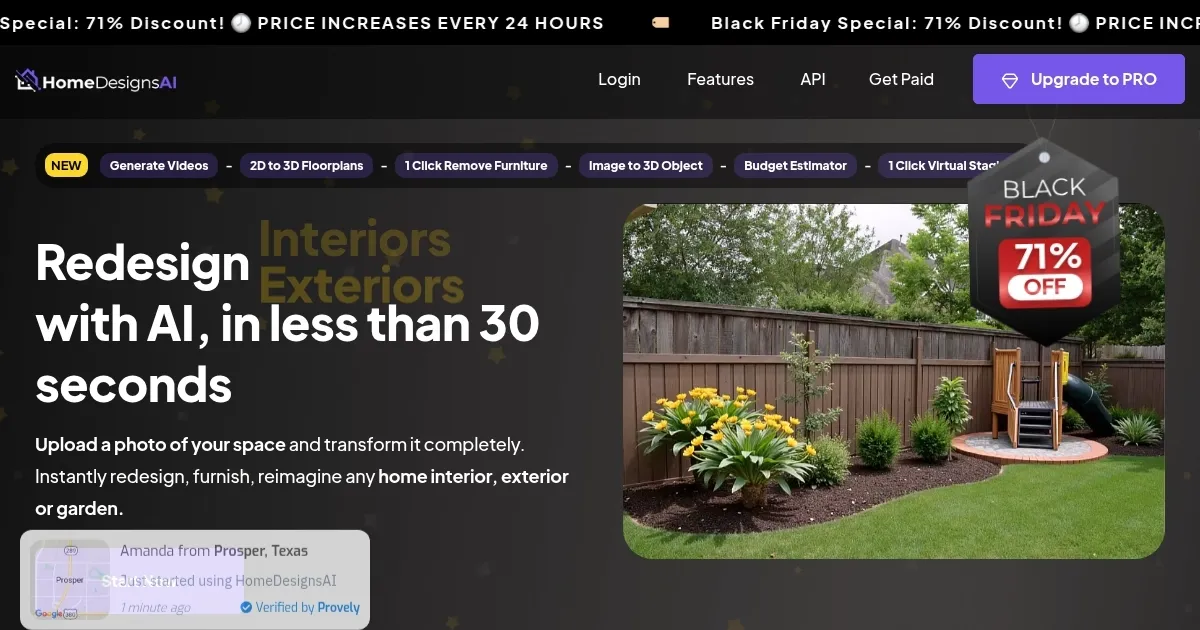
Homepage Screenshot 📸

HomeDesignsAI screenshot

Video Overview 🎬

HomeDesignsAI - Video Overview

What are the key features? ✨

  • Virtual Staging: automatically furnishes empty or under-construction rooms with realistic furniture and decor
  • Beautiful Redesign Mode: transforms existing spaces into polished, professional designs across 80+ styles
  • Creative Redesign Mode: rearranges layouts and introduces bold, imaginative changes while keeping core structure
  • Color & Texture Swap: instantly tests new wall colors, materials, and surface finishes
  • Furniture Finder: detects items in generated designs and provides direct shopping links

Who is it for? 🤔

HomeDesigns AI helps homeowners who want to visualize remodeling ideas, interior designers and architects seeking quick client concepts, real estate agents using virtual staging to enhance listings, landscapers planning garden or patio updates, and small businesses in home improvement that need fast, professional-looking visuals without hiring full design teams.

Examples of what you can use it for 💡

  • Homeowner: uploads a photo of their outdated living room to explore modern, rustic, or coastal redesign options before buying furniture
  • Interior Designer: generates multiple style variations for client proposals in minutes instead of hours of manual rendering
  • Real Estate Agent: virtually stages empty properties to make listings more appealing and speed up sales
  • Landscaper: visualizes backyard, patio, or garden transformations for client approvals without physical mockups
  • Architect: tests exterior facade updates in different architectural styles using photos or sketches

Pros & Cons ⚖️

  • Fast photorealistic results
  • Huge style variety
  • Shoppable furniture links
  • Easy for beginners
  • Occasional AI glitches
  • Limited free credits

FAQs 💬

What does HomeDesigns AI actually do?
It takes a photo of your interior, exterior, or garden and uses AI to generate redesigned versions in various styles within seconds.
Do I need design experience to use it?
No, the tool is built for beginners with a simple upload-and-generate process, though professionals also find it valuable for speed.
Can it handle exteriors and gardens too?
Yes, it supports full redesigns of house facades, patios, backyards, and other outdoor spaces alongside interiors.
Is there a free version?
Limited free credits are available for testing, but full access and higher volume require a paid subscription plan.
How realistic are the generated images?
Outputs are photorealistic, especially with HD and Precision+ options, though occasional artifacts may appear and need regeneration.
Does it provide shopping links for furniture?
Yes, the Furniture Finder feature identifies pieces in designs and links to similar real-world products online.
What are the main redesign modes?
Beautiful Redesign for elegant makeovers, Creative Redesign for inventive layouts, Fill Spaces for virtual staging, and modes like Color Swap or Texture Swap.
Can I use it for commercial purposes?
Higher-tier plans include commercial licenses suitable for professionals, agencies, or business use.
How does it compare to Canva AI interior tools?
HomeDesigns AI covers exteriors and gardens more comprehensively, while Canva focuses on quick restyling and staging of furnished rooms.
What should I do if results look off?
Regenerate with adjusted AI intervention, use Precision+, or add specific custom instructions to guide the output better.

Ready to try HomeDesignsAI?

Transforms photos of rooms, houses, or outdoor spaces into AI-redesigned photorealistic versions

Visit HomeDesignsAI ↗

HomeDesignsAI alternatives 🔗

  1. Zillow 3D Home Zillow 3D Home Creates free virtual 3D home tours and interactive floor plans for real estate listings
  2. Homestyler AI Designer Homestyler AI Designer Choose design style and room type, and let AI design the room for you
  3. Autodraft Autodraft An AI-powered platform that can transform text prompts into vivid visuals
  4. mnml.ai mnml.ai An AI design assistant for architects and interior designers for creating high-quality renders
  5. RoomGPT RoomGPT An AI-powered tool that allows users to easily redesign their living spaces
  6. Rendair Rendair Transforms sketches and images into photorealistic architectural renders in seconds
Share
HomeDesignsAI screenshot enlarged
Promote HomeDesignsAI
light badge
Copy Embed Code
dark badge
Copy Embed Code
neutral badge
Copy Embed Code
Best AI Tools

Discover the best AI tools for any use case

Explore
  • Tool Categories
  • AI Use Cases
  • AI Events
  • AI News
  • Saved Tools
Company
  • About Us
  • Contact Us
  • Media & Partnerships
  • Suggest a Tool
Legal
  • Privacy Policy
  • Terms of Service
Copyright © 2026 Best AI Tools 415 Mission Street, 37th Floor, San Francisco, CA 94105