logo-darklogo-darklogo-darklogo-dark
  • Home
  • Browse
    • Assistant
    • Coding
    • Image
    • Productivity
    • Video
    • Voice
    • Writing
    • All Categories
    • AI Use Cases
  • My Favorites
  • Suggest a Tool
✕
Home › Video Generation & Editing ›

DeepfakesWeb

Published by Dusan Belic on July 10, 2023

DeepfakesWeb

DeepfakesWeb
DeepfakesWeb Homepage
Categories Video Generation & Editing
Online deepfake video maker that lets you swap faces using AI

DeepfakesWeb

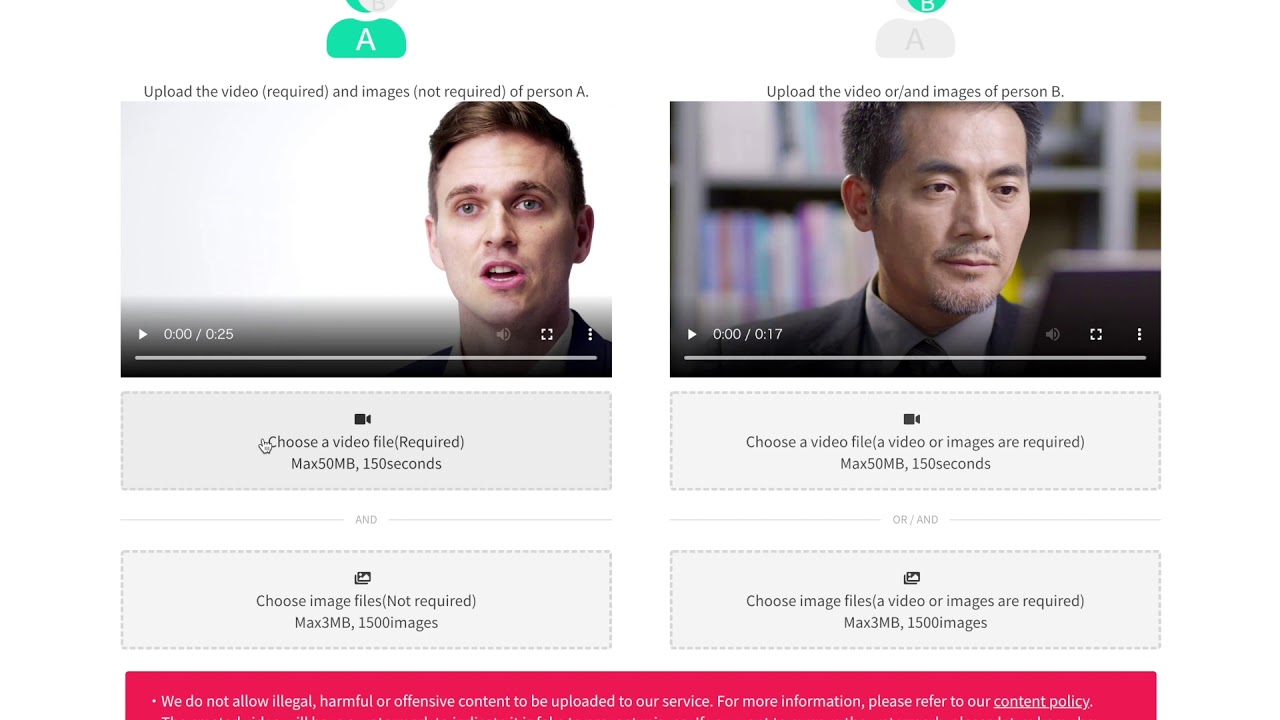
DeepfakesWeb is an online platform that enables users to create deepfake videos using artificial intelligence. It operates entirely in the cloud, requiring users simply to upload videos for the AI to process.

The quality of the deepfake videos generated depends significantly on the quality and length of the source materials. In that sense, users are encouraged to provide clean and diverse data in the form of videos and images to achieve the best results. Specifically, it is recommended to provide multiple angles of the face, various expressions, and a range of lighting conditions — as well as make sure that all those different/similar videos are of the same resolution, preferably 1080p or higher.

DeepfakesWeb operates on a pay-per-use basis, with pricing based on the number of iterations needed to create the deepfake — indicating that more iterations can lead to better quality results​​.

As part of its commitment to responsible use of deepfake technology, DeepfakesWeb implements visible watermarks and leaves traces of manipulation in the video data to ensure that videos are identifiable as deepfakes. This approach aims to mitigate the ethical and societal risks associated with deepfakes, while promoting a safe and transparent environment for users to explore the technology for entertainment, gaming, satire, and cultural applications​​.

To sum it up, DeepfakesWeb will help you make deepfake videos but will do so in a responsible manner. And that, we think, is pretty important.

DeepfakesWeb Homepage
Categories Video Generation & Editing

Video Overview ▶️

What are the key features? ⭐

  • Cloud-based tool: DeepfakesWeb operates online, and you don't need to download or install any software. Just upload your videos, and the platform does the rest​​.
  • Customizable AI models: You can train your AI model with your videos and images to improve the quality of the face swaps.
  • Responsible use: DeepfakesWeb emphasizes the ethical use of deepfake technology, with every video produced including a visible watermark and clear traces in the video data to indicate that it's a deepfake.
  • Privacy included: Your uploaded videos, images, and data are kept private. The platform assures users that their information is not shared with third parties or published without consent.
  • Accessibility: The platform is easy to use and thus accessible to a wider audience. It offers services at a low cost, charging based on the number of iterations (steps of improvement) your project requires.

Who is it for? 🤔

DeepfakesWeb is made for a few different user groups, ranging from hobbyists and enthusiasts who are interested in exploring the potential of AI and deepfake technology for personal entertainment or creative projects to professionals in the fields of education, filmmaking, and content creation who seek new ways to engage their audience. It is also aimed at developers and artists looking for accessible deepfake tools to integrate into their work, whether for educational content, artistic expression, or prototyping video productions. Finally, it could also be interesting to everyone else looking to see what modern AI tech can do. And it can do a lot.

Examples of what you can use it for 💭

  • Create entertaining videos by swapping faces of actors in famous movie scenes or music videos
  • Enhance educational materials by using deepfakes to depict historical figures speaking or performing actions
  • Craft personalized video messages or greetings by swapping your face onto a character in a scene
  • Utilize deepfake technology for artistic projects or digital art, exploring new forms of expression and creativity
  • Filmmakers can use it to prototype scenes by swapping faces of actors to see how they might look in different roles or settings

Pros & Cons ⚖️

  • An easy way to create deepfake videos
  • You can train your own model
  • Entirely cloud-based solution, no need to install anything on your device(s)
  • Outcomes can vary widely

FAQs 💬

What exactly does DeepfakesWeb let you create?
It specializes in face swap deepfake videos where you replace a face in a target video with one from a uploaded image, producing a downloadable MP4 clip.
Do I need any special software or powerful computer to use it?
No, everything processes in the cloud so you just need a web browser and internet connection, no downloads or high-end hardware required.
What kind of inputs work best for good results?
Clear, high-quality front-facing images for the source face and well-lit target videos with visible faces give the strongest outputs, blurry or side-profile shots tend to reduce quality.
How long does it usually take to generate a video?
Processing typically runs from a few minutes up to around 30 minutes total depending on video length and current server load.
Is my uploaded content kept private?
Yes, only you access your images, videos, and results, the platform does not share or publish anything.
Does the tool add anything to make deepfakes easier to detect?
It includes invisible digital watermarks and builds in some intentional minor flaws so common detection tools can flag them as AI-generated.
Can I use it for images only or just videos?
The main focus is video face swaps, though a separate free basic face swap tool exists for static images on the site.
What video lengths and sizes does it support?
It handles videos up to 150 seconds long and 200MB in file size.
Is registration required to start creating deepfakes?
Yes, you need an account to upload, process, and download your generated videos.
What happens if a generation fails or doesn't turn out well?
The platform offers refunds for failed generations or unused credits in many cases, though success depends on input quality.

Related tools ↙️

  1. Simplified Simplified An all-in-one tool for content creation and social media management
  2. ScriptMe ScriptMe A transcription and subtitling tool that makes converting audio and video into text a breeze
  3. AutoShorts.ai AutoShorts.ai Generates and posts faceless videos for TikTok and YouTube daily
  4. EaseUS Fixo EaseUS Fixo Repairs corrupted video, photo, and document files with AI-driven precision
  5. Meitu Meitu Edits photos and videos with AI-powered tools for stunning visual enhancements
  6. ScreenApp ScreenApp Transforms screen recordings into searchable AI transcripts and summaries
Last update: January 27, 2026
Share
Promote DeepfakesWeb
light badge
Copy Embed Code
light badge
Copy Embed Code
light badge
Copy Embed Code
About Us | Contact Us | Suggest an AI Tool | Privacy Policy | Terms of Service

Copyright © 2026 Best AI Tools
415 Mission Street, 37th Floor, San Francisco, CA 94105