logo-darklogo-darklogo-darklogo-dark
  • Home
  • Browse
    • Assistant
    • Coding
    • Image
    • Productivity
    • Video
    • Voice
    • Writing
    • All Categories
    • AI Use Cases
  • My Favorites
  • Suggest a Tool
✕
Home › Image Generation & Editing ›

ImgUpscaler

Published by Dusan Belic on July 10, 2023

ImgUpscaler

ImgUpscaler Homepage
Categories Image Generation & Editing

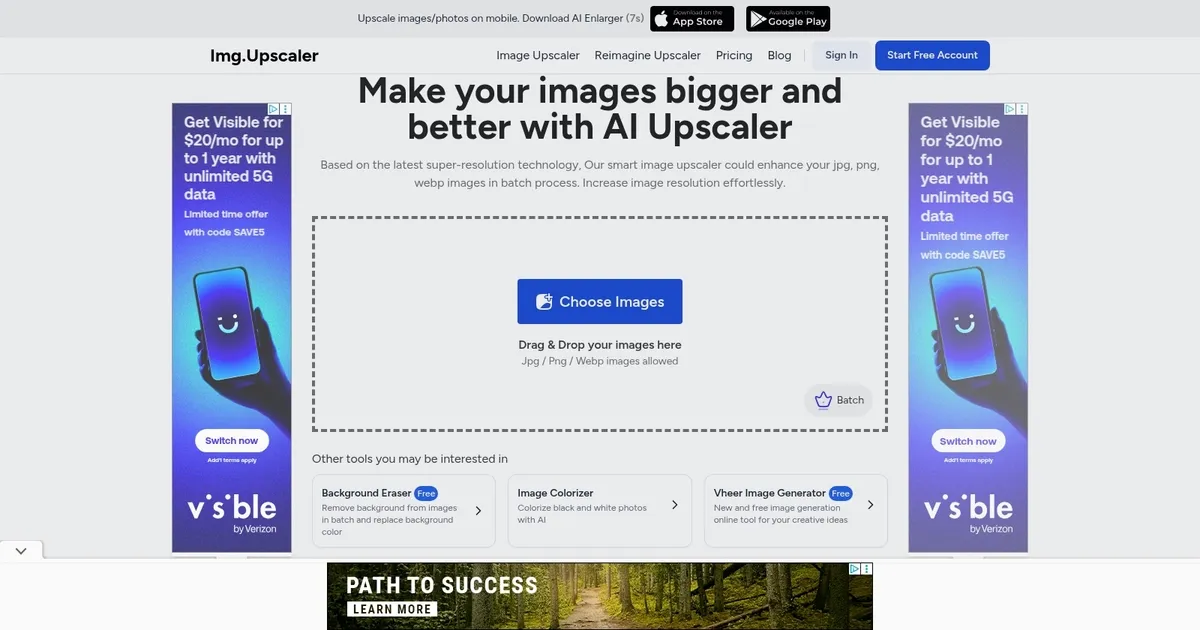
ImgUpscaler - screenshot

AI image upscaler and enlarger

ImgUpscaler

ImgUpscaler is an AI-powered online tool designed to upscale and enhance images using the latest artificial intelligence and Super-Resolution technology. It allows users to increase the resolution of their images by 200% or 400%, effectively making them clearer and of higher quality without sacrificing details.

The tool supports batch processing, enabling users to upscale multiple images at once, and it’s particularly optimized for enhancing anime and cartoon pictures, providing better results than similar tools. Additionally, ImgUpscaler is equipped with a powerful image editor for further fine-tuning and offers free usage for commercial purposes, with the option to upscale images to a maximum dimension of 4000×4000 for free users, and up to 16000x16000px for premium users.

ImgUpscaler stands out by offering a fast and bulk image upscaling process, making it an ideal solution for those looking to upscale multiple images efficiently. It ensures user privacy by deleting all photos within 24 hours and supports various image enhancements, such as removing artifacts and adding details to anime photos, faces, animals, and AI-generated images like those created by Midjourney.

The platform is part of ImgLarger, which provides comprehensive AI solutions for photos — including enhancement, enlargement, background removal, and more — with ImgUpscaler focusing specifically on quick and bulk image upscaling solutions.

ImgUpscaler Homepage
Categories Image Generation & Editing

What are the key features? ⭐

  • AI-powered upscaling: Uses advanced AI to enhance and enlarge images, delivering high-quality outputs with detail retention.
  • Batch processing: Allows multiple images to be upscaled simultaneously, saving time for users.
  • High resolution support: Capable of producing images up to 16000x16000 pixels, making it suitable for high-quality prints.
  • Multiple upscaling models: Offers tailored models for different image types, including portraits and detailed images.
  • Easy to use: Simple drag-and-drop functionality for easy image uploading and processing.

Who is it for? 🤔

ImgUpscaler targets photographers, graphic designers, e-commerce businesses, and anime/cartoon enthusiasts who need high-quality image enlargements. It appeals to individual users and professionals looking to enhance their images for various purposes, including printing, online displays, and creative projects. The service is ideal for anyone needing efficient and reliable image upscaling solutions.

Examples of what you can use it for 💭

  • Enhance product images for better clarity and visual appeal in online stores
  • Upscale personal or professional photos for prints or digital portfolios without losing quality
  • Improve the resolution of images used in design projects
  • Specifically optimized for upscaling anime and cartoon images, maintaining vibrant colors and clean lines
  • Create high-quality visuals for advertisements, social media posts, and other marketing materials

Pros & Cons ⚖️

  • Quick results with little effort
  • Batch processing is a huge time saver
  • Different AI models serving different purposes
  • There are better tools offering upscaling and other functionalities
FAQs 💬

What is ImgUpscaler and how does it work for beginners?
ImgUpscaler is a web-based AI tool that enlarges and enhances low-resolution images using super-resolution technology. You upload a photo in formats like JPG, PNG, or WebP, pick a scaling factor of 200% or 400%, and the AI adds details while reducing blur and noise. It's simple for new users since there's no software to install, just drag and drop, and results show up in seconds. I think it's great for folks starting out who don't want complicated setups.
Is ImgUpscaler free to use, and what are the limits?
Yes, there's a free plan with 20 credits per month for single-image processing, no sign-up needed for basics. Each upscale costs one credit, so you can handle a few images without paying. Paid plans start at $19 a year for more credits and batch options. From what I've seen in recent reviews, the free tier works well for casual tries but might run out quick if you're editing often.
What file formats does ImgUpscaler support, and what's the max size?
It handles JPG, PNG, WebP, and sometimes HEIC or BMP, up to about 10MB per file though exact limits aren't always clear on the site. Output can go up to 16,000x16,000 pixels on higher plans, which is huge for prints or social media. Just keep in mind, bigger files take longer to process.
Can I use ImgUpscaler for commercial purposes?
Absolutely, upscaled images are free for commercial use as long as you own the original. Photographers and e-commerce sellers often mention this in feedback, saying it's handy for product shots without extra fees. That said, always check your source images' rights to stay safe.
How does batch processing work in ImgUpscaler?
On free plans, it's single images only, but Starter or higher lets you upload up to 5-8 at once for quicker workflows. The AI processes them together, saving time for pros handling multiple photos. Users on forums like Reddit say it's a game-changer for bulk edits, though it uses more credits.
What makes ImgUpscaler's AI different from other upscalers like Topaz or Let's Enhance?
It focuses on fast, browser-based upscaling with noise removal and detail sharpening, powered by deep learning models. Unlike Topaz's desktop controls, it's more plug-and-play, and compared to Let's Enhance, it has a bigger free tier but fewer artistic filters. Recent tests show it shines on everyday photos, though complex art might need tweaks.
Is ImgUpscaler safe for privacy, especially with sensitive photos?
They delete uploads within 24 hours and use SSL encryption, which sounds solid for most users. Reviews from 2025 praise this for client work, but a few folks worry about cloud processing. If privacy's huge for you, I might suggest downloading a local tool instead.
Does ImgUpscaler have a mobile app or integrations?
There's a companion app called AI Enlarger on iOS and Android for on-the-go edits, linking back to the web tool. No deep integrations like Photoshop plugins yet, but it pairs well with editors for final touches. X users often share workflows combining it with Grok or Midjourney.
What if I'm not happy with ImgUpscaler, can I get a refund?
Paid plans come with a 7-day money-back guarantee, full refund no questions asked. Support is email-based, and while most say it's responsive, some Trustpilot reviews from late 2025 complain about delays. Probably best to test the free version first.
How's the image quality from ImgUpscaler, any common issues?
It delivers sharp, detailed results for most photos, especially landscapes or products, with minimal artifacts. But older reviews note occasional blurriness on fine details like text, and it can alter colors slightly. In 2025 benchmarks, it scores well for speed over perfection, so preview before downloading.

Related tools ↙️

  1. Retoucher Retoucher Removes image backgrounds instantly and adds custom ones for professional photos
  2. Aragon AI Aragon AI An AI service that lets you transform your selfies into AI-generated headshots
  3. Luma Dream Machine Luma Dream Machine Generates stunning images and videos from simple text prompts
  4. Pixelhunter Pixelhunter Automatically resizes and crops images using AI for social media platforms.
  5. Imagen Imagen Generates photorealistic images from detailed text prompts
  6. Astria Astria The AI tool that lets you create custom, unique images and videos
Last update: November 22, 2025
Share
Promote ImgUpscaler
light badge
Copy Embed Code
light badge
Copy Embed Code
light badge
Copy Embed Code
About Us | Contact Us | Suggest an AI Tool | Privacy Policy | Terms of Service

Copyright © 2026 Best AI Tools
415 Mission Street, 37th Floor, San Francisco, CA 94105