logo-darklogo-darklogo-darklogo-dark
  • Home
  • Browse
    • Assistant
    • Coding
    • Image
    • Productivity
    • Video
    • Voice
    • Writing
    • All Categories
    • AI Use Cases
  • Events
  • My Favorites
  • Suggest a Tool
✕
Home › Image Generation & Editing›
Published by Dusan Belic on August 30, 2023

Astria

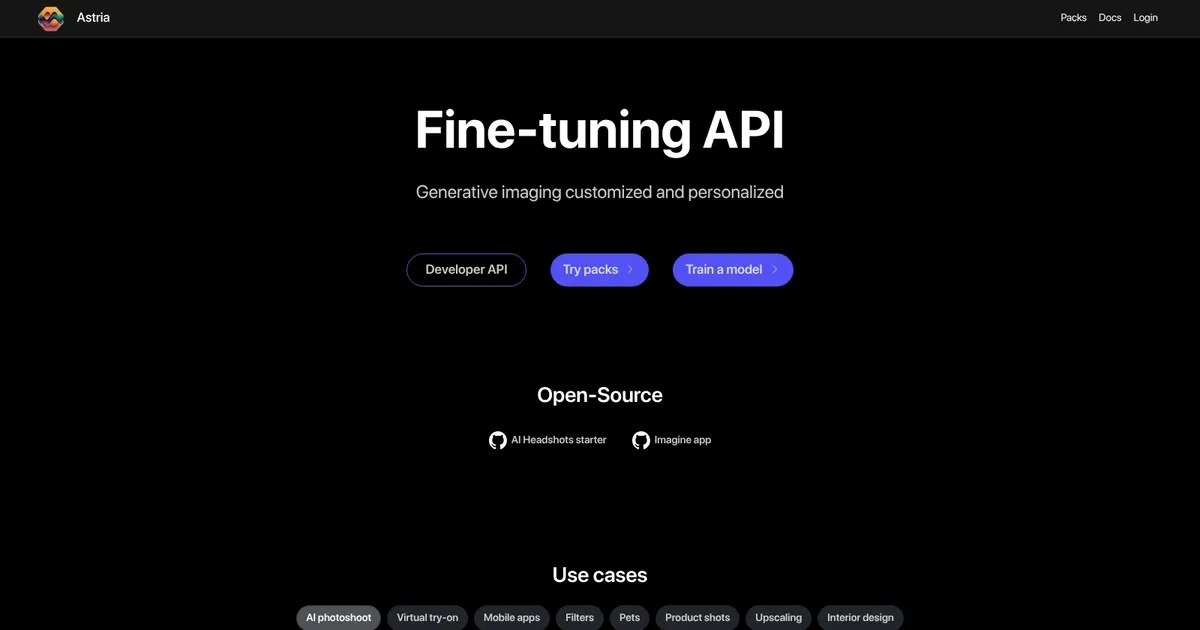
Astria Homepage
Categories Image Generation & Editing

Astria - screenshot

The AI tool that lets you create custom, unique images and videos

Astria

Astria is a generative AI system designed to streamline (and enhance) the process of creating custom images and videos. To that end, it allows users to generate unique visuals based on their specific requirements without deep technical expertise.

Beyond images, users can also create motion videos from their concepts, enabling the visualization of stories and ideas without any pre-existing footage. Such an approach to content creation opens up many possibilities for dynamic visual storytelling and digital art production.

Astria boasts an easy-to-use API that allows developers to make their apps and services that much better.

The platform is made for different use cases, from PhotoBooth and Video2Video creations to specialized video model applications. In that sense, Astria positions itself as a partner in the creative process, offering customizable results for individuals and businesses alike.

Astria Homepage
Categories Image Generation & Editing

What are the key features? ⭐

  • Fine-Tuning API: adapts pre-trained models like Flux, SDXL, SD1.5 for personalized image generation with strong subject consistency
  • LoRA and Checkpoint Support: enables efficient lightweight customization or full model checkpoints for specific styles and subjects
  • Generative Filters with ControlNet: applies artistic effects, line art, or styles while preserving trained identity
  • Tiled Upscaling and Face Correction: enhances resolution with added detail and fixes facial inconsistencies in outputs
  • Single API Workflow: combines training, batch generation, upscaling, and corrections in streamlined calls

Who is it for? 🤔

Astria helps creators, developers, small business owners, photographers, marketers, and app builders who need consistent, personalized AI-generated images at scale. It's especially useful for anyone wanting professional-quality custom visuals (headshots, product shots, avatars, pet art, virtual try-ons) without manual photo shoots or heavy local hardware, and for those integrating tailored generation into apps or services.

Examples of what you can use it for 💭

  • Photographer or studio owner: creates unlimited branded AI headshots or style-specific portraits for clients without physical sessions
  • E-commerce seller: generates product variants with changed backgrounds, lighting matches, or virtual try-on for clothing
  • Mobile app developer: builds features for user-uploaded avatars in fantasy styles, mythical creatures, or custom filters
  • Pet business or influencer: produces artistic pet portraits in various themes to engage audiences or monetize services
  • Interior designer or real estate: redecorates rooms from photos or sketches to realistic renders with custom furniture and lighting

Pros & Cons ⚖️

  • Excellent identity preservation across styles
  • Easy fine-tuning process
  • Fast, queue-free generation
  • Strong Flux model support
  • Credits can add up quickly
  • Best results need good training images

FAQs 💬
What is Astria mainly used for?
Astria specializes in fine-tuning AI image models to generate personalized, consistent images like custom headshots, avatars, product visuals, or artistic renders.
Which base models does Astria support for fine-tuning?
It supports Flux, Stable Diffusion XL (SDXL), and Stable Diffusion 1.5 (SD1.5), with Flux often providing the highest current quality.
Do I need technical skills to use Astria?
No, the web interface is straightforward for uploading images and training, though API use benefits from developer knowledge.
How long does fine-tuning take?
Typically a few hours, depending on model and dataset size, with no long queues reported.
Can I use Astria for commercial projects?
Yes, licensing covers commercial use for open models, and many users build services or products around it.
Is there a free tier or trial?
No unlimited free tier is highlighted, but you can buy credits to start small and test with gallery packs.
How does Astria compare to Leonardo.ai?
Astria focuses more on custom fine-tuning for consistency, while Leonardo.ai offers broader creative tools and prompt-based generation.
What makes Flux fine-tuning special on Astria?
Flux delivers sharper, more detailed results with better prompt adherence and identity preservation than older bases.
Can I download my trained model?
Yes, users can download trained LoRAs or checkpoints for use elsewhere if supported.
Is Astria suitable for beginners?
Yes for basic use, though optimal results improve with curated images and prompt experimentation.
Visit Astria

Related tools ↙️

  1. Dawn AI Dawn AI Generates personalized avatars and images from selfies using advanced AI technology
  2. Imajinn Imajinn Transforms user photos into artistic images and custom visuals using AI
  3. Imgix Imgix Optimizes images in real-time using AI for faster web delivery
  4. Cloudinary Cloudinary Manages, transforms, optimizes, and delivers images and videos with AI-powered features
  5. SVG AI SVG AI Transforms text prompts into scalable vector icons and logos instantly
  6. Blackshark.ai Blackshark.ai Creates photorealistic 3D digital twins from satellite imagery using AI
Last update: February 28, 2026
Share
Promote Astria
light badge
Copy Embed Code
dark badge
Copy Embed Code
neutral badge
Copy Embed Code
About Us | Contact Us | Suggest an AI Tool | Privacy Policy | Terms of Service

Copyright © 2026 Best AI Tools
415 Mission Street, 37th Floor, San Francisco, CA 94105