logo-darklogo-darklogo-darklogo-dark
  • Tool Categories
    • 🎨Art & Creative Design505
    • 🏢Business Management644
    • 💻Coding & Development515
    • 👮Detection83
    • 🧠General Use727
    • 🏥Health & Wellness55
    • 📷Image & Photo Analysis100
    • 🖼️Image Generation & Editing618
    • 📐Interior & Architectural Design37
    • 🎓Learning & Education483
    • ⚖️Legal & Finance90
    • 🎭Lifestyle & Entertainment236
    • 📢Marketing & Advertising627
    • 🎧Music & Audio138
    • 👔Office & Workplace1,014
    • 🔬Research & Data Analysis372
    • 👥Social Media245
    • 🎥Video Generation & Editing426
    • 👧🏻Virtual Companion135
    • 🎤Voice Generation & Editing381
    • ✍️Writing & Editing808
    • All Categories
    • AI Use Cases
  • News
  • Events
    • Academic Conferences
    • Developer Conferences
    • Expos / Trade Shows
    • Industry Summits
    • Workshops / Training
    • All Events
    • Past Events
  • Saved Tools
  • Suggest a Tool
✕
Home › Image Generation & Editing › Photo Editing› Pixelhunter
Pixelhunter

Pixelhunter

Automatically resizes and crops images using AI for social media platforms.

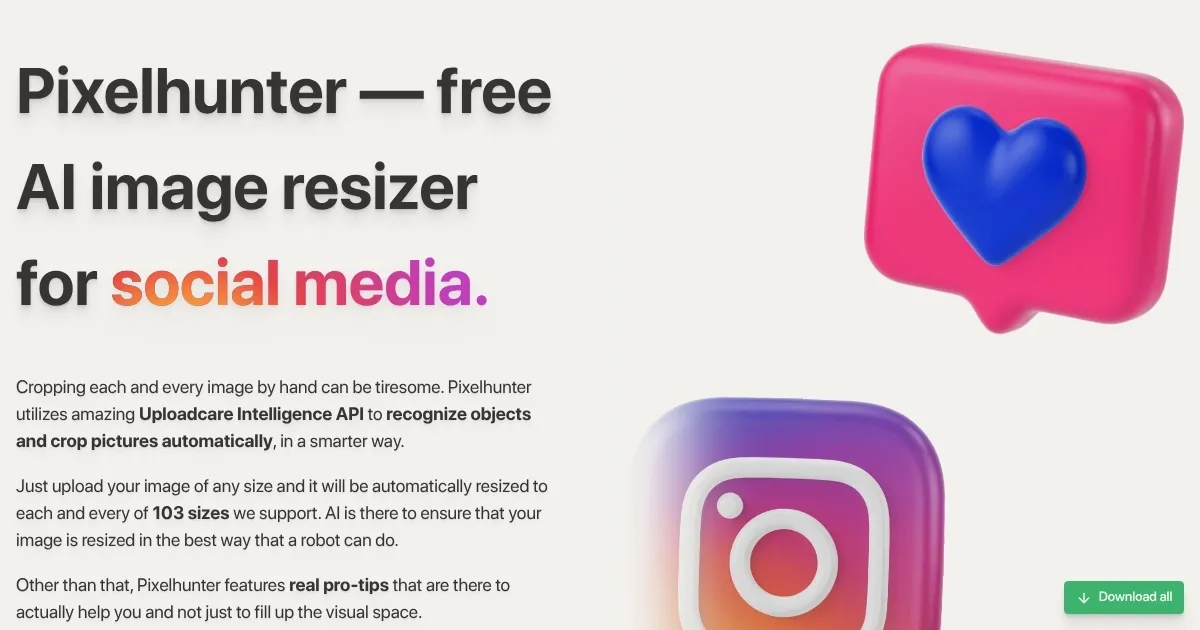
Pixelhunter is an AI-driven image resizer designed for social media optimization. It processes uploaded images to fit specific platform dimensions through automated cropping and resizing. The tool integrates the Uploadcare Intelligence API for object recognition, ensuring focal points remain intact during adjustments. Supported formats include over 100 sizes for platforms such as Instagram, Facebook, LinkedIn, and Google Ads.

Key operations involve uploading an image file, selecting a target size or platform, and allowing the AI to generate the output. Compression applies automatically to maintain quality without visible artifacts. Free access covers basic usage with limits on batch processing, while paid tiers expand capacity for higher volumes.

Users report positive experiences with speed and accuracy on review sites like Product Hunt, where it scores around 4.4 out of 5. Common praises include the intuitive web interface and time savings over manual tools. Some note occasional delays with complex images due to AI analysis.

Competitors include Canva, which offers broader editing alongside resizing, and ImageKit, focused on API integrations for developers. Pixelhunter differs by prioritizing quick, standalone social media adaptations without additional design features.

For implementation, upload images in common formats like JPEG or PNG. Review the AI-suggested crop before finalizing. Export options provide direct downloads suited to each platform’s requirements. Regular updates add new sizes, keeping pace with social media changes.

Visit Pixelhunter ↗
Categories
🖼️ Image
✏️ Photo Editing 💎 Image Enhancing
👥 Social
📱 Social Media Management
🎨 Art
🖌️ Graphic Design
📷 Image Analysis
👁️ Image Recognition

Homepage Screenshot 📸

Pixelhunter screenshot

What are the key features? ✨

  • AI Object Recognition: Uses Uploadcare Intelligence API to detect and preserve key elements during cropping.
  • Platform Presets: Supports over 100 predefined sizes for social media like Instagram and Facebook.
  • Smart Compression: Applies optimization to reduce file sizes while maintaining visual quality.
  • Bulk Processing: Allows multiple image uploads for efficient batch resizing in paid plans.
  • Pro Tips Integration: Provides platform-specific advice on formats and best practices.

Who is it for? 🤔

Pixelhunter suits social media managers, content creators, and small business owners who handle frequent image posts across platforms but lack time for manual edits. It helps freelancers and marketers streamline workflows, especially those new to design tools, by automating fits to diverse dimensions without quality loss. Digital agencies with light editing needs find it handy for quick client deliverables, while hobbyists appreciate the free entry point for personal shares.

Examples of what you can use it for 💡

  • Social Media Manager: Resizes campaign visuals to match Instagram and LinkedIn specs in one upload.
  • Content Creator: Crops video thumbnails for YouTube and TikTok to highlight key subjects automatically.
  • Small Business Owner: Prepares product photos for Facebook ads with optimal compression for faster loads.
  • Freelance Designer: Batches client images for multiple platforms, saving hours on routine tasks.
  • Ecommerce Seller: Adapts listing images to fit Etsy and Pinterest dimensions without cropping errors.

Pros & Cons ⚖️

  • Fast AI cropping
  • Free basic plan
  • Quality preservation
  • Easy web access
  • Bulk limits free
  • No advanced edits

FAQs 💬

What file formats does Pixelhunter support?
It handles common types like JPEG, PNG, and WebP for uploads and outputs.
How many platform sizes are available?
Over 100 presets cover major social media and ad platforms.
Is there a free version?
Yes, the free tier allows limited uploads with full AI features.
Does it require an account?
Basic use works without signup, but accounts unlock saved history.
Can I process multiple images at once?
Free plan caps at small batches; paid options support larger volumes.
What makes the cropping smart?
Uploadcare API detects objects and focuses crops on them.
Are outputs watermarked?
No, all downloads come clean without marks.
How does pricing work?
Starts free, with affordable subscriptions for unlimited access.
Is it mobile-friendly?
The web app works on phones via browser.
Does it integrate with other tools?
Direct links to downloads; API available for developers.

Ready to try Pixelhunter?

Automatically resizes and crops images using AI for social media platforms.

Visit Pixelhunter ↗

Pixelhunter alternatives 🔗

  1. Imagen Imagen Generates photorealistic images from detailed text prompts
  2. Black Forest Labs Black Forest Labs Generates high-quality images from text prompts with precision and speed
  3. Stable Diffusion Stable Diffusion Generates high-quality images from text prompts with versatile styles
  4. Adobe Express Adobe Express Creates on-brand content with AI-driven design and video tools
  5. Adobe Firefly Adobe Firefly Generates images, videos, audio, and vectors using AI.
  6. Freepik AI Freepik AI Creates AI images and videos with fluid motion, detailed textures, and synced audio up to 1080p
Share
Pixelhunter screenshot enlarged
Promote Pixelhunter
light badge
Copy Embed Code
dark badge
Copy Embed Code
neutral badge
Copy Embed Code
Best AI Tools

Discover the best AI tools for any use case

Explore
  • Tool Categories
  • AI Use Cases
  • AI Events
  • AI News
  • Saved Tools
Company
  • About Us
  • Contact Us
  • Media & Partnerships
  • Suggest a Tool
Legal
  • Privacy Policy
  • Terms of Service
Copyright © 2026 Best AI Tools 415 Mission Street, 37th Floor, San Francisco, CA 94105