logo-darklogo-darklogo-darklogo-dark
  • Tool Categories
    • 🎨Art & Creative Design505
    • 🏢Business Management644
    • 💻Coding & Development515
    • 👮Detection83
    • 🧠General Use727
    • 🏥Health & Wellness55
    • 📷Image & Photo Analysis100
    • 🖼️Image Generation & Editing618
    • 📐Interior & Architectural Design37
    • 🎓Learning & Education483
    • ⚖️Legal & Finance90
    • 🎭Lifestyle & Entertainment236
    • 📢Marketing & Advertising627
    • 🎧Music & Audio138
    • 👔Office & Workplace1,014
    • 🔬Research & Data Analysis372
    • 👥Social Media245
    • 🎥Video Generation & Editing426
    • 👧🏻Virtual Companion135
    • 🎤Voice Generation & Editing381
    • ✍️Writing & Editing808
    • All Categories
    • AI Use Cases
  • News
  • Events
    • Academic Conferences
    • Developer Conferences
    • Expos / Trade Shows
    • Industry Summits
    • Workshops / Training
    • All Events
    • Past Events
  • Saved Tools
  • Suggest a Tool
✕
Home › Image Generation & Editing › Image Upscaling› Upscale.media
Upscale.media

Upscale.media by PixelBin.io

An AI tool for upscaling and enhancing images

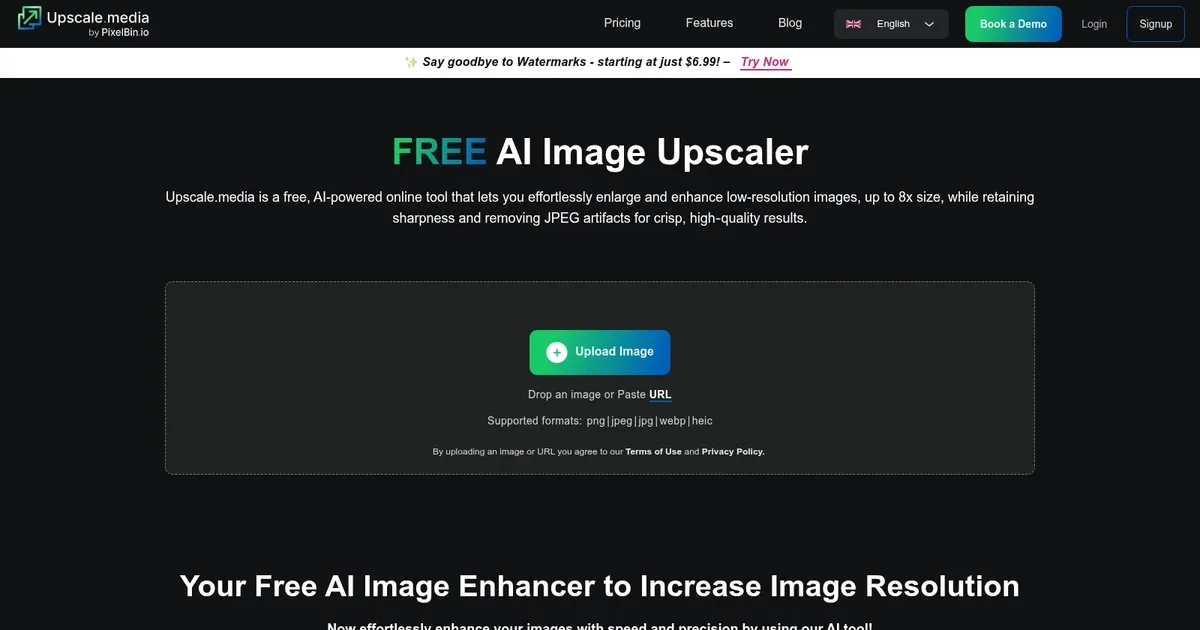
Upscale.media is a platform that serves as an AI image enhancer, enabling users to upscale images while maintaining superior quality. It lets users easily enhance visuals, with support for different image types — including PNG, JPG, JPEG, and WEBP.

The maximum output resolution and size is 1500 x 1500 pixels and 25 MB.

Everyone can try out Upscale.media for free, and then sign-up for the premium offering to upscale even more images. Those calculations take serious resources, and it’s only obvious that a service like this can’t be free forever.

Upscale.media supports bulk transformations, allowing you to upload multiple images at once. Also, it offers an API that enables developers to integrate Upscale.media’s capabilities into their apps and services to speed up their workflows and enhance productivity.

Finally, it’s worth adding that the tool offers a mobile app, so you can upscale images even while on the go. Pretty cool.

Visit Upscale.media ↗
Categories
🖼️ Image
⬆️ Image Upscaling 💎 Image Enhancing 🌟 Photo Enhancing 🛠️ Photo Restoration

Homepage Screenshot 📸

Upscale.media screenshot

Video Overview 🎬

Upscale.media - Video Overview

What are the key features? ✨

  • AI Upscaling: Increases image resolution up to 8x by reconstructing details with neural networks trained on high-low res pairs.
  • JPEG Artifact Reduction: Removes compression-induced blockiness and blur to restore smooth textures in processed images.
  • Quality Refinement: Enhances tones, edges, and clarity across the entire image without introducing over-sharpening artifacts.
  • Bulk Processing: Handles multiple image uploads simultaneously for efficient workflow in professional or batch scenarios.
  • Mobile Accessibility: Operates directly in web browsers on smartphones, enabling on-the-go enhancements without dedicated apps.

Who is it for? 🤔

Upscale.media suits photographers restoring archival shots, eCommerce managers polishing product catalogs for higher conversions, graphic designers refining illustrations and logos for print or web, social media creators boosting post engagement with crisp visuals, and casual users reviving personal photos without technical hurdles, all while offering scalable plans that grow with creative demands.

Examples of what you can use it for 💡

  • Photographer: Uses bulk processing to upscale multiple low-res event shots into high-quality prints ready for client galleries.
  • eCommerce Seller: Enhances product images by 4x to eliminate artifacts, improving listings on platforms like Amazon for better sales visuals.
  • Graphic Designer: Refines AI-generated art from tools like Midjourney with quality adjustments, creating sharp assets for branding materials.
  • Social Media Influencer: Quickly upscales compressed profile pics and stories to maintain detail across feeds, increasing viewer interaction.
  • Archivist: Restores faded historical images through artifact reduction, preserving details for digital collections or exhibits.

Pros & Cons ⚖️

  • An easy way to upscale images
  • Mobile app for upscaling on the go
  • API access for integration with other apps and services
  • Free version is rather limited

FAQs 💬

What formats does Upscale.media support for input?
It handles PNG, JPEG, JPG, WebP, and HEIC images, plus short MP4, MOV, and WebM videos.
Is there a free version of Upscale.media?
Yes, the free tier offers 3 credits and downloads monthly after sign-up, or one daily image without registration.
How does Upscale.media ensure image quality during upscaling?
It uses neural networks to reconstruct details based on trained patterns, avoiding simple stretching that causes distortion.
Can I use Upscale.media on mobile devices?
Absolutely, it works in any modern browser on phones or tablets without needing an app download.
What is the maximum upscale level available?
Users can enhance images up to 8x resolution while maintaining sharpness and natural textures.
Does Upscale.media add watermarks to outputs?
No, all downloads come watermark-free, even on the free plan.
How long does processing take on Upscale.media?
Most images process in seconds, though larger files may take up to a minute during high traffic.
Is an API available for Upscale.media?
Yes, enterprise and subscription plans include API access for automated image workflows in apps or sites.
Can Upscale.media handle batch uploads?
Yes, bulk processing allows multiple images at once, ideal for professional catalogs or edits.
What if I exceed my plan's credits on Upscale.media?
You can purchase add-on credits or upgrade to a higher subscription for continued access without interruption.

Ready to try Upscale.media?

An AI tool for upscaling and enhancing images

Visit Upscale.media ↗

Upscale.media alternatives 🔗

  1. Freepik AI Freepik AI Creates AI images and videos with fluid motion, detailed textures, and synced audio up to 1080p
  2. Pixelcut Pixelcut A suite of AI-powered image editing and upscaling tools
  3. Fotor Fotor Enhances and edits photos with AI-powered tools and creative features
  4. Cutout.Pro Cutout.Pro An AI-powered automatic visual design platform that saves time & money
  5. Pixlr Pixlr An AI-powered online photo editing and design platform, enabling everyone to create stunning designs
  6. Reimagine Reimagine A photo enhancement tool that digitizes, restores, colorizes, and animates old photographs using AI.
Share
Upscale.media screenshot enlarged
Promote Upscale.media
light badge
Copy Embed Code
dark badge
Copy Embed Code
neutral badge
Copy Embed Code
Best AI Tools

Discover the best AI tools for any use case

Explore
  • Tool Categories
  • AI Use Cases
  • AI Events
  • AI News
  • Saved Tools
Company
  • About Us
  • Contact Us
  • Media & Partnerships
  • Suggest a Tool
Legal
  • Privacy Policy
  • Terms of Service
Copyright © 2026 Best AI Tools 415 Mission Street, 37th Floor, San Francisco, CA 94105