logo-darklogo-darklogo-darklogo-dark
  • Tool Categories
    • 🎨Art & Creative Design505
    • 🏢Business Management644
    • 💻Coding & Development515
    • 👮Detection83
    • 🧠General Use727
    • 🏥Health & Wellness55
    • 📷Image & Photo Analysis100
    • 🖼️Image Generation & Editing618
    • 📐Interior & Architectural Design37
    • 🎓Learning & Education483
    • ⚖️Legal & Finance90
    • 🎭Lifestyle & Entertainment236
    • 📢Marketing & Advertising627
    • 🎧Music & Audio138
    • 👔Office & Workplace1,014
    • 🔬Research & Data Analysis372
    • 👥Social Media245
    • 🎥Video Generation & Editing426
    • 👧🏻Virtual Companion135
    • 🎤Voice Generation & Editing381
    • ✍️Writing & Editing808
    • All Categories
    • AI Use Cases
  • News
  • Events
    • Academic Conferences
    • Developer Conferences
    • Expos / Trade Shows
    • Industry Summits
    • Workshops / Training
    • All Events
    • Past Events
  • Saved Tools
  • Suggest a Tool
✕
Home › Image Generation & Editing › Image Enhancing› Let’s Enhance
Let’s Enhance

Let’s Enhance

Upscales low-res images to 4K using AI for sharp, detailed results.

Let’s Enhance is dubbed the “automated AI image upscaler and fixer.” It uses so-called “Super Resolution” technology — based on Deep Convolutional Neural Networks along with other machine learning techs — to do its magic.

Just a few years ago, it was impossible to dramatically increase photo size without losing quality, with the best options only making pictures blurry.

Then came the age of AI, ML, and Neural Networks, enabling tools like Let’s Enhance to add extra details and pixels to photos much better than traditional software. This was made possible thanks to modern algorithms, which have been trained on a huge dataset of pictures.

Today, Let’s Enhance lets you resize pictures, making them crisp, clear and ready for any web and print format. And as a result, you get to save time for (more) creative tasks.

The tool works with all kinds of imagery, from old photos to digital art, from portraits to landscapes, and from logos to product images. It also lets you generate art with text prompts and can be integrated with other software through its API.

Visit Let’s Enhance ↗
Categories
🖼️ Image
💎 Image Enhancing ⬆️ Image Upscaling 🌟 Photo Enhancing ✏️ Photo Editing 🛠️ Photo Restoration

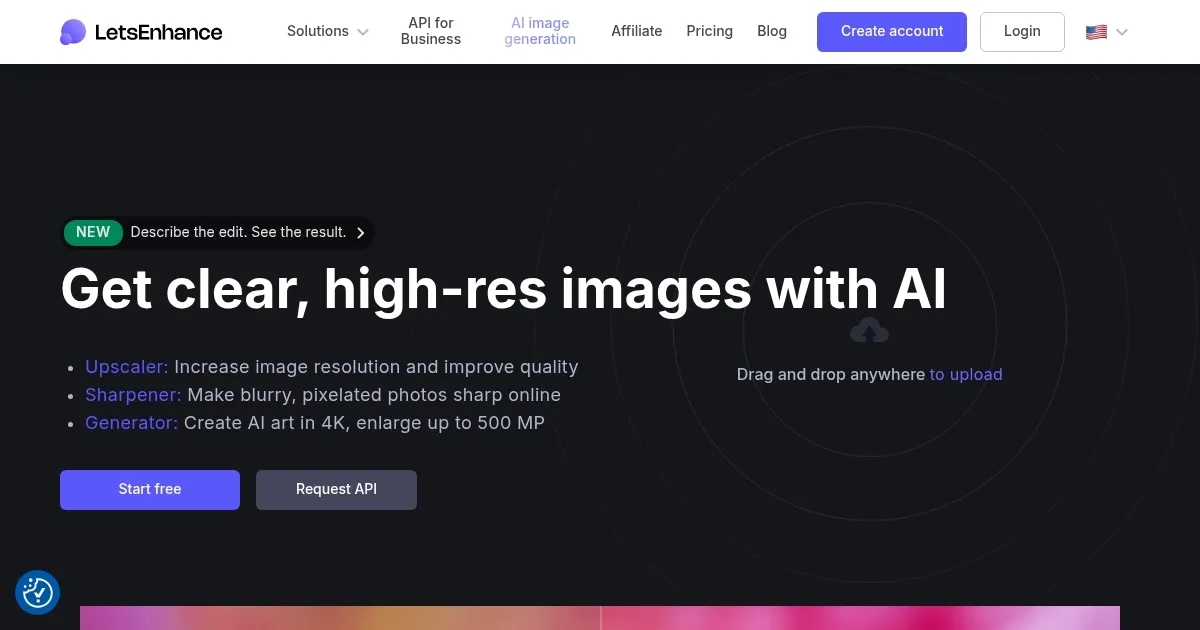
Homepage Screenshot 📸

Let’s Enhance screenshot

Video Overview 🎬

Let’s Enhance - Video Overview

What are the key features? ✨

  • Upscaler: Boosts image resolution up to 16x using AI to add intelligent details for HD or 4K outputs.
  • Sharpener: Automatically clarifies blurry or pixelated photos by enhancing edges and reducing noise.
  • Generator: Creates high-res AI art from text prompts, scalable to 500 MP for creative projects.
  • Batch Editing: Processes multiple images simultaneously with one-click presets for efficient workflows.
  • Light AI: Adjusts colors, lighting, and white balance via HDR filters for vibrant, natural results.

Who is it for? 🤔

Let’s Enhance suits creative professionals like photographers and designers who need quick, high-quality upscales for prints or web use, eCommerce sellers aiming to sharpen product images for better sales, and hobbyists restoring old family photos or generating AI art, as its intuitive web interface and credit-based plans make advanced enhancement accessible without steep learning curves or heavy software installs.

Examples of what you can use it for 💡

  • Photographer: Upscales low-res shoots to 4K for client galleries, preserving natural skin tones and details.
  • eCommerce Seller: Enhances product photos in batch mode to remove artifacts and boost clarity for online listings.
  • Graphic Designer: Generates and refines AI art from prompts to create scalable logos or illustrations.
  • Real Estate Agent: Sharpens phone-captured property images for listings with one-click color corrections.
  • Print Shop Owner: Restores vintage scans to 300 DPI for large posters using the Old Photo mode.

Pros & Cons ⚖️

  • One tool for resizing, upscaling, and sharpening your photos
  • API access for integration with third-party apps
  • Ability to generate art with AI is included
  • No mobile app

FAQs 💬

What file formats does Let’s Enhance support?
It handles JPEG and PNG files best, with optimal results from unprocessed originals up to 64 MP on paid plans.
How does the upscaling work technically?
Deep convolutional neural networks analyze and predict pixels, adding details trained on vast image datasets for natural enhancements.
Is there a mobile app for Let’s Enhance?
No native app exists, but it works smoothly via mobile browsers for on-the-go uploads and processing.
Can I use it for commercial projects?
Yes, paid plans allow commercial use, including API integration for automated eCommerce or print workflows.
What’s the difference between upscale modes?
Magic adds creative details, Balanced preserves originals, Gentle softens enhancements, and Digital Art suits illustrations.
Does it remove watermarks on free outputs?
Free tier includes a watermark; upgrade to any paid plan for clean, watermark-free downloads.
How many images can I process for free?
New users get 10 free credits, each handling one image up to 8 MP upscale.
Is Let’s Enhance good for old photo restoration?
Yes, the Old Photo mode reduces noise and fades while upscaling up to 16x for clear, vibrant revivals.
Can I integrate it with other tools?
Its API connects easily with workflows like Photoshop or eCommerce platforms for seamless automation.
What if the results aren’t perfect?
Tweak modes or toggles like Light AI, and reprocess; support chat helps refine settings for better outcomes.

Ready to try Let’s Enhance?

Upscales low-res images to 4K using AI for sharp, detailed results.

Visit Let’s Enhance ↗

Let’s Enhance alternatives 🔗

  1. Pixelcut Pixelcut A suite of AI-powered image editing and upscaling tools
  2. PhotoRoom PhotoRoom An AI-powered photo editing tool that removes backgrounds and enhances photos with user-friendly features.
  3. Fotor Fotor Enhances and edits photos with AI-powered tools and creative features
  4. Cutout.Pro Cutout.Pro An AI-powered automatic visual design platform that saves time & money
  5. Picsart Picsart A platform for creating, customizing, and sharing images and videos
  6. DeepAI DeepAI Generates images, videos, text, and music from simple text prompts
Share
Let’s Enhance screenshot enlarged
Promote Let’s Enhance
light badge
Copy Embed Code
dark badge
Copy Embed Code
neutral badge
Copy Embed Code
Best AI Tools

Discover the best AI tools for any use case

Explore
  • Tool Categories
  • AI Use Cases
  • AI Events
  • AI News
  • Saved Tools
Company
  • About Us
  • Contact Us
  • Media & Partnerships
  • Suggest a Tool
Legal
  • Privacy Policy
  • Terms of Service
Copyright © 2026 Best AI Tools 415 Mission Street, 37th Floor, San Francisco, CA 94105