logo-darklogo-darklogo-darklogo-dark
  • Home
  • Browse
    • Assistant
    • Coding
    • Image
    • Productivity
    • Video
    • Voice
    • Writing
    • All Categories
    • AI Use Cases
  • Events
  • My Favorites
  • Suggest a Tool
✕
Home › Image Generation & Editing›
Published by Dusan Belic on July 10, 2023

Upscayl

Upscayl
Upscayl Homepage
Categories Image Generation & Editing

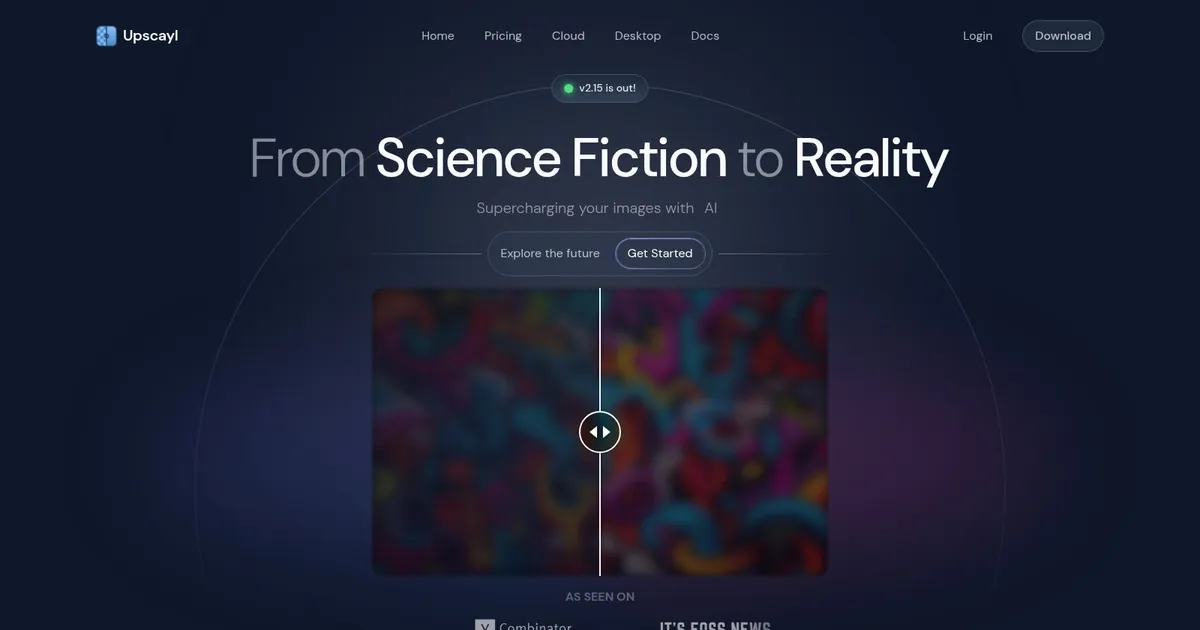
Upscayl - screenshot

Enlarges low-resolution images with AI while adding plausible details locally and offline

Upscayl

Upscayl is an innovative AI image upscaling tool designed to enhance the quality of low-resolution images, transforming them into high-resolution versions with improved sharpness and clarity. It offers users a way to supercharge their images without needing advanced hardware or technical skills.

The tool features a variety of models and modes that cater to different upscaling needs — including a face enhancement tool for more detailed and precise facial improvements. The software is available across multiple platforms — including a desktop version for Linux, macOS, and Windows — ensuring broad accessibility. Moreover, it’s free and open source, allowing for customization and continuous improvement by the developer community.

Upscayl’s feature Upscayl Cloud allows users to upscale images directly from the cloud, eliminating the need for powerful GPU hardware and making the tool accessible anytime, anywhere, and on any device. This web-based version promises to deliver faster performance, with speeds reportedly being 5x faster than the desktop version, and supports video upscaling and commercial usage.

Furthermore, Upscayl Cloud is designed to be fully scalable, handling a high volume of image upscaling tasks simultaneously. Plus, by removing technical and hardware barriers — it makes the tool more accessible to a wider audience — including professionals and hobbyists alike.

Upscayl Homepage
Categories Image Generation & Editing

What are the key features? ⭐

  • AI-Powered Upscaling: enlarges images while intelligently adding plausible details using Real-ESRGAN based models
  • Multiple AI Models: offers specialized models for photos, digital art, anime, and general content
  • Batch Processing: upscales entire folders of images in one session
  • Double Upscayl: applies a second upscale pass for enhanced detail on demanding images
  • Local & Offline Processing: runs entirely on the user's GPU for privacy and no internet requirement

Who is it for? 🤔

Upscayl suits photographers restoring old or low-res shots, graphic designers fixing compressed client assets, hobbyists enlarging personal photos or AI-generated art, indie game developers upscaling sprites and textures, and anyone who values offline privacy and avoids subscription costs while still needing capable AI upscaling on Windows, macOS, or Linux.

Examples of what you can use it for 💭

  • Photographer: restores faded family photos or old film scans to sharp, printable quality without losing natural texture
  • Graphic Designer: enlarges compressed web assets or mockups for presentations and print while keeping edges clean
  • Digital Artist: upscales AI-generated illustrations or concept art to higher resolutions suitable for portfolios or posters
  • Content Creator: enhances low-res social media images or thumbnails to look professional on larger screens
  • Archivist: revives vintage or damaged photos from personal collections for digital preservation and sharing

Pros & Cons ⚖️

  • Completely free and open-source with no subscriptions
  • Runs locally for strong privacy and offline use
  • Multiple models for different image types
  • Batch processing saves time on multiple files
  • Requires Vulkan-compatible GPU for best performance
  • Can produce artifacts on very poor source images

FAQs 💬

What platforms does Upscayl support?
Upscayl runs on Windows, macOS, and Linux, making it cross-platform for desktop users.
Is Upscayl really completely free?
Yes, the desktop version is fully free and open-source with no hidden fees or subscriptions required.
Does Upscayl require an internet connection?
No, the core desktop app processes everything locally and works offline after installation.
What kind of hardware do I need?
A Vulkan-compatible GPU (most modern NVIDIA or AMD cards) is required for practical performance; CPU-only or weak integrated graphics will be very slow or unsupported.
Can Upscayl upscale images more than 4x?
Yes, it supports higher factors through double upscaling or chained processing, reaching up to 16x in some workflows.
How does Upscayl compare to paid tools like Topaz?
It delivers strong results for free, especially on privacy and basic upscaling, though paid options like Topaz Gigapixel AI often edge ahead on complex faces or generative features.
Does it handle batch processing?
Yes, batch mode lets you upscale entire folders at once, which is great for large collections.
Can I use it for anime or digital art?
Yes, dedicated models optimize for anime, digital illustrations, and other stylized content with good results.
What image formats does it support for output?
It saves upscaled images as PNG, JPG, or WEBP, covering most common needs.
Is there a cloud version available?
Yes, an optional paid Upscayl Cloud exists for faster processing and extra features, but the desktop app remains the free flagship.
Visit Upscayl

Related tools ↙️

  1. Dawn AI Dawn AI Generates personalized avatars and images from selfies using advanced AI technology
  2. Imajinn Imajinn Transforms user photos into artistic images and custom visuals using AI
  3. Imgix Imgix Optimizes images in real-time using AI for faster web delivery
  4. Cloudinary Cloudinary Manages, transforms, optimizes, and delivers images and videos with AI-powered features
  5. SVG AI SVG AI Transforms text prompts into scalable vector icons and logos instantly
  6. Blackshark.ai Blackshark.ai Creates photorealistic 3D digital twins from satellite imagery using AI
Last update: December 30, 2025
Share
Promote Upscayl
light badge
Copy Embed Code
dark badge
Copy Embed Code
neutral badge
Copy Embed Code
About Us | Contact Us | Suggest an AI Tool | Privacy Policy | Terms of Service

Copyright © 2026 Best AI Tools
415 Mission Street, 37th Floor, San Francisco, CA 94105