logo-darklogo-darklogo-darklogo-dark
  • Home
  • Browse
    • Assistant
    • Coding
    • Image
    • Productivity
    • Video
    • Voice
    • Writing
    • All Categories
    • AI Use Cases
  • My Favorites
  • Suggest a Tool
✕
Home › Image Generation & Editing›
Published by Dusan Belic on September 3, 2024

LivePortrait

LivePortrait
LivePortrait Homepage
Categories Image Generation & Editing
Animates static portraits into lifelike moving videos using driving motion from video sources

LivePortrait

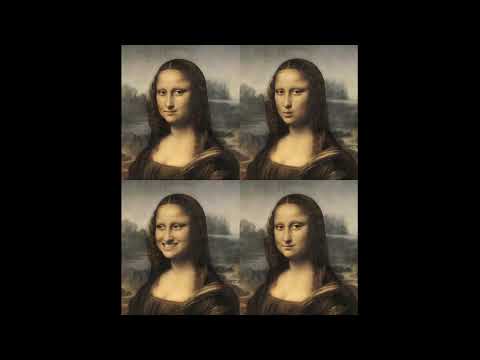
LivePortrait is an AI-powered platform that transforms static images into animated, interactive portraits. It can add realistic facial expressions, eye movements, and other subtle animations to bring photos to life — making it cool for enhancing social media profiles, digital storytelling, or marketing materials.

With an easy-to-grasp interface, users can easily upload images and select from different animation styles to create dynamic visuals that capture attention. This approach makes the tool accessible to anyone, regardless of their technical expertise.

Whether it’s a slight smile, a blink, or a more elaborate expression – LivePortrait ensures that the animations are both natural and captivating. This makes the tool valuable for the likes of content creators, marketers, and anyone else looking to add a personal touch to their visual content.

In summary, LivePortrait offers a unique way to enhance static images, making them more engaging and interactive. The platform’s focus on ease of use, combined with its AI-driven animation capabilities, sets it apart as a useful tool for creating dynamic and memorable visual experiences.

LivePortrait Homepage
Categories Image Generation & Editing

Video Overview ▶️

LivePortrait - Video Overview

What are the key features? ⭐

  • High-Quality Animation Generation: produces lifelike animated videos from static portraits with smooth facial movements
  • Precise Motion Control: accurately retargets eye gaze, lip shapes, and expressions from driving sources
  • Diverse Style Support: works effectively with real photos, cartoon characters, and artistic paintings
  • Custom Animation Patterns: allows preset templates or user-uploaded videos to drive unique motions
  • Enhanced Image Processing: includes restore, colorize, and upscale options to improve source images before animation

Who is it for? 🤔

LivePortrait helps content creators, social media users, educators, marketers, and hobbyists who want to bring static portraits to life for engaging videos, personalized messages, educational explainers, or fun experiments. It suits anyone working with photos, art, or characters who needs quick, realistic facial animation without complex software, especially if they value control over motion sources and versatility across image styles.

Examples of what you can use it for 💭

  • Content Creator: animates profile photos or character designs into short talking clips for YouTube intros or TikTok posts
  • Educator: revives historical figures or artwork to narrate lessons, making history or art classes more interactive
  • Marketer: creates personalized video messages by animating client or team photos synced to custom scripts
  • Hobbyist: turns family portraits or memes into lively, humorous animations for sharing with friends
  • Artist: experiments with animating paintings or drawings to explore new storytelling formats

Pros & Cons ⚖️

  • Fast generation times
  • Realistic facial motion
  • Versatile style support
  • Free testing available
  • Input quality sensitive
  • Limited extreme motion

FAQs 💬

What kind of images work best with LivePortrait?
Clear, front-facing portraits with neutral expressions and good lighting give the most realistic results. Avoid heavy angles or obstructions on the face.
Does LivePortrait support audio input for lip sync?
It transfers motion from a driving video, including lip movements, but does not carry over audio. Add sound separately in a video editor.
Can I use cartoon or artistic images?
Yes, the tool supports real photos, animated styles, and artistic portraits with good compatibility across types.
Is there a free way to try LivePortrait?
A free playground exists where you can test animations without payment, though heavy use may require credits.
How long do animations take to generate?
Short clips often complete in seconds to a minute, depending on complexity and current load.
What are the main competitors to LivePortrait?
Tools like D-ID and Hedra offer similar portrait animation, with differences in input focus (audio vs video driving) and ease of use.
Does it work on animals or full body?
It focuses on human-like portraits and faces. Future updates may add animal support, but currently stick to head-focused images.
Visit LivePortrait

Related tools ↙️

  1. Dawn AI Dawn AI Generates personalized avatars and images from selfies using advanced AI technology
  2. Cloudinary Cloudinary Manages, transforms, optimizes, and delivers images and videos with AI-powered features
  3. Imgix Imgix Optimizes images in real-time using AI for faster web delivery
  4. Imajinn Imajinn Transforms user photos into artistic images and custom visuals using AI
  5. SVG AI SVG AI Transforms text prompts into scalable vector icons and logos instantly
  6. Artisse Artisse Generates hyper-realistic photos using AI from user selfies and custom prompts
Last update: February 23, 2026
Share
Promote LivePortrait
light badge
Copy Embed Code
dark badge
Copy Embed Code
neutral badge
Copy Embed Code
About Us | Contact Us | Suggest an AI Tool | Privacy Policy | Terms of Service

Copyright © 2026 Best AI Tools
415 Mission Street, 37th Floor, San Francisco, CA 94105