logo-darklogo-darklogo-darklogo-dark
  • Tool Categories
    • 🎨Art & Creative Design505
    • 🏢Business Management644
    • 💻Coding & Development514
    • 👮Detection83
    • 🧠General Use728
    • 🏥Health & Wellness55
    • 📷Image & Photo Analysis100
    • 🖼️Image Generation & Editing618
    • 📐Interior & Architectural Design37
    • 🎓Learning & Education483
    • ⚖️Legal & Finance90
    • 🎭Lifestyle & Entertainment236
    • 📢Marketing & Advertising627
    • 🎧Music & Audio138
    • 👔Office & Workplace1,014
    • 🔬Research & Data Analysis373
    • 👥Social Media245
    • 🎥Video Generation & Editing426
    • 👧🏻Virtual Companion135
    • 🎤Voice Generation & Editing381
    • ✍️Writing & Editing808
    • All Categories
    • AI Use Cases
  • News
  • Events
    • Academic Conferences
    • Developer Conferences
    • Expos / Trade Shows
    • Industry Summits
    • Workshops / Training
    • All Events
    • Past Events
  • Saved Tools
  • Suggest a Tool
✕
Home › Writing & Editing › Writing Assistant› Scribbler
Scribbler

Scribbler by Distiller

Extracts key insights, summaries, transcripts from podcasts and videos instantly

Scribbler is a useful AI tool that can efficiently extract key insights from podcasts and YouTube videos, making content consumption quicker and more manageable. The platform generates concise summaries of long-form content, allowing users to grasp the main points without needing to listen or watch the entire episode. This can be particularly useful for busy professionals and avid learners who want to stay informed without spending a lot of time.

Scribbler is able to provide full transcripts with clickable timestamps, allowing users to jump directly to specific sections of interest. This makes it easy to revisit crucial points or share them with others and can be especially beneficial for content creators, educators, and researchers who need to reference specific parts of a podcast or video.

In addition, Scribbler lets users engage in interactive conversations with the content. Users can ask questions about the episode, and the AI will generate responses based on the transcript to provide a deeper understanding of the material. Such a capability makes Scribbler a valuable tool for those who want to extract maximum value from their time spent on digital content.

To sum it up, Scribbler is a powerful tool for folks looking to optimize their content consumption. By providing quick summaries, detailed transcripts, and interactive features – it helps users stay informed and engaged with minimal effort. If this sounds appealing to you, there’s a link on this page you can click on to test out Scribbler.

Visit Scribbler ↗
Categories
✍️ Writing
🤖 Writing Assistant ✍️ Blog Generation ♻️ Content Repurposing 🅰️ Text Generation ✒️ Copywriting 🖋️ Writing

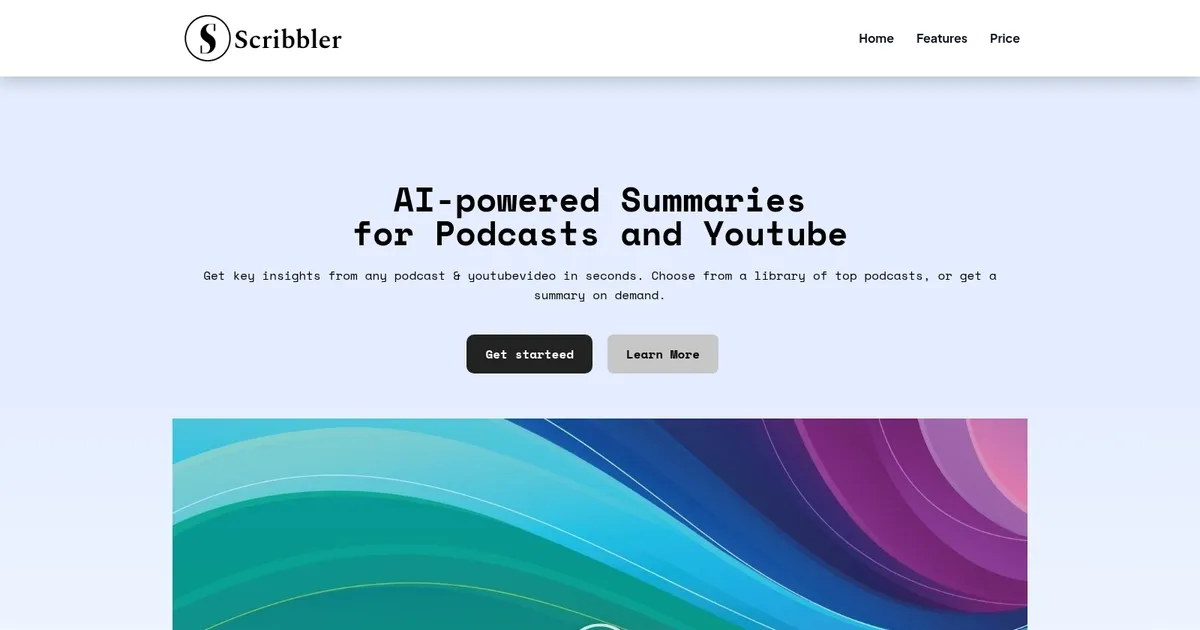
Homepage Screenshot 📸

Scribbler screenshot

What are the key features? ✨

  • AI-Powered Summaries: Delivers concise key insights and takeaways from podcasts or YouTube videos in seconds.
  • Full Transcripts with Timestamps: Provides complete, navigable transcripts where users click timestamps to jump to exact moments.
  • Chat with Content: Enables interactive questioning of episode material for direct, context-grounded answers.
  • On-Demand Processing: Allows users to submit any podcast or video URL for custom summarization and transcription.
  • Email Digests via Subscriptions: Sends curated highlights from subscribed podcasts straight to the inbox regularly.

Who is it for? 🤔

Scribbler helps busy professionals, lifelong learners, students, researchers, and content enthusiasts who want to absorb insights from podcasts and YouTube videos without investing full listening or viewing time. It suits people juggling multiple interests, needing quick knowledge boosts for work, studies, or personal growth, especially when dealing with information-dense episodes or staying updated on many shows.

Examples of what you can use it for 💡

  • Busy executive: Quickly grasps main arguments from industry podcasts during commutes or breaks without full episodes.
  • Student or researcher: Extracts quotes, facts, and counterpoints from educational videos or interviews for papers and notes.
  • Lifelong learner: Scans self-improvement or history podcasts to decide which ones deserve full attention later.
  • Content creator: Reviews competitor interviews or discussions rapidly to spark ideas or spot trends.
  • Team lead: Shares key takeaways from relevant episodes with colleagues via chat insights or digests.

Pros & Cons ⚖️

  • Fast, clear summaries
  • Accurate timestamped transcripts
  • Interactive content chat
  • Convenient email digests
  • Credit costs for heavy use
  • Minor audio accuracy issues

FAQs 💬

What kind of content does Scribbler support?
It handles podcasts from popular platforms and most YouTube videos with spoken content.
Is there a free version available?
Yes, the free plan gives unlimited access to the pre-processed library, with credits available for on-demand needs.
How accurate are the transcripts?
Transcripts work well for clear speech, but heavy accents, overlap, or noise can cause small errors occasionally.
Can I chat about any episode?
Premium unlocks unlimited chat for both library and on-demand content.
Does it work for non-English podcasts or videos?
It focuses primarily on English-language content for best results.
How do email digests work?
Subscribe to shows in premium, and receive curated insight summaries for new episodes automatically.
What happens if I submit a very long video?
Processing charges apply per hour of content, with lower rates in premium.
Can I export summaries or transcripts?
Basic copy-paste works, though dedicated export formats aren't highlighted.

Ready to try Scribbler?

Extracts key insights, summaries, transcripts from podcasts and videos instantly

Visit Scribbler ↗

Scribbler alternatives 🔗

  1. ChatGPT ChatGPT All-round AI assistant generating human-like responses to user queries and tasks
  2. Gemini Gemini Generates responses from text, images, audio, and video inputs using advanced multimodal AI
  3. Claude Claude Assists users in reasoning, coding, writing, and analyzing data with advanced AI models
  4. Poe Poe Aggregates top AI models for seamless chatting and bot creation
  5. SwiftKey AI Keyboard SwiftKey AI Keyboard Enhances typing with AI-powered autocorrect and predictions
  6. Brave Leo Brave Leo Assists with web queries, content creation, and document analysis in-browser
Share
Scribbler screenshot enlarged
Promote Scribbler
light badge
Copy Embed Code
dark badge
Copy Embed Code
neutral badge
Copy Embed Code
Best AI Tools

Discover the best AI tools for any use case

Explore
  • Tool Categories
  • AI Use Cases
  • AI Events
  • AI News
  • Saved Tools
Company
  • About Us
  • Contact Us
  • Media & Partnerships
  • Suggest a Tool
Legal
  • Privacy Policy
  • Terms of Service
Copyright © 2026 Best AI Tools 415 Mission Street, 37th Floor, San Francisco, CA 94105