MakeUGC

Let’s talk about MakeUGC, a tool that’s practically a magic wand for brands needing quick, authentic-looking video content. Imagine you’re a small business owner, juggling a million tasks, and you need a snappy ad for TikTok or Instagram Reels. Hiring creators costs a fortune — $150 or more per video — and takes days, sometimes weeks. MakeUGC steps in with a bold promise: high-quality, user-generated content (UGC) videos in minutes, not days, at a fraction of the cost. I think it’s safe to say this tool is a game-changer for anyone who’s ever groaned at the thought of coordinating with influencers or editing endless footage.
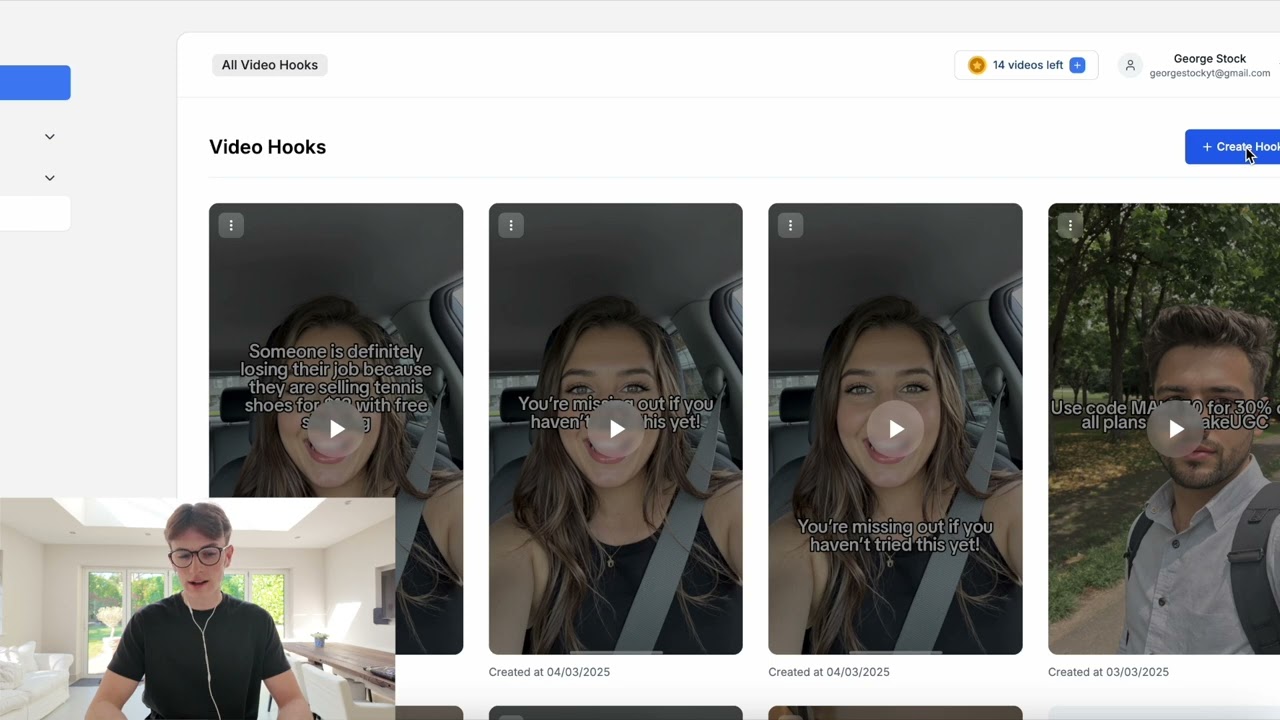
The process is refreshingly simple. You sign up, pick from over 150 AI avatars, write a script or let the AI whip one up, and boom — your video is ready in as little as two minutes. The avatars are lifelike, with realistic expressions and movements, and they can even hold your product, thanks to a nifty feature available in higher-tier plans like Pro or Enterprise. Want your product showcased in a park or a podcast setting? MakeUGC offers a variety of scenes and backgrounds to match your vibe. The platform supports 29 languages, which is a huge plus for brands targeting global audiences. And the videos? They feel native to platforms like TikTok, often fooling viewers into thinking they’re watching real people.
What’s not to love? Well, not everything’s perfect. Some users on platforms like Trustpilot have grumbled about occasional glitches, like lip-sync issues or product rendering that feels off in shorter clips, particularly the 10-second ‘hook’ videos. Customer support can also lag during peak hours, which might frustrate those on tight deadlines. But the positives outweigh these hiccups. The user interface is intuitive, even for non-techies, and the ability to generate videos for as little as $5 a pop — compared to hundreds for traditional methods — makes it a no-brainer for cost-conscious marketers. Plus, you own your creatives outright, with no restrictions on where you can use them.
Compared to competitors like Synthesia, which excels at polished, corporate-style videos, or Tagshop, with its focus on customizable avatars, MakeUGC stands out for its focus on influencer-style UGC that resonates on social media. It’s not as feature-heavy as Synthesia for training videos, but it’s laser-focused on short, snappy ads. Another rival, BuzzClip, is great for TikTok trends but lacks the multilingual support MakeUGC offers.
The surprise element? The AI’s ability to nail emotional delivery. These avatars don’t just read scripts — they emote, making your ads feel human. I was skeptical at first, but after seeing sample videos on X, I’m convinced this tool can make ads that stop thumbs mid-scroll. My advice: start with the Startup plan to test the waters, use the AI script generator to save time, and experiment with different avatars to find your brand’s perfect match. Keep an eye on processing times during peak hours, and you’ll be churning out viral content in no time.
Video Overview ▶️
What are the key features? ⭐
- AI Video Generation: Turns scripts into high-quality videos using machine learning.
- Custom AI Avatars: Creates realistic avatars that emote and align with brand identity.
- AI Script Generation: Generates scripts from user input for quick content creation.
- Multilingual Support: Supports 29 languages for global audience targeting.
- Sound Effects & Background Music: Enhances videos with customizable audio options.
Who is it for? 🤔
Examples of what you can use it for 💭
- E-commerce Owner: Creates product demo videos to boost conversions on online stores.
- Social Media Manager: Produces TikTok-style ads for rapid audience engagement.
- Marketing Consultant: Generates client testimonials for campaigns in multiple languages.
- Real Estate Agent: Showcases properties through engaging video tours.
- Content Creator: Crafts viral hooks for Reels to grow follower base.
Pros & Cons ⚖️
- Fast video generation in minutes.
- Cost-effective compared to creators.
- Supports 29 languages.
- Lip-sync issues occasionally occur.
- Limited music and sound options.