logo-darklogo-darklogo-darklogo-dark
  • Tool Categories
    • ๐ŸŽจArt & Creative Design505
    • ๐ŸขBusiness Management644
    • ๐Ÿ’ปCoding & Development515
    • ๐Ÿ‘ฎDetection83
    • ๐Ÿง General Use727
    • ๐ŸฅHealth & Wellness55
    • ๐Ÿ“ทImage & Photo Analysis100
    • ๐Ÿ–ผ๏ธImage Generation & Editing618
    • ๐Ÿ“Interior & Architectural Design37
    • ๐ŸŽ“Learning & Education483
    • โš–๏ธLegal & Finance90
    • ๐ŸŽญLifestyle & Entertainment236
    • ๐Ÿ“ขMarketing & Advertising627
    • ๐ŸŽงMusic & Audio138
    • ๐Ÿ‘”Office & Workplace1,014
    • ๐Ÿ”ฌResearch & Data Analysis372
    • ๐Ÿ‘ฅSocial Media245
    • ๐ŸŽฅVideo Generation & Editing426
    • ๐Ÿ‘ง๐ŸปVirtual Companion135
    • ๐ŸŽคVoice Generation & Editing381
    • โœ๏ธWriting & Editing808
    • All Categories
    • AI Use Cases
  • News
  • Events
    • Academic Conferences
    • Developer Conferences
    • Expos / Trade Shows
    • Industry Summits
    • Workshops / Training
    • All Events
    • Past Events
  • Saved Tools
  • Suggest a Tool
โœ•
Home › Art & Creative Design › Fashion› Uwear.ai
Uwear.ai

Uwear.ai

Generate lifelike on-model clothing photos from a single flat-lay image in seconds

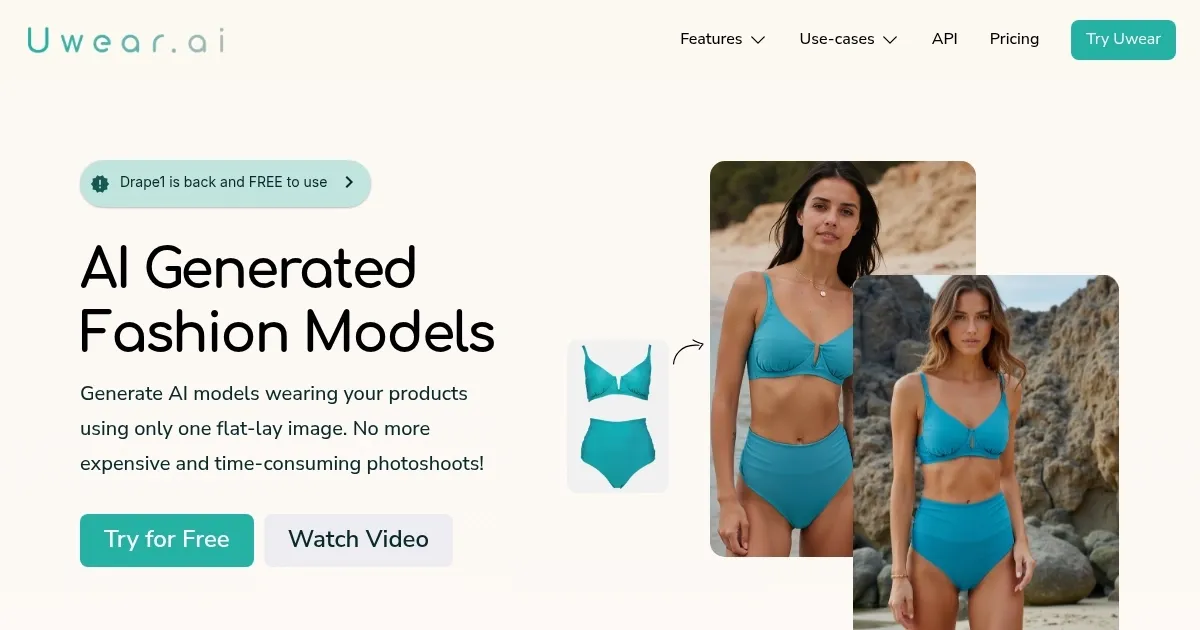
Uwear.ai is a neat tool that can create lifelike on-model clothing photos from a single image. Picture a flat-lay photo of a plain black t-shirt, the kind you’d toss on a table without a second thought. Upload it to Uwear.ai, type in “male, athletic build, standing in a park,” and boom — 30 seconds later, you’ve got a model rocking that tee like it’s straight out of a catalog. The Drape AI model, Uwear.ai’s secret sauce, works some serious magic, mapping the fabric’s folds and colors onto a virtual human with eerie precision. It’s like watching your design come to life without the hassle of a photoshoot. For a small e-commerce shop or a designer on a budget, this feels like finding a cheat code.

The interface is clean, almost too simple. Upload your image, describe your model, and pick a background — say, a sleek studio or a sunny street. The Enhance feature saved my bacon when the AI slightly mangled the t-shirt’s collar; a quick tweak, and it looked crisp. Upscale doubled the resolution, making the image pop on my laptop screen. I even tried the video feature, turning my static t-shirt into a 7-second clip of the model strutting. It’s not Hollywood, but it’s snappy enough for social media..

Now, the hiccups. My t-shirt had a small logo, and Uwear.ai turned it into a blurry smudge. Frustrating, but not a dealbreaker. The 80-character limit for model descriptions also cramped my style — I wanted to specify “tousled hair” but ran out of room. And while the speed is impressive, I wished for a tad more control over lighting. Still, the output was polished enough to make my client nod approvingly, which is no small feat.

What caught me off guard was how fun it is to play with diversity. I generated the same t-shirt on a curvy woman, a lanky teen, and a middle-aged guy, each in a different setting. It’s a powerful way to visualize your product’s appeal across demographics. The API option also hints at big potential for scaling, though I didn’t test it myself.

If you’re curious, give Uwear.ai a spin with its free demo. Stick to simple garments to avoid pattern woes, and experiment with model descriptions to find your sweet spot. The video feature is worth a try for social media flair — just keep your expectations modest.

Visit Uwear.ai ↗
Categories
๐ŸŽจ Art
๐Ÿ‘— Fashion ๐Ÿ‘• Clothing Generation
๐Ÿ–ผ๏ธ Image
๐Ÿ›๏ธ Product Photography ๐Ÿ–ผ๏ธ Image Generation ๐Ÿง Person Generation ๐Ÿง‘โ€๐ŸŽค Avatar Generation
๐Ÿ“ข Advertising
๐ŸŽจ Ad Creative

Homepage Screenshot 📸

Uwear.ai screenshot

What are the key features? ✨

  • Drape AI Model: Generates realistic on-model images from flat-lay photos with high garment fidelity.
  • Enhance Tool: Corrects minor visual flaws like unnatural hands or facial details in generated images.
  • Upscale Feature: Doubles image resolution to 1535 x 2048 for crisp, high-quality visuals.
  • Video Generation: Creates 5-to-10-second clips of models wearing clothes for dynamic displays.
  • API Access: Enables large-scale image processing for high-volume e-commerce needs.

Who is it for? 🤔

Uwear.ai is best for e-commerce retailers, small fashion brands, and independent designers who need cost-effective, high-quality product visuals without traditional photoshoots. It suits businesses aiming to showcase clothing on diverse models quickly, as well as larger retailers seeking scalable solutions through API integration. Marketing teams and social media managers also benefit from its video generation for engaging content.

Examples of what you can use it for 💡

  • Small Retail Owner: Generates professional on-model photos to enhance online store visuals.
  • Fashion Designer: Visualizes clothing concepts on diverse models before production.
  • E-commerce Manager: Creates short video clips for social media marketing campaigns.
  • Marketing Team: Produces varied model images to appeal to diverse customer demographics.
  • Large Retailer: Uses API to process hundreds of product images overnight for catalogs.

Pros & Cons ⚖️

  • Fast image generation in under a minute.
  • High garment fidelity with Drape AI.
  • Diverse model customization options.
  • API for scalable, high-volume use.
  • Struggles with complex patterns, text.
  • Limited lighting control options.

FAQs 💬

What types of photos work best with Uwear.ai?
Flat-lay photos yield the best results, as they avoid body shape bias from mannequins.
Can Uwear.ai handle complex clothing patterns?
It may blur intricate patterns or small text, but simpler designs render accurately.
Is there a free trial for Uwear.ai?
Yes, Uwear.ai offers free demo credits to test the platform with your own images.
How long does it take to generate an image?
Images are generated in under a minute, typically within 30 seconds.
Can I customize the modelโ€™s appearance?
Yes, you can specify body type, skin tone, and pose via text prompts.
Does Uwear.ai support video content?
It generates 5-to-10-second video clips for dynamic product displays.
Is Uwear.ai suitable for large retailers?
The API allows batch processing for high-volume image generation needs.
How does Uwear.ai compare to PhotoRoom?
Uwear.ai focuses on clothing visualization, while PhotoRoom offers broader editing tools.
Can I use ghost mannequin photos?
Yes, but results may follow the mannequinโ€™s shape, impacting model diversity.
What is the Enhance feature?
It corrects visual flaws like unnatural hands or faces in generated images.

Ready to try Uwear.ai?

Generate lifelike on-model clothing photos from a single flat-lay image in seconds

Visit Uwear.ai ↗

Uwear.ai alternatives 🔗

  1. The New Black The New Black An AI-powered platform that wants to revolutionize the fashion design process
  2. SellerPic SellerPic Using AI to transform ordinary product photos into professional visuals
  3. WeShop AI WeShop AI Using AI to offer a fresh approach to product photography
  4. Botika Botika Using artificial intelligence to create fancy fashion photos with AI-generated models
  5. DRESSX DRESSX An AI-powered fashion platform that generates high-quality outfits based on text prompts
  6. FASHN AI FASHN AI Creates AI-generated fashion visuals for virtual try-ons and model swaps
Share
Uwear.ai screenshot enlarged
Promote Uwear.ai
light badge
Copy Embed Code
dark badge
Copy Embed Code
neutral badge
Copy Embed Code
Best AI Tools

Discover the best AI tools for any use case

Explore
  • Tool Categories
  • AI Use Cases
  • AI Events
  • AI News
  • Saved Tools
Company
  • About Us
  • Contact Us
  • Media & Partnerships
  • Suggest a Tool
Legal
  • Privacy Policy
  • Terms of Service
Copyright © 2026 Best AI Tools 415 Mission Street, 37th Floor, San Francisco, CA 94105