Kolors Virtual Try On
Visualize outfits on any model using AI, preserving fabric textures and logos
Using “Kolors Virtual Try On” feels like stepping into a sci-fi dressing room where the mirrors do all the work. This AI tool takes a photo of you or a model, slaps on any outfit you choose, and delivers a result that’s startlingly realistic. The fabric textures, the way a logo sits just right, it’s almost spooky how good it looks, though I’ll admit, I fumbled a bit at first figuring out the upload process.
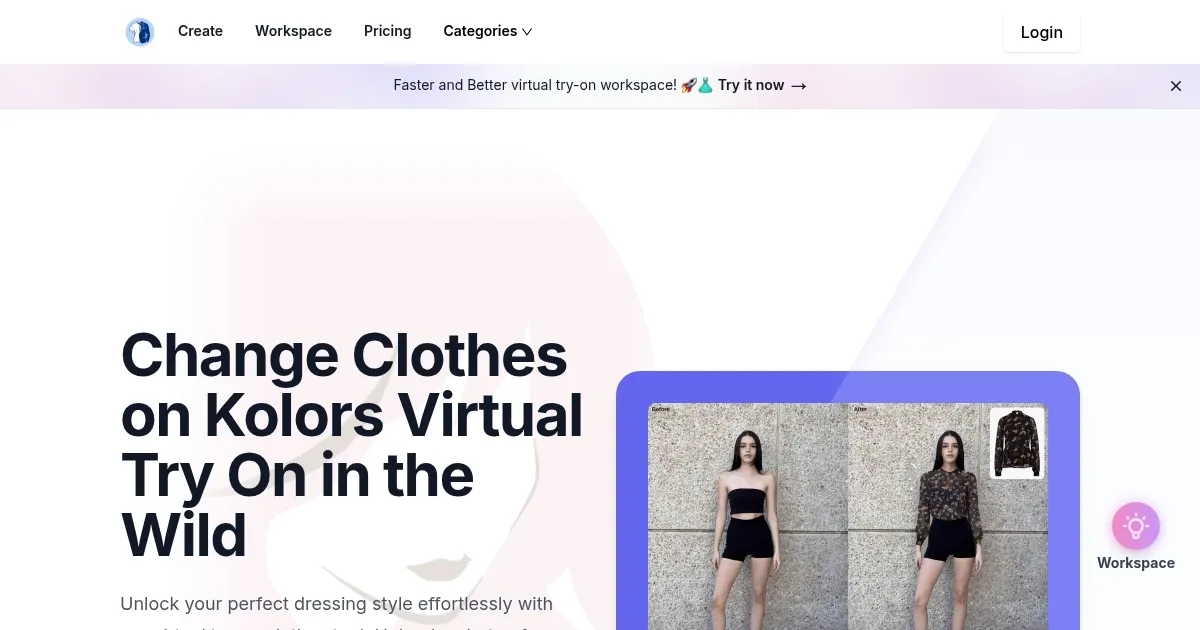
Here’s how it went down. I uploaded a selfie, nothing fancy, just me in a T-shirt standing against a plain wall. Then I picked a sleek blazer from Kolors’ clothing library, hit generate, and bam, there I was looking like I was ready for a boardroom meeting. The AI-Powered Clothing Transfer feature is the star here, it maps the outfit onto your photo with precision, keeping the fabric’s weave and even the tiniest logo intact. I also tried uploading a dress from a retailer’s website, and while it took a second try to get the alignment right, the result was sharp enough to fool my friends into thinking I’d actually tried it on. The outdoor scene compatibility is a nice touch, I could see that blazer in a park or on a city sidewalk, which made it easier to imagine wearing it in real life.
What I liked? The speed is insane, results pop up in seconds, and the interface is clean, almost too clean, like it’s daring you to mess it up. The Extensive Style Library is a goldmine, with everything from casual tees to formal gowns, so you’re not stuck with just one vibe. But, I ran into a snag, the free version only gives you a few tries before you’re gently pushed toward a paid plan. It’s not a dealbreaker, but it stings when you’re in the middle of mixing and matching outfits. Also, the lighting in some renders felt slightly off, like the AI couldn’t quite nail the shadows on my photo. Compared to competitors like Fashmates, which leans hard into social integration, or Veesion, with its video-heavy focus, Kolors feels more polished for static images and everyday users.
A surprise moment came when I used the 360° view feature. Spinning the model to see the outfit from all angles felt like I was directing a mini fashion show on my laptop. It’s not flawless, the rendering can get a bit glitchy with complex patterns, but it’s a fun way to check how a skirt flows or a jacket sits. For businesses, this tool is a lifesaver, e-commerce sellers can pump out catalog images without a studio, and designers can test ideas without sewing a stitch. If you’re trying it out, use a clear photo with good lighting, and don’t skip the customizable fit options, they let you tweak the outfit to hug your virtual curves just right.
Practical Advice: Stick to high-quality images for uploads, play with the fit adjustments to get the look just right, and save your favorite outfits in the dashboard to revisit later.
Homepage Screenshot 📸
What are the key features? ✨
- AI-Powered Clothing Transfer: Maps outfits onto models with realistic texture and logo preservation.
- Outdoor Scene Compatibility: Visualizes clothes in various real-world environments for context.
- Extensive Style Library: Offers a wide range of clothing options, from casual to formal.
- Accurate Fit Simulation: Adapts outfits to different body types for realistic results.
- Dynamic 360° View: Allows users to see outfits from multiple angles for a complete look.
Who is it for? 🤔
Examples of what you can use it for 💡
- Online Shopper: Visualizes how clothes fit before purchasing to boost confidence.
- Fashion Designer: Prototypes designs on various body types without physical samples.
- E-commerce Seller: Creates catalog images without expensive photoshoots.
- Social Media Influencer: Generates diverse outfit looks for engaging content.
- Marketing Professional: Produces realistic visuals for fashion campaigns quickly.
Pros & Cons ⚖️
- Fast rendering in seconds
- Realistic fabric textures
- Wide clothing library
- Limited free tier tries
- Complex patterns may glitch
FAQs 💬
Ready to try Kolors Virtual Try On?
Visualize outfits on any model using AI, preserving fabric textures and logos
Visit Kolors Virtual Try On