logo-darklogo-darklogo-darklogo-dark
  • Tool Categories
    • ๐ŸŽจArt & Creative Design505
    • ๐ŸขBusiness Management644
    • ๐Ÿ’ปCoding & Development515
    • ๐Ÿ‘ฎDetection83
    • ๐Ÿง General Use727
    • ๐ŸฅHealth & Wellness55
    • ๐Ÿ“ทImage & Photo Analysis100
    • ๐Ÿ–ผ๏ธImage Generation & Editing618
    • ๐Ÿ“Interior & Architectural Design37
    • ๐ŸŽ“Learning & Education483
    • โš–๏ธLegal & Finance90
    • ๐ŸŽญLifestyle & Entertainment236
    • ๐Ÿ“ขMarketing & Advertising627
    • ๐ŸŽงMusic & Audio138
    • ๐Ÿ‘”Office & Workplace1,014
    • ๐Ÿ”ฌResearch & Data Analysis372
    • ๐Ÿ‘ฅSocial Media245
    • ๐ŸŽฅVideo Generation & Editing426
    • ๐Ÿ‘ง๐ŸปVirtual Companion135
    • ๐ŸŽคVoice Generation & Editing381
    • โœ๏ธWriting & Editing808
    • All Categories
    • AI Use Cases
  • News
  • Events
    • Academic Conferences
    • Developer Conferences
    • Expos / Trade Shows
    • Industry Summits
    • Workshops / Training
    • All Events
    • Past Events
  • Saved Tools
  • Suggest a Tool
โœ•
Home › Image Generation & Editing › Image Generation› Flux AI Pro
Flux AI Pro

Flux AI Pro

Generates high-quality images from text prompts with exceptional detail and speed

Flux AI Image Generator is a text-to-image and image-to-image platform developed by Black Forest Labs, leveraging a 12-billion-parameter model for high-quality visual output. It offers six models: FLUX.1 Schnell (fastest, 1 credit per generation), FLUX.1 Dev (balanced, 10 credits), FLUX.1 Pro (advanced, 20 credits), FLUX.1 Realism (photorealistic focus, 14 credits), Flux 1.1 Pro (faster and improved, 16 credits), and Flux 1.1 Pro Ultra (4K resolution, 24 credits). The platform supports resolutions up to 2.0 megapixels and multiple aspect ratios, including square (512×512, 1024×1024), portrait (768×1024, 576×1024), and landscape (1024×768, 1024×576). It excels in prompt adherence, producing detailed images from complex text inputs, and renders readable text within images effectively.

Key features include Kontext models for text-based image editing, LoRA fine-tuning for custom training, and a community showcase for browsing user-generated content. The platform’s transformer-based flow technology ensures photorealistic quality and diverse outputs, outperforming competitors like Midjourney and Stable Diffusion in text rendering and prompt accuracy. Flux 1.1 Pro, tested as ‘blueberry,’ achieved the highest Elo score on Artificial Analysis for image quality and speed, generating images six times faster than its predecessor.

Free users get 100 credits upon signup, sufficient for testing Schnell but limited for premium models. Paid plans offer more credits and access to advanced features like Private Mode and Kontext editing, though pricing details require visiting the site. Compared to DALLยทE, Flux AI provides superior text rendering but fewer video tools than Runway. The Playground offers free access to Schnell without signup, ideal for quick tests.

Drawbacks include the credit system’s potential cost for heavy users and limited video capabilities. The interface, while user-friendly, lacks advanced controls for power users. NSFW content is automatically set to private, with adjustable safety tolerance in paid plans.

Start with the free Playground to test FLUX.1 Schnell. Use detailed prompts for optimal results, explore the community showcase for inspiration, and consider a paid plan for Kontext editing or higher resolutions if you’re a professional user.

Visit Flux AI Pro ↗
Categories
๐Ÿ–ผ๏ธ Image
๐Ÿ–ผ๏ธ Image Generation ๐Ÿช„ Text to Image โœ๏ธ Photo Editing
๐ŸŽจ Art
๐ŸŽจ Art Generation ๐Ÿ–ผ๏ธ Design Generation

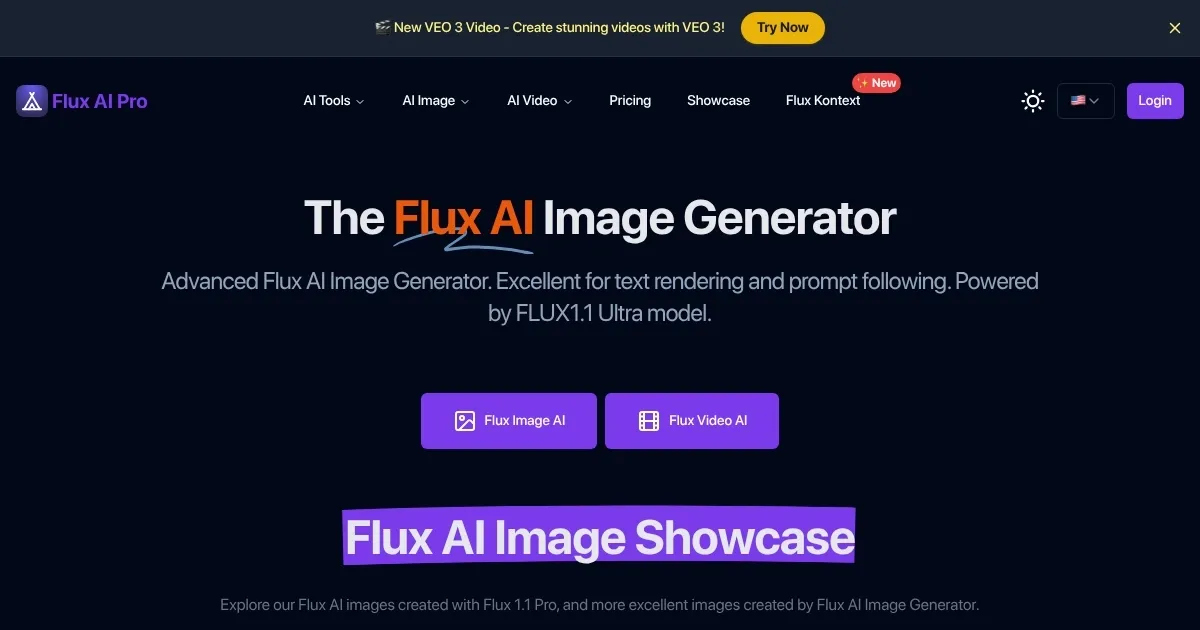
Homepage Screenshot 📸

Flux AI Pro screenshot

What are the key features? ✨

  • FLUX.1 Schnell: Generates images quickly, ideal for rapid prototyping.
  • FLUX.1 Pro: Delivers high-quality images with excellent prompt adherence.
  • Kontext Models: Enables text-based editing of existing images for precise modifications.
  • LoRA Fine-Tuning: Allows custom training on user images for tailored outputs.
  • Community Showcase: Displays user-generated images for inspiration and exploration.

Who is it for? 🤔

Flux AI Image Generator is ideal for digital artists, graphic designers, marketers, and game developers seeking high-quality, customizable visuals. It suits both beginners, who benefit from its intuitive interface and free Playground, and professionals needing advanced features like Kontext editing and 4K resolution for commercial projects, such as advertising, product visualization, or concept art. Its open-source FLUX.1 Dev model also appeals to developers and researchers exploring AI image generation.

Examples of what you can use it for 💡

  • Graphic Designer: Creates photorealistic product visuals for marketing campaigns.
  • Game Developer: Generates concept art for characters and environments.
  • Social Media Manager: Produces eye-catching posts with custom aspect ratios.
  • Illustrator: Crafts unique book covers in diverse artistic styles.
  • Educator: Develops engaging illustrations for teaching materials.

Pros & Cons ⚖️

  • Exceptional prompt adherence
  • High-quality image output
  • Fast generation with Schnell
  • Opaque pricing structure
  • Limited video capabilities

FAQs 💬

Is Flux AI Image Generator free to use?
Free access is available via the Playground with FLUX.1 Schnell, and registered users get 100 credits, but advanced models require paid credits.
What models does Flux AI offer?
It provides six models: FLUX.1 Schnell, Dev, Pro, Realism, Flux 1.1 Pro, and Flux 1.1 Pro Ultra, each suited for different speed and quality needs.
Can I use Flux AI for commercial projects?
Yes, itโ€™s designed for both personal and commercial use, meeting professional standards.
How does Flux AI compare to Midjourney?
Flux AI outperforms in text rendering and prompt adherence, with faster generation times than Midjourney.
What are the credit costs for each model?
FLUX.1 Schnell costs 1 credit, Dev 10, Pro 20, Realism 14, Flux 1.1 Pro 16, and Flux 1.1 Pro Ultra 24 per generation.
Does Flux AI support image editing?
Yes, Kontext models allow text-based editing of images, but this feature requires a paid plan.
What resolutions does Flux AI support?
It supports resolutions up to 2.0 megapixels, with aspect ratios like square, portrait, and landscape.
Is technical knowledge required to use Flux AI?
No, the intuitive interface is beginner-friendly, though advanced users can access API and fine-tuning options.
Can I browse user-generated images?
Yes, the community showcase lets users explore images created by others for inspiration.
Does Flux AI handle text in images well?
It excels at rendering clear, readable text within images, surpassing many competitors.

Ready to try Flux AI Pro?

Generates high-quality images from text prompts with exceptional detail and speed

Visit Flux AI Pro ↗

Flux AI Pro alternatives 🔗

  1. ChatGPT ChatGPT All-round AI assistant generating human-like responses to user queries and tasks
  2. Grok Grok Delivers witty, real-time AI responses with advanced reasoning and image generation
  3. Imagen Imagen Generates photorealistic images from detailed text prompts
  4. Black Forest Labs Black Forest Labs Generates high-quality images from text prompts with precision and speed
  5. Kling AI Kling AI Generates cinematic videos from text or images with realistic motion
  6. Runway Runway Generates and edits AI-powered videos from text prompts
Share
Flux AI Pro screenshot enlarged
Promote Flux AI Pro
light badge
Copy Embed Code
dark badge
Copy Embed Code
neutral badge
Copy Embed Code
Best AI Tools

Discover the best AI tools for any use case

Explore
  • Tool Categories
  • AI Use Cases
  • AI Events
  • AI News
  • Saved Tools
Company
  • About Us
  • Contact Us
  • Media & Partnerships
  • Suggest a Tool
Legal
  • Privacy Policy
  • Terms of Service
Copyright © 2026 Best AI Tools 415 Mission Street, 37th Floor, San Francisco, CA 94105