
logo-darklogo-darklogo-darklogo-dark
  • Home
  • Browse
    • Assistant
    • Coding
    • Image
    • Productivity
    • Video
    • Voice
    • Writing
    • All Categories
    • AI Use Cases
  • My Favorites
  • Suggest a Tool
✕
Home › Art & Creative Design ›

Playbook AI

Published by Dusan Belic on August 30, 2023

Playbook AI

Playbook
Playbook AI Homepage
Categories Art & Creative Design

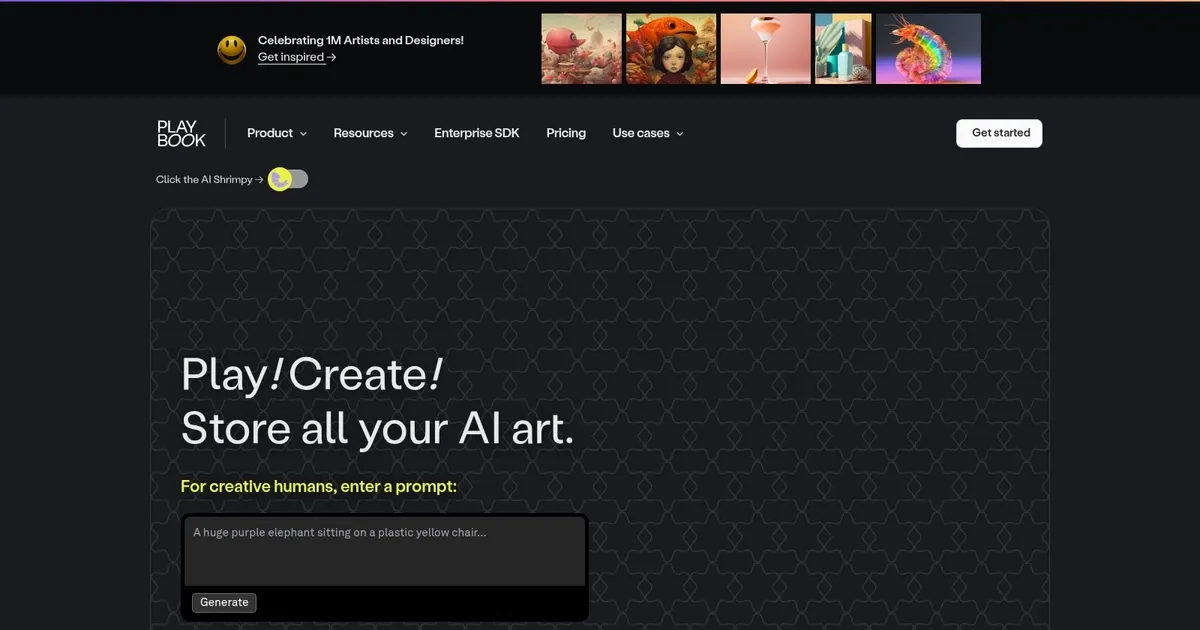
Playbook AI - screenshot

Create beautiful images with ease using DALL-E and Stable Diffusion image generation models

Playbook AI

Playbook AI is a platform designed for artists and designers to collaborate, create, organize, and store AI-generated art. It allows users to easily generate art based on specific prompts, leveraging AI technologies like DALL-E or Stable Diffusion to do its magic.

The service emphasizes ease of use and creativity, providing a space where users can save every version of their AI prompts along with the resulting artwork. Users can store up to 4TB of AI art and related prompts, helping them keep track of their workflow, experiment with hundreds of variations, and ensure that their process and inspirations are systematically organized for easy retrieval and refinement. In that sense, Playbook AI helps creatives blend AI with their artistic process while helping them organize their projects.

The platform also addresses concerns regarding privacy and the ethical use of AI in art creation. It assures users that their data or art will not be sold to third-party organizations, including other AI services, highlighting a commitment to its users’ privacy and intellectual property. Playbook AI also offers guidance on best practices for AI-generated art, emphasizing responsible use and advising against profiting from mimicking other artists’ styles.

This approach underscores the platform’s goal of providing a supportive environment for artists to explore AI’s potential to enhance creativity without compromising ethical standards or the artists’ ownership over their creations.

Playbook AI Homepage
Categories Art & Creative Design

What are the key features? ⭐

  • AI art generation: Create art using AI models like DALL-E and Stable Diffusion to produce high-quality visuals.
  • Prompt storage: Save every version of your AI prompts along with the generated art so you never lose your creative process.
  • Massive storage: Offers up to 4TB of storage for organizing and storing AI art variations and projects.
  • Collaboration tools: Facilitates collaboration with team members on creative projects, making it useful for design teams.
  • Integration with popular AI tools: Seamlessly integrates with popular AI art generators, allowing users to create and manage AI-generated content within the platform.

Who is it for? 🤔

Playbook AI is made for creative professionals, including artists, designers, and design teams who need to generate, store, and manage AI-generated art and large creative projects. It is useful for those who work collaboratively and require extensive storage and organization capabilities. Ultimately, the platform caters to both individual freelancers and larger teams looking to streamline their creative processes.

Examples of what you can use it for 💭

  • Manage and organize large creative projects with extensive storage and collaboration features
  • Generate and store AI art directly within the platform, streamlining the process for artists
  • Collaborate with team members on design projects by sharing files and ideas
  • Keep track of all AI art prompts, making it easy to reproduce or iterate on previous work
  • Share and manage large design files, making it ideal for projects with bigger storage requirements

Pros & Cons ⚖️

  • An easy way to generate AI art
  • It's useful to store your prompts for seamless access afterward
  • Access to multiple AI models from one place
  • We keep saying that Midjourney is the best

FAQs 💬

What is Playbook AI?
Playbook AI is a feature in the Playbook platform that lets creatives generate AI art using models like Flux, DALL-E, or Stable Diffusion right inside the app. It automatically saves images and prompts, and organizes everything for you.
Who is Playbook AI designed for?
It's built for creative professionals like designers, artists, and teams who use AI for inspiration, mood boards, illustrations, branding, or mockups, and need a better way to manage their work.
What AI models does Playbook AI support?
It integrates Flux, DALL-E, and Stable Diffusion for generating images from text prompts directly in the platform.
How does Playbook AI handle prompts and variations?
Every prompt you use is saved alongside the generated image, and you can import or create hundreds of variations while keeping track of your entire workflow.
Can I integrate other AI tools like Midjourney with Playbook AI?
Yes, it supports importing from Midjourney and other tools, with guides to help organize external generations.
Does Playbook AI protect my privacy and ownership?
The platform does not sell your data or art to third parties, including for training AI models, and focuses on artist privacy and intellectual property.
What can I use AI for in Playbook?
You can source ideas, build mood boards, inspire illustrations, create branding elements, render concepts, or make mockups to boost your creative process.
Is Playbook AI good for organizing AI-generated art?
It provides free storage and automatic tagging to save, view, and manage progress on AI art variations in one visual space.
How does generating art work in Playbook AI?
Just enter a text prompt, choose a model, and the tool creates the image while storing the prompt and result automatically.
Are there ethical guidelines for using Playbook AI?
Best practices include avoiding mimicking another artist's style for profit, and using AI mainly for personal inspiration or ethical creative enhancement.

Related tools ↙️

  1. fylm.ai fylm.ai Generates AI-assisted color grades and LUTs for images in the cloud
  2. AI Genie AI Genie Create and share unique AI-generated art with ease
  3. Tailor Brands Logo Maker Tailor Brands Logo Maker Web-based logo creator that uses AI to create custom logos in just a few clicks
  4. ColorMagic ColorMagic An AI-powered tool designed to produce color palettes with ease
  5. FigJam AI FigJam AI Instantly visualize ideas, suggest best practices, and automate tedious tasks
  6. aiCarousels aiCarousels Craft stunning social media carousels effortlessly with AI-driven design tools
Last update: December 15, 2025
Share
Promote Playbook AI
light badge
Copy Embed Code
light badge
Copy Embed Code
light badge
Copy Embed Code
About Us | Contact Us | Suggest an AI Tool | Privacy Policy | Terms of Service

Copyright © 2026 Best AI Tools
415 Mission Street, 37th Floor, San Francisco, CA 94105




