logo-darklogo-darklogo-darklogo-dark
  • Home
  • Browse
    • Assistant
    • Coding
    • Image
    • Productivity
    • Video
    • Voice
    • Writing
    • All Categories
    • AI Use Cases
  • My Favorites
  • Suggest a Tool
✕
Home › Art & Creative Design / Image Generation & Editing ›

RunComfy

Published by Dusan Belic on October 10, 2024

RunComfy

RunComfy
RunComfy Homepage
Categories Art & Creative DesignImage Generation & Editing
Streamline the use of ComfyUI, a modular interface for AI art generation

RunComfy

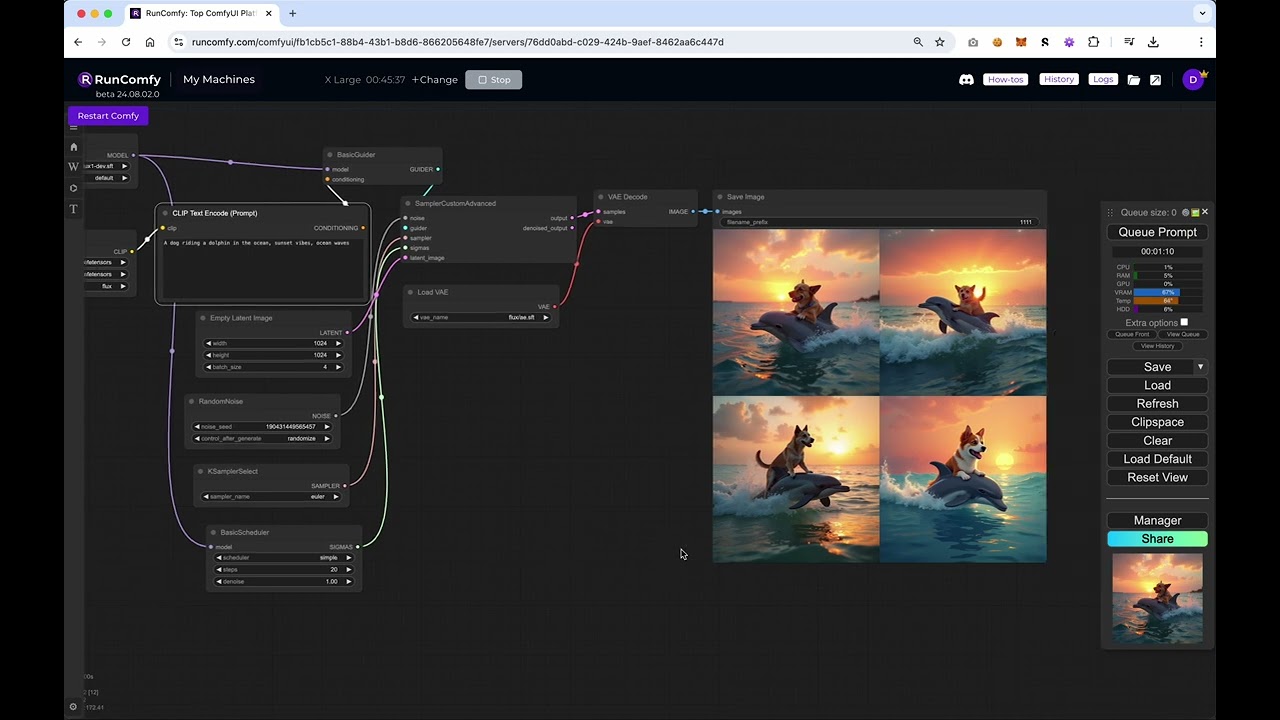
RunComfy is a cloud-based platform designed to streamline the use of ComfyUI, a modular interface for AI art generation — allowing artists and developers to create AI-powered visuals without the hassle of setting up the software. The platform provides access to powerful GPU machines and preloaded models, with over 200 models and nodes already configured. This, in turn, eliminates the technical complexities often associated with AI art creation, letting users dive straight into creative work.

RunComfy supports a broad range of use cases, including image-to-video and text-to-video animations, which are essential for video creators and digital artists. The platform’s high-performance GPUs can handle complex tasks like Stable Video Diffusion and AnimateDiff, which enable smooth transitions and detailed animations. Plus, for those who need to generate dynamic or looping content – RunComfy’s workflow templates make it easy to get started without requiring deep technical knowledge.

Speaking of workflow, the platform allows users to store and manage their projects in the cloud. This is meant to make it useful for both small-scale artists and large organizations working on extensive creative projects.

Price-wise, RunComfy offers several flexible plans, including a free tier with limited features. For more advanced needs, the Pro and Business plans provide access to additional GPU power and extended usage limits. Check it out.

RunComfy Homepage
Categories Art & Creative DesignImage Generation & Editing

Video Overview ▶️

What are the key features? ⭐

  • Ready-to-use ComfyUI environment: As a cloud-based platform, RunComfy offers a fully prepared ComfyUI environment with no setup required.
  • GPU power selection: Choose from powerful GPU machines with various VRAM sizes for fast image and video creation.
  • Preloaded workflows: RunComfy provides access to 200+ preloaded workflows and nodes to generate, transform, and restore visual content.
  • No technical hassles: Simplifies complex ComfyUI processes, making it easy to focus on creativity rather than setup.
  • Cloud storage: Automatically saves your results to private cloud storage.

Who is it for? 🤔

RunComfy is designed for AI artists, creative professionals, and businesses looking to harness powerful AI tools without the hassle of setup or technical management. It targets those who want to create high-quality images and videos, from individual creators to teams needing scalable solutions for design and visual production.

Examples of what you can use it for 💭

  • Generate stunning images and videos using advanced models like Stable Diffusion and AnimateDiff
  • Restore and upscale videos with workflows that remove blur and improve quality
  • Change the style of existing images using preloaded transformation models
  • Experiment with various artistic workflows for video creation and image manipulation
  • Use AI to restore old or low-quality images by enhancing their clarity and color

Pros & Cons ⚖️

  • No local setup required
  • High-speed GPUs enable quick AI art generation
  • Pre-installed models deliver a ready-to-use solution
  • Subscription might be expensive for continuous use

FAQs 💬

What is RunComfy?
RunComfy provides a cloud-hosted version of ComfyUI, the popular node-based interface for Stable Diffusion and other AI models. You can launch it instantly in your browser and access pre-configured environments with fast model downloads.
Do I need to install anything to use RunComfy?
No, everything runs in the cloud. You just sign in and start using ComfyUI directly, with no local setup or GPU required on your device.
What models and workflows does RunComfy support?
It supports a wide range including SD1.x, SDXL, SD3, Flux.1, AnimateDiff, ControlNet, and Stable Video Diffusion. Over 200 ready-to-run templates exist for tasks like image generation, video creation, upscaling, and animation.
Can I install custom nodes or download models from external sources?
Yes, it includes the ComfyUI-Manager for installing custom nodes. You can download models directly from Civitai, Hugging Face, or Google Drive much faster than local uploads.
Is RunComfy suitable for beginners new to ComfyUI?
Absolutely, the zero-setup approach and library of pre-made templates make it easy to start experimenting right away, even if you're unfamiliar with node-based workflows.
Can I share my workflows with others?
Yes, you can save and share workflows via simple links that include all models, custom nodes, and settings, so others can open the exact same environment.
Does RunComfy allow deploying workflows as APIs?
It offers serverless API deployment with autoscaling, versioning, monitoring, and pay-as-you-go billing for programmatic access.
What GPU options are available?
On-demand machines come with VRAM ranging from 16GB up to 141GB, letting you handle everything from basic to very large models.
Can I upload my own models, LoRAs, or files?
Yes, there's a file browser for uploading custom models, LoRAs, images, or videos, and files persist across sessions in your cloud storage.
Is there support if I run into issues?
Technical help is available through Discord and email, plus extensive guides on the platform.

Related tools ↙️

  1. Artguru Artguru Transforms text or photos into unique AI-generated artwork in seconds
  2. VisualizeAI VisualizeAI Transforms sketches and text into 3D designs
  3. Sourceful Sourceful Generates AI-powered packaging concepts refined by experts for print-ready results
  4. MyArchitectAI MyArchitectAI Transforms architectural designs and sketches into photorealistic renders in seconds using AI
  5. DALL-E DALL-E Generates detailed images from text prompts with enhanced nuance and safety features
  6. Venngage Venngage Easily create professional-quality infographics, reports, and presentations with the help of AI
Last update: December 23, 2025
Share
Promote RunComfy
light badge
Copy Embed Code
light badge
Copy Embed Code
light badge
Copy Embed Code
About Us | Contact Us | Suggest an AI Tool | Privacy Policy | Terms of Service

Copyright © 2026 Best AI Tools
415 Mission Street, 37th Floor, San Francisco, CA 94105