logo-darklogo-darklogo-darklogo-dark
  • Tool Categories
    • 🎨Art & Creative Design505
    • 🏢Business Management644
    • 💻Coding & Development514
    • 👮Detection83
    • 🧠General Use728
    • 🏥Health & Wellness55
    • 📷Image & Photo Analysis100
    • 🖼️Image Generation & Editing618
    • 📐Interior & Architectural Design37
    • 🎓Learning & Education483
    • ⚖️Legal & Finance90
    • 🎭Lifestyle & Entertainment236
    • 📢Marketing & Advertising627
    • 🎧Music & Audio138
    • 👔Office & Workplace1,014
    • 🔬Research & Data Analysis373
    • 👥Social Media245
    • 🎥Video Generation & Editing426
    • 👧🏻Virtual Companion135
    • 🎤Voice Generation & Editing381
    • ✍️Writing & Editing808
    • All Categories
    • AI Use Cases
  • News
  • Events
    • Academic Conferences
    • Developer Conferences
    • Expos / Trade Shows
    • Industry Summits
    • Workshops / Training
    • All Events
    • Past Events
  • Saved Tools
  • Suggest a Tool
✕
Home › Video Generation & Editing › Video Enhancing› GoEnhance
GoEnhance

GoEnhance

A powerful AI-driven platform designed to transform video and image editing

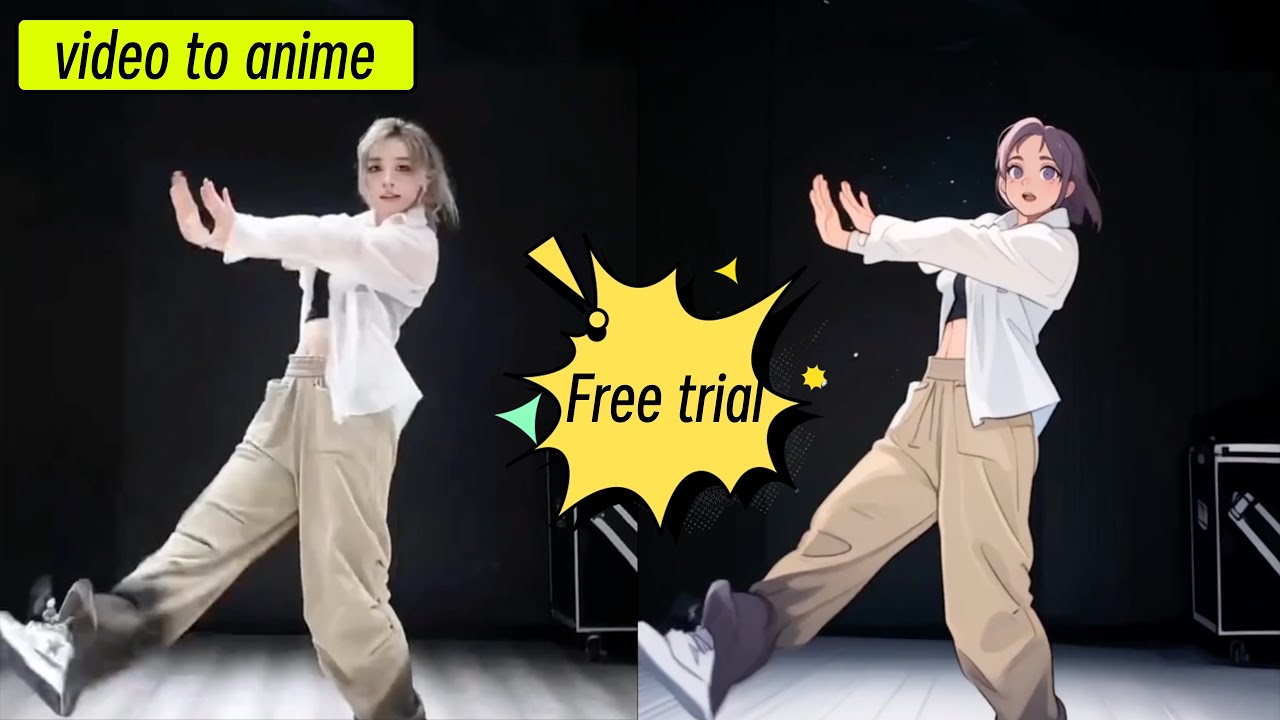
GoEnhance is a powerful AI-driven platform designed to transform video and image editing, offering a wide range of creative capabilities for both beginners and professionals. To that end, it provides tools to enhance and upscale images, create character animations, and apply unique styles to videos. The tool offers more than 20 animation styles — ranging from Pixar to anime — that let users easily convert standard footage into captivating visual experiences.

The most spectacular “Video to Video” tool allows users to transform their videos into various artistic styles with just a few clicks. Moreover, GoEnhance’s character animation function breathes life into static images, making it ideal for filmmakers or educators who want to animate different kinds of figures for promotional or educational content. The platform also excels in frame animation, where it can intelligently interpolate frames to create smooth transitions, thus simplifying the animation process for those without advanced skills.

GoEnhance is equally robust in its image enhancement capabilities, with its AI-driven upscaling being able to take low-resolution or degraded images and enhance them to high-definition quality. This, in turn, makes it an excellent solution for restoring old photographs or preparing visuals for professional use.

Lastly, we should mention that GoEnhance offers flexible pricing plans to cater to different user needs. The free tier provides limited access with basic features, while (naturally) the paid plans unlock more advanced functionalities, faster generation speeds, and higher token allowances. Pretty cool.

Visit GoEnhance ↗
Categories
🎥 Video
✨ Video Enhancing ✏️ Video Editing 🎞️ Animation Generation ⬆️ Video Upscaling
🖼️ Image
🎨 Style Transferring 💎 Image Enhancing ⬆️ Image Upscaling

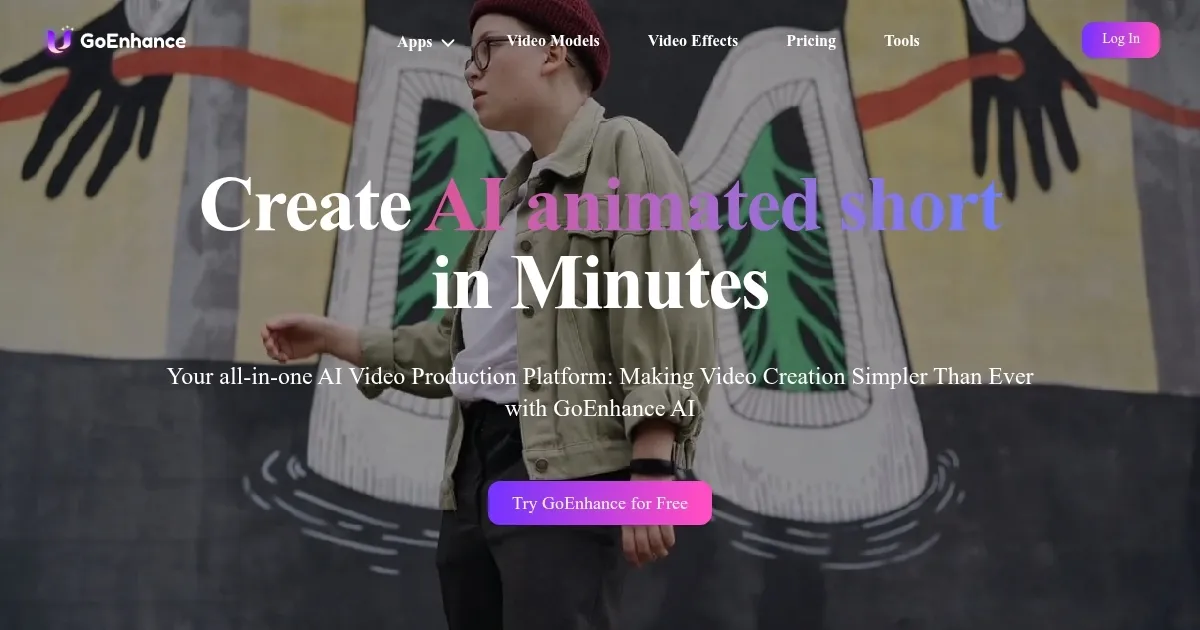
Homepage Screenshot 📸

GoEnhance screenshot

Video Overview 🎬

GoEnhance - Video Overview

What are the key features? ✨

  • Video-to-animation: Easily convert videos into animations with over 30 styles for a high-quality finish.
  • Video face swap: Use AI to swap faces in videos or images for personalized content.
  • AI video generator: Create videos from text or images, quickly bringing your ideas to life.
  • Image upscaling: Enhance low-res photos to 4K quality, revealing intricate details.
  • Character animation: Turn static images into dynamic animations, which is ideal for anime and character-driven projects.

Who is it for? 🤔

GoEnhance is made for content creators, digital marketers, video producers, and creative professionals looking to enhance their visual projects with the power of AI. It is also appealing to casual users who want to improve personal images or videos, providing both high-level production capabilities and easy-to-use features.

Examples of what you can use it for 💡

  • Generate animations or face swaps for social media and marketing content
  • Quickly produce high-resolution videos from text or image prompts
  • Use AI to animate or enhance images for personal or professional artwork
  • Upscale product images and videos for detailed promotional material
  • Restore and enhance old or low-quality images for professional portfolios

Pros & Cons ⚖️

  • More than 20 unique styles for videos
  • Converts videos to various animations quickly
  • Simplifies creative video production
  • Potentially high cost for continuous use

FAQs 💬

What is GoEnhance?
GoEnhance is an all-in-one online platform that uses advanced AI models to generate, enhance, and edit videos and images. It lets users turn text or photos into professional videos, swap faces, or upscale old pictures, all in a simple browser interface. I think it's especially handy for quick social media content.
Who should use GoEnhance?
It's great for beginners like hobbyists or small creators who want easy tools without fancy software, and pros such as marketers or filmmakers needing fast animations. The platform serves over 3 million users, from TikTok enthusiasts to short film makers. Probably best if you're juggling multiple creative tasks.
How does the video generation feature work?
You input text, an image, or a video clip, pick a style like anime or Pixar, and the AI processes it into HD or 4K output. It supports models like Kling AI or Sora2 for realistic motion and audio sync. Results come quick in fast mode, though complex ones might take a few tries.
What image tools does it offer?
Key ones include the Image Enhancer for upscaling blurry photos up to 8x with sharp details, Face Swap for photos, and Text-to-Image generation in various art styles. Nano Banana Pro handles tough low-res fixes well. It's solid for restoring old family pics or creating thumbnails.
Is there a free version available?
Yes, the free tier gives some tokens to try features like basic upscaling or short video clips without cost. It has limits on jobs and speed, but it's enough to test the waters. Upgrading unlocks more, yet the starter pack feels generous for casual use.
What file formats does GoEnhance support?
It handles common video formats for inputs like MP4 or MOV, and outputs up to 4K at 60fps ready for TikTok or Reels. Images work with JPEG, PNG, and more, with no size caps in pro modes. Just ensure your uploads aren't too huge for smooth processing.
How user-friendly is the interface for new users?
The dashboard is straightforward, with drag-and-drop uploads and one-click effects, so even non-tech folks can jump in. Tutorials on their site and YouTube cover basics to advanced tricks. Might take a session or two to master all tools, but it's way less intimidating than pro editors.
What AI models are integrated into the platform?
It pulls from top ones like GoEnhance's own, Kling 2.6 for audio-video, Runway, Sora2, Hailuo, and Flux for images. This mix means versatile outputs, from realistic to stylized. Updates keep adding new ones, so capabilities evolve fast.
Can I use it for commercial projects?
Absolutely, outputs are watermark-free on paid plans and cleared for business use like ads or films. Many users create pro shorts for clients without issues. Just check the terms for your specific model to stay safe.
How does it compare to tools like Upscayl or Topaz?
Unlike offline apps like Upscayl, which is free but hardware-heavy for upscaling, GoEnhance runs in-browser with broader video features. Topaz excels at photo sharpening, yet GoEnhance adds generation and effects in one spot. It's more all-around for creators, though purists might prefer Topaz for pure enhancement.

Ready to try GoEnhance?

A powerful AI-driven platform designed to transform video and image editing

Visit GoEnhance ↗

GoEnhance alternatives 🔗

  1. Runway Runway Generates and edits AI-powered videos from text prompts
  2. Cutout.Pro Cutout.Pro An AI-powered automatic visual design platform that saves time & money
  3. Media.io Media.io An online platform offering AI-powered video, audio, and image editing tools
  4. Topaz Labs Topaz Labs An AI-powered photo and video enhancement software designed for professionals
  5. Vmake AI Vmake AI An AI-powered platform designed to enhance the online retail experience
  6. VideoProc VideoProc Enhances, converts, compresses, and edits videos with AI and GPU acceleration
Share
GoEnhance screenshot enlarged
Best AI Tools

Discover the best AI tools for any use case

Explore
  • Tool Categories
  • AI Use Cases
  • AI Events
  • AI News
  • Saved Tools
Company
  • About Us
  • Contact Us
  • Media & Partnerships
  • Suggest a Tool
Legal
  • Privacy Policy
  • Terms of Service
Copyright © 2026 Best AI Tools 415 Mission Street, 37th Floor, San Francisco, CA 94105