logo-darklogo-darklogo-darklogo-dark
  • Tool Categories
    • 🎨Art & Creative Design505
    • 🏢Business Management644
    • 💻Coding & Development515
    • 👮Detection83
    • 🧠General Use727
    • 🏥Health & Wellness55
    • 📷Image & Photo Analysis100
    • 🖼️Image Generation & Editing618
    • 📐Interior & Architectural Design37
    • 🎓Learning & Education483
    • ⚖️Legal & Finance90
    • 🎭Lifestyle & Entertainment236
    • 📢Marketing & Advertising627
    • 🎧Music & Audio138
    • 👔Office & Workplace1,014
    • 🔬Research & Data Analysis372
    • 👥Social Media245
    • 🎥Video Generation & Editing426
    • 👧🏻Virtual Companion135
    • 🎤Voice Generation & Editing381
    • ✍️Writing & Editing808
    • All Categories
    • AI Use Cases
  • News
  • Events
    • Academic Conferences
    • Developer Conferences
    • Expos / Trade Shows
    • Industry Summits
    • Workshops / Training
    • All Events
    • Past Events
  • Saved Tools
  • Suggest a Tool
✕
Home › Image Generation & Editing › Image Generation› Scenario
Scenario

Scenario

Craft unique and style-consistent game assets with custom-trained AI models

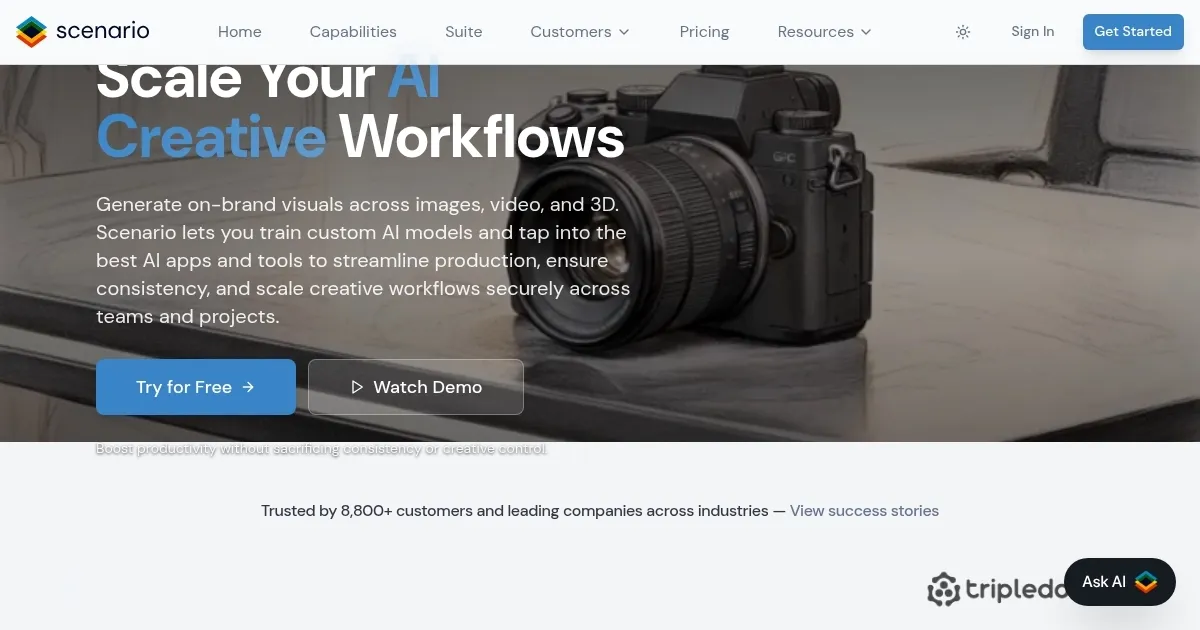
Scenario is an online tool that allows users to craft unique and style-consistent game assets with custom-trained AI models.

As such, this isn’t the tool for an average user, myself included. Instead, it’s meant for game developers who could use it to give their studios “AI superpowers.”

These “superpowers” enable them to train and deploy custom-trained models that are style-consistent, fully controllable, and integrated into their workflow. As a result, game developers get to shatter development time and streamline their workflow.

Once these assets are created, game developers can integrate them with the Scenario GenAI Engine API — which works with game engines like Unity or can be integrated directly with the games themselves.

Obviously, this isn’t a free service, but Scenario does offer a free trial so that you (presuming you’re a game developer) can test it out before spending a dime of your hard-earned money.

Visit Scenario ↗
Categories
🖼️ Image
🖼️ Image Generation 🎨 Style Transferring
🎨 Art
🎨 Art Generation 🖼️ Design Generation 🧊 3D Modeling 🌅 Illustration Generation
🎭 Lifestyle
🎮 Game
💻 Coding
🎮 Game Generation

Homepage Screenshot 📸

Scenario screenshot

Video Overview 🎬

What are the key features? ✨

  • Train your models: Scenario allows game developers to build unlimited, custom AI models that perfectly align with the art direction of their titles. Gather your training data, from characters and props to backgrounds and concept art, and upload it for the model to learn.
  • Take full control: The service offers advanced features such as Composition Control and Pixel-Perfect Inpainting that allow you to adjust outputs. Whether you're working with facial expressions, environments, outfits, or seasons - you can create infinite variants without compromising on the aspects you like.
  • Integrated: The Scenario GenAI Engine is API-first and can be integrated into diverse workflows, design software, game engines like Unity, or within the games themselves.
  • Your style remains intact: Use Scenario to generate custom models with your unique visuals, matching the established aesthetics.
  • A time-saving tool: As Scenario likes to put it - you can train once, customize infinitely, and deploy anywhere. This, in turn, will let you drop days and weeks from every workflow across the entire studio.

Who is it for? 🤔

Scenario is not made for enthusiasts. Rather, it is a professional tool designed for game developers, who could use it to speed up their time to production. Instead of spending a ton of time on every aspect of game, Scenario allows them to streamline their workflow and focus on the big picture. The AI will do the hard work, embrace and implement essential features of every character and the wider environment - and later make implementation easier through its API.

Examples of what you can use it for 💡

  • Craft unique and style-consistent game assets
  • Create your own custom-trained AI models
  • Implement across platforms with the provided API
  • Streamline workflow in the game publishing studio

Pros & Cons ⚖️

  • A truly time-saving tool for game developers
  • Lets them create their own AI for in-game characters
  • Can sing along Unity or be integrated directly in the game
  • It is a tool made for professionals (not a bug, though)

Ready to try Scenario?

Craft unique and style-consistent game assets with custom-trained AI models

Visit Scenario ↗

Scenario alternatives 🔗

  1. ChatGPT ChatGPT All-round AI assistant generating human-like responses to user queries and tasks
  2. Grok Grok Delivers witty, real-time AI responses with advanced reasoning and image generation
  3. Imagen Imagen Generates photorealistic images from detailed text prompts
  4. Black Forest Labs Black Forest Labs Generates high-quality images from text prompts with precision and speed
  5. Kling AI Kling AI Generates cinematic videos from text or images with realistic motion
  6. Runway Runway Generates and edits AI-powered videos from text prompts
Share
Scenario screenshot enlarged
Promote Scenario
light badge
Copy Embed Code
dark badge
Copy Embed Code
neutral badge
Copy Embed Code
Best AI Tools

Discover the best AI tools for any use case

Explore
  • Tool Categories
  • AI Use Cases
  • AI Events
  • AI News
  • Saved Tools
Company
  • About Us
  • Contact Us
  • Media & Partnerships
  • Suggest a Tool
Legal
  • Privacy Policy
  • Terms of Service
Copyright © 2026 Best AI Tools 415 Mission Street, 37th Floor, San Francisco, CA 94105