logo-darklogo-darklogo-darklogo-dark
  • Home
  • Browse
    • Assistant
    • Coding
    • Image
    • Productivity
    • Video
    • Voice
    • Writing
    • All Categories
    • AI Use Cases
  • My Favorites
  • Suggest a Tool
✕
Home › Art & Creative Design›
Published by Dusan Belic on July 10, 2023

SeaArt

SeaArt Homepage
Categories Art & Creative Design

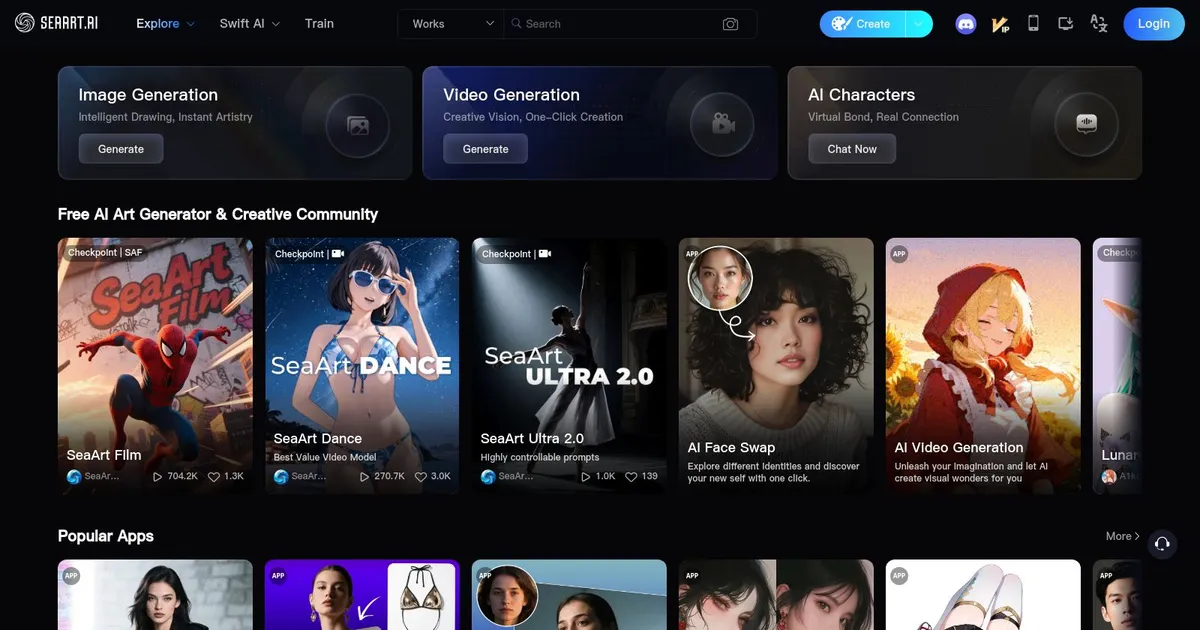
SeaArt - screenshot

An AI-driven art creation platform with features including various styles, face swaps, and image upscaling.

SeaArt

SeaArt AI is an art generator tool. This tool offers various functionalities that cater to creating various types of digital art through AI-driven processes. Users can generate art in styles ranging from realistic and anime to cartoon and epic character designs, as well as scenes, landscapes, product designs, and more.

The platform supports features like face swaps, image upscaling, background removal, and creating variations of existing works, making it suitable for diverse creative projects.

In addition to art creation, SeaArt AI provides a community and sharing aspect where users can follow others, explore new works, participate in daily challenges, and share their creations. The platform caters to a broad audience, from individual creators to enterprise clients, offering advanced services like AI model training and customizations.

This comprehensive suite of tools and community features positions SeaArt AI as a versatile platform for digital artists looking to explore the potential of AI in art creation and collaboration.

SeaArt Homepage
Categories Art & Creative Design

What are the key features? ⭐

  • AI art generation: Create art from text descriptions (prompts) using advanced AI models.
  • Different styles: The tool offers multiple artistic styles and filters for diverse outputs.
  • Easy to use: It includes a simple and intuitive design that is easy to use.
  • High-res outputs: The tool can generate high-quality, detailed images.
  • Community: You can share your creations with a community of users for feedback and inspiration.

Who is it for? 🤔

SeaArt AI targets digital artists, marketers, content creators, and educators looking to leverage AI to generate unique images. It appeals to individuals who want to enhance their creative projects, produce engaging visual content, and explore artistic possibilities using AI technology. Ultimately, both professionals and hobbyists will find SeaArt AI useful for their image creation needs.

Examples of what you can use it for 💭

  • Produce unique digital art for personal or commercial use
  • Generate visually appealing images for different marketing campaigns
  • Create engaging and shareable content for social media platforms
  • Use AI-generated images to enhance educational materials
  • Experiment with different styles and concepts for inspiration

Pros & Cons ⚖️

  • Create mesmerizing art with little effort
  • Multiple styles to choose from
  • Useful for different kinds of users
  • Midjourney tends to produce better-looking images

FAQs 💬

Is SeaArt AI free to use?
Yes, it provides 150 daily free credits for generations, with paid upgrades for more capacity and features.
Can SeaArt generate videos from images?
Yes, the Image-to-Video tool animates static uploads into clips using models like SeaArt Lite for smooth motion.
How does model training work?
Users upload datasets to train LoRAs online, with SeaArt handling compute; results integrate directly into generations.
What styles are available?
Over 980,000 models support anime, realistic, 3D, oil painting, and more, browsable via community library.
Is commercial use allowed?
Yes, users own generated outputs fully, enabling sales, prints, or project integration without restrictions.
How to control image details?
ComfyUI Workflow allows node adjustments for composition, colors, and prompts; Swift Tools add targeted edits.
Does it support audio creation?
The AI Audio tool generates voices from text in various tones, ideal for video narration or stories.
Can I chat with AI characters?
Cyberpub lets users create and interact with custom personas, blending dialogue and visuals for immersive experiences.
What about mobile access?
The app supports full features via QR scan, though web offers more precise controls for complex workflows.
How recent are updates?
2025 enhancements include Kling 2.1 for better video realism and multilingual prompts, based on user input.
Visit SeaArt

Related tools ↙️

  1. MyArchitectAI MyArchitectAI Transforms architectural designs and sketches into photorealistic renders in seconds using AI
  2. Imajinn Imajinn Transforms user photos into artistic images and custom visuals using AI
  3. SVG AI SVG AI Transforms text prompts into scalable vector icons and logos instantly
  4. Typeset Typeset Automates design and writing for ebooks, presentations, and social graphics quickly
  5. Architect Render Architect Render Generates photorealistic architectural renderings from sketches, photos, or designs in seconds
  6. Flowstep Flowstep Generates user flows, wireframes, and UI designs from simple text prompts
Last update: November 10, 2025
Share
Promote SeaArt
light badge
Copy Embed Code
dark badge
Copy Embed Code
neutral badge
Copy Embed Code
About Us | Contact Us | Suggest an AI Tool | Privacy Policy | Terms of Service

Copyright © 2026 Best AI Tools
415 Mission Street, 37th Floor, San Francisco, CA 94105




