logo-darklogo-darklogo-darklogo-dark
  • Tool Categories
    • ๐ŸŽจArt & Creative Design505
    • ๐ŸขBusiness Management644
    • ๐Ÿ’ปCoding & Development515
    • ๐Ÿ‘ฎDetection83
    • ๐Ÿง General Use727
    • ๐ŸฅHealth & Wellness55
    • ๐Ÿ“ทImage & Photo Analysis100
    • ๐Ÿ–ผ๏ธImage Generation & Editing618
    • ๐Ÿ“Interior & Architectural Design37
    • ๐ŸŽ“Learning & Education483
    • โš–๏ธLegal & Finance90
    • ๐ŸŽญLifestyle & Entertainment236
    • ๐Ÿ“ขMarketing & Advertising627
    • ๐ŸŽงMusic & Audio138
    • ๐Ÿ‘”Office & Workplace1,014
    • ๐Ÿ”ฌResearch & Data Analysis372
    • ๐Ÿ‘ฅSocial Media245
    • ๐ŸŽฅVideo Generation & Editing426
    • ๐Ÿ‘ง๐ŸปVirtual Companion135
    • ๐ŸŽคVoice Generation & Editing381
    • โœ๏ธWriting & Editing808
    • All Categories
    • AI Use Cases
  • News
  • Events
    • Academic Conferences
    • Developer Conferences
    • Expos / Trade Shows
    • Industry Summits
    • Workshops / Training
    • All Events
    • Past Events
  • Saved Tools
  • Suggest a Tool
โœ•
Home › Image Generation & Editing › Image Upscaling› DeepImage
DeepImage

DeepImage

Easy-to-use apps to automatically enhance photos in a few clicks

DeepImage AI is an advanced AI-powered tool designed to enhance photos quality with various features. It allows users to upscale images up to 300 megapixels, correct colors and lighting, remove background noise, and improve overall image sharpness — catering to a broad range of needs from removing artifacts to generating new image backgrounds.

Its easy-to-use applications allow users to select from many filters and adjustments to refine their photos without requiring time-consuming manual post-processing. The tool is particularly useful for generating high-quality product photos for e-commerce, creating avatars from user-uploaded photos, and even generating images from textual prompts.

Beyond image enhancements, DeepImage AI offers specialized services for various sectors — including real estate, e-commerce, and digital arts. It helps automate photo processing for e-commerce platforms, enhance digital art quality for better print results, and improve real estate photos by ensuring perfect HDR and white balance corrections.

The tool’s ability to increase image resolution makes it invaluable for achieving premium print quality and for businesses looking to improve the impact of their visual content. DeepImage AI integrates with popular services such as Google Drive and offers API access for streamlining workflows — positioning itself as an essential tool for professionals and businesses looking to enhance their digital imagery and stay competitive in the digital marketplace.

Visit DeepImage ↗
Categories
๐Ÿ–ผ๏ธ Image
โฌ†๏ธ Image Upscaling ๐Ÿ’Ž Image Enhancing ๐ŸŒŸ Photo Enhancing โœ‚๏ธ Background Removal ๐Ÿ› ๏ธ Photo Restoration ๐Ÿ–ผ๏ธ Image Generation ๐Ÿงน Object Removal

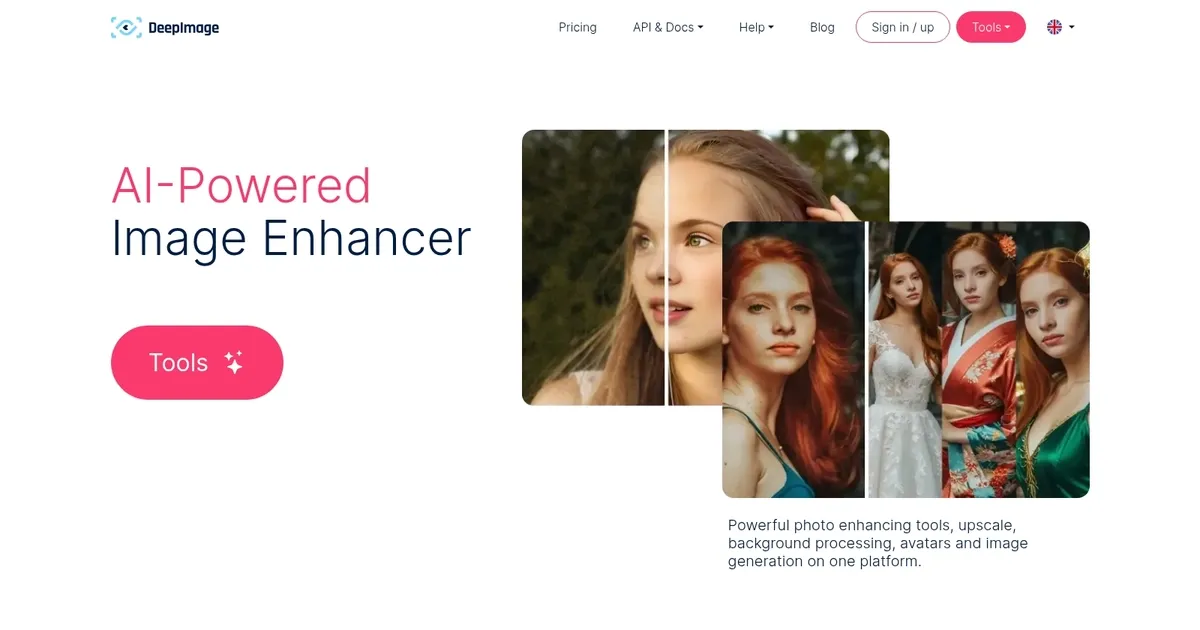
Homepage Screenshot 📸

DeepImage screenshot

Video Overview 🎬

DeepImage - Video Overview

What are the key features? ✨

  • Generative Upscale: Revolutionary upscaling that creates new contextual details to revive low-quality or lost images.
  • Image Upscaling & Enhancement: Increases resolution up to 4x with detail quality improvements and batch processing for up to 50 images.
  • Noise Reduction: Instantly removes noise from high-ISO or low-light photos.
  • Sharpening & Face Recovery: Sharpens blurry images and recovers fine details, especially in faces.
  • Background Tools & Generation: Removes or swaps backgrounds, plus avatar creation and text-to-image generation.

Who is it for? 🤔

DeepImage helps e-commerce sellers who need clean product photos fast, real-estate agents creating virtual staging, professional photographers restoring old images, social media creators wanting quick enhancements or avatars, and small businesses handling bulk photo processing without complex software.

Examples of what you can use it for 💡

  • E-commerce seller: Upscales and removes backgrounds from product photos to create professional listings quickly for platforms like Shopify or Amazon.
  • Real-estate professional: Enhances property images, sharpens details, and generates clean backgrounds for better marketing materials.
  • Photographer: Restores noisy or blurry old photos with noise reduction and generative upscale for archival or reprint purposes.
  • Social media creator: Creates stylized avatars from selfies and generates new images to boost content variety.
  • Print service provider: Upscales images to meet high-DPI requirements for large-format prints while preserving quality.

Pros & Cons ⚖️

  • Excellent generative detail addition
  • Fast batch processing
  • Easy web interface
  • Occasional over-creativity in portraits

FAQs 💬

What is Generative Upscale and how does it differ from regular upscaling?
Generative Upscale uses AI to invent new plausible details based on image context, reviving lost information instead of just stretching existing pixels like traditional methods.
Can I use DeepImage without creating an account?
Basic features allow quick tests without signup, but full processing and downloads often require an account or credits.
What is the maximum upscaling available?
Standard reliable upscaling goes up to 4x, with options for higher multiples like 16x depending on the image, though quality varies.
Does it work well on portraits and faces?
It recovers face details effectively in many cases, but generative features might introduce slight changes to expressions or features.
Is there a free option to try the tool?
Yes, limited free processing is available for testing, with paid credits or plans unlocking more usage and higher quality.
How does it compare to desktop tools like Topaz?
It offers simpler web access and speed, while desktop options provide more control and offline use.
Can I process multiple images at once?
Yes, batch processing supports up to 50 images simultaneously for efficient workflows.

Ready to try DeepImage?

Easy-to-use apps to automatically enhance photos in a few clicks

Visit DeepImage ↗

DeepImage alternatives 🔗

  1. Freepik AI Freepik AI Creates AI images and videos with fluid motion, detailed textures, and synced audio up to 1080p
  2. Pixelcut Pixelcut A suite of AI-powered image editing and upscaling tools
  3. Fotor Fotor Enhances and edits photos with AI-powered tools and creative features
  4. Cutout.Pro Cutout.Pro An AI-powered automatic visual design platform that saves time & money
  5. Pixlr Pixlr An AI-powered online photo editing and design platform, enabling everyone to create stunning designs
  6. Reimagine Reimagine A photo enhancement tool that digitizes, restores, colorizes, and animates old photographs using AI.
Share
DeepImage screenshot enlarged
Promote DeepImage
light badge
Copy Embed Code
dark badge
Copy Embed Code
neutral badge
Copy Embed Code
Best AI Tools

Discover the best AI tools for any use case

Explore
  • Tool Categories
  • AI Use Cases
  • AI Events
  • AI News
  • Saved Tools
Company
  • About Us
  • Contact Us
  • Media & Partnerships
  • Suggest a Tool
Legal
  • Privacy Policy
  • Terms of Service
Copyright © 2026 Best AI Tools 415 Mission Street, 37th Floor, San Francisco, CA 94105