logo-darklogo-darklogo-darklogo-dark
  • Tool Categories
    • ๐ŸŽจArt & Creative Design505
    • ๐ŸขBusiness Management644
    • ๐Ÿ’ปCoding & Development515
    • ๐Ÿ‘ฎDetection83
    • ๐Ÿง General Use727
    • ๐ŸฅHealth & Wellness55
    • ๐Ÿ“ทImage & Photo Analysis100
    • ๐Ÿ–ผ๏ธImage Generation & Editing618
    • ๐Ÿ“Interior & Architectural Design37
    • ๐ŸŽ“Learning & Education483
    • โš–๏ธLegal & Finance90
    • ๐ŸŽญLifestyle & Entertainment236
    • ๐Ÿ“ขMarketing & Advertising627
    • ๐ŸŽงMusic & Audio138
    • ๐Ÿ‘”Office & Workplace1,014
    • ๐Ÿ”ฌResearch & Data Analysis372
    • ๐Ÿ‘ฅSocial Media245
    • ๐ŸŽฅVideo Generation & Editing426
    • ๐Ÿ‘ง๐ŸปVirtual Companion135
    • ๐ŸŽคVoice Generation & Editing381
    • โœ๏ธWriting & Editing808
    • All Categories
    • AI Use Cases
  • News
  • Events
    • Academic Conferences
    • Developer Conferences
    • Expos / Trade Shows
    • Industry Summits
    • Workshops / Training
    • All Events
    • Past Events
  • Saved Tools
  • Suggest a Tool
โœ•
Home › Image Generation & Editing › Photo Editing› SnapEdit
SnapEdit

SnapEdit by SnapTeam

Automated AI photo editor, background remover, and enhancer

SnapEdit is an online photo editing platform powered by AI, offering a variety of tools to enhance and transform photos with ease. You can use it to enhance photo quality, remove backgrounds, delete unwanted objects, and restore old photos — all with just a few clicks.

The platform is easy to use, offering one-click tools that can automatically detect and remove unwanted elements from pictures — such as text, wirelines, and background clutter. This feature is particularly useful for users who want to clean up their photos quickly without needing to learn complicated editing software.

Beyond removing unwanted elements, SnapEdit also offers the ability to enhance the overall quality of photos. The AI can automatically improve blurry images, restoring clarity and vibrance. This, in turn, also makes it helpful for enhancing old or low-quality photos, making them look like they were taken with modern high-resolution cameras.

In addition, SnapEdit provides a variety of templates and manual editing options. Users can choose from over 100 background templates to replace the original background of their photos.

Finally, it’s worth adding that SnapEdit has garnered a large user base and positive reviews, indicating its effectiveness and popularity. With millions of images processed and a high rating on app stores, it’s clear that many users find SnapEdit’s tools helpful for their photo editing needs. Want to join them?

Visit SnapEdit ↗
Categories
๐Ÿ–ผ๏ธ Image
โœ๏ธ Photo Editing ๐Ÿงน Object Removal โœ‚๏ธ Background Removal ๐Ÿ’Ž Image Enhancing ๐ŸŒŸ Photo Enhancing โฌ†๏ธ Image Upscaling ๐Ÿ’ง Watermark Removal

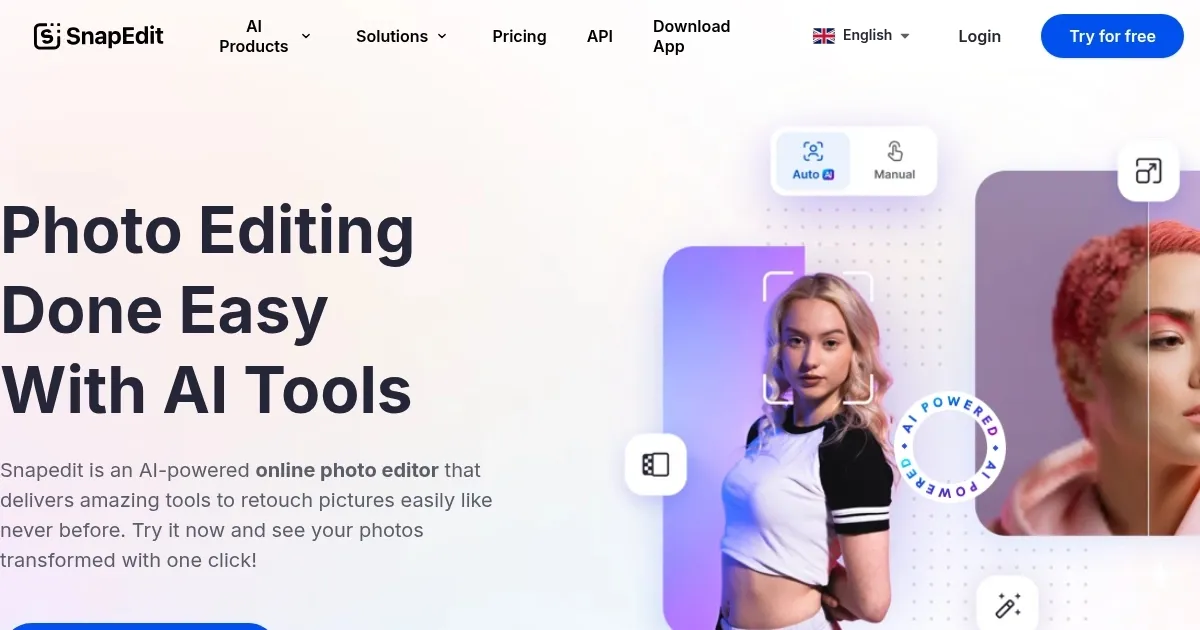
Homepage Screenshot 📸

SnapEdit screenshot

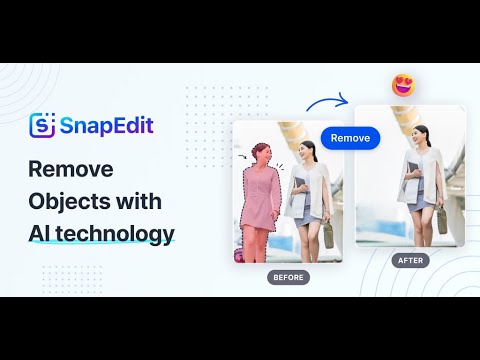
Video Overview 🎬

SnapEdit - Video Overview

What are the key features? ✨

  • AI-powered object removal: SnapEdit uses advanced AI to remove unwanted objects from photos, like a stray wire, an unwanted person in the background, or text overlay.
  • Background replacement: The app offers the ability to change or remove the background of an image and even includes over 100 background templates.
  • Photo enhancements: SnapEdit can enhance the quality of photos, making them sharper, improving colors, and adjusting brightness and contrast.
  • Easy to use: The app is designed with simplicity in mind so that it can be used even by those with little to no photo editing experience.
  • Editing tools: Beyond AI-powered features, SnapEdit also offers a range of manual editing tools - enabling users to tweak their photos by adjusting various aspects like saturation, exposure, and more.

Who is it for? 🤔

SnapEdit is made for those who seek an easy and efficient way to enhance their photos, whether for personal or professional use. It appeals to a broad range of users, from social media enthusiasts and bloggers who want to improve their online content to small business owners and online sellers needing professional-looking product images. The app's user-friendly design and AI-powered features make it accessible and useful for both beginners in photo editing and those with more experience looking for quick, effective solutions.

Examples of what you can use it for 💡

  • Sharpen blurry images, brighten dull colors, and generally enhance the overall quality of your pictures
  • Remove unwanted backgrounds or distracting elements from your product images
  • Change the backgrounds of your photos to something more artistic or surreal
  • Bring old, faded, or damaged photos back to life
  • Real estate agents or interior designers can remove unwanted items or enhance the lighting in their photos

Pros & Cons ⚖️

  • An easy way to remove objects from your photos
  • Great for changing the backgrounds of your images
  • Also includes "regular" image editing tools
  • Free version is fairly (and intentionally) limited

FAQs 💬

What is SnapEdit?
SnapEdit is an AI-powered online photo editor that lets you remove unwanted objects, edit backgrounds, and enhance image quality with just a few clicks. It's designed for beginners and pros alike, working on web, mobile, and tablets, and it processes over 300 million images for more than 20 million users.
Is SnapEdit free to use?
Yes, SnapEdit offers a free plan with basic features like limited object removal and enhancements, but it includes watermarks and fewer credits. Paid plans start around $10 a month for more advanced tools without limits.
How does the object removal tool work in SnapEdit?
You upload a photo, brush over the unwanted item, and the AI automatically detects and removes it, filling in the space naturally. It works best on simple backgrounds, and you can tweak manually if needed, all in seconds.
Can SnapEdit handle background changes?
Absolutely. The tool removes backgrounds precisely and lets you replace them with over 100 templates or custom colors, perfect for product shots or social media posts, and it supports HD downloads.
What about photo enhancement features?
SnapEdit's AI enhancer upscales blurry or low-res images to 4K, fixes lighting, and restores old photos with one click. It boosts clarity and vibrancy, making casual snaps look professional without much effort.
Is there a mobile app for SnapEdit?
Yes, SnapEdit has apps for iOS and Android with the same core features, rated 4.9 stars on the App Store. Some users note login glitches, but once in, it's smooth for on-the-go edits.
What are the main limitations of the free version?
The free tier caps you at a few edits per day, adds watermarks, and skips pro tools like super erase for large objects. Upgrading unlocks unlimited use and better AI precision.
How secure is SnapEdit for uploading photos?
SnapEdit claims strong privacy with encrypted uploads and no long-term storage of your images; they delete after processing. User reviews confirm it's legit, scoring 74 out of 100 on safety checks, though always review their policy.
Does SnapEdit work well for beginners?
It sure does. The interface is simple, no steep learning curve like Photoshop, and AI handles the heavy lifting. Many new users praise how it turns quick edits into pro results, though complex scenes might need a couple tries.
What do users say about SnapEdit's performance?
Most love the speed and ease, especially for background removal and upscaling, with high ratings across stores. A few mention occasional errors on tricky edits or login issues, but overall, it's a solid choice for everyday photo tweaks.

Ready to try SnapEdit?

Automated AI photo editor, background remover, and enhancer

Visit SnapEdit ↗

SnapEdit alternatives 🔗

  1. Imagen Imagen Generates photorealistic images from detailed text prompts
  2. Black Forest Labs Black Forest Labs Generates high-quality images from text prompts with precision and speed
  3. Stable Diffusion Stable Diffusion Generates high-quality images from text prompts with versatile styles
  4. Adobe Express Adobe Express Creates on-brand content with AI-driven design and video tools
  5. Adobe Firefly Adobe Firefly Generates images, videos, audio, and vectors using AI.
  6. Freepik AI Freepik AI Creates AI images and videos with fluid motion, detailed textures, and synced audio up to 1080p
Share
SnapEdit screenshot enlarged
Promote SnapEdit
light badge
Copy Embed Code
dark badge
Copy Embed Code
neutral badge
Copy Embed Code
Best AI Tools

Discover the best AI tools for any use case

Explore
  • Tool Categories
  • AI Use Cases
  • AI Events
  • AI News
  • Saved Tools
Company
  • About Us
  • Contact Us
  • Media & Partnerships
  • Suggest a Tool
Legal
  • Privacy Policy
  • Terms of Service
Copyright © 2026 Best AI Tools 415 Mission Street, 37th Floor, San Francisco, CA 94105