logo-darklogo-darklogo-darklogo-dark
  • Home
  • Browse
    • Assistant
    • Coding
    • Image
    • Productivity
    • Video
    • Voice
    • Writing
    • All Categories
    • AI Use Cases
  • My Favorites
  • Suggest a Tool
✕
Home › Design Generation›
Published by Dusan Belic on July 10, 2023

Uizard

Uizard
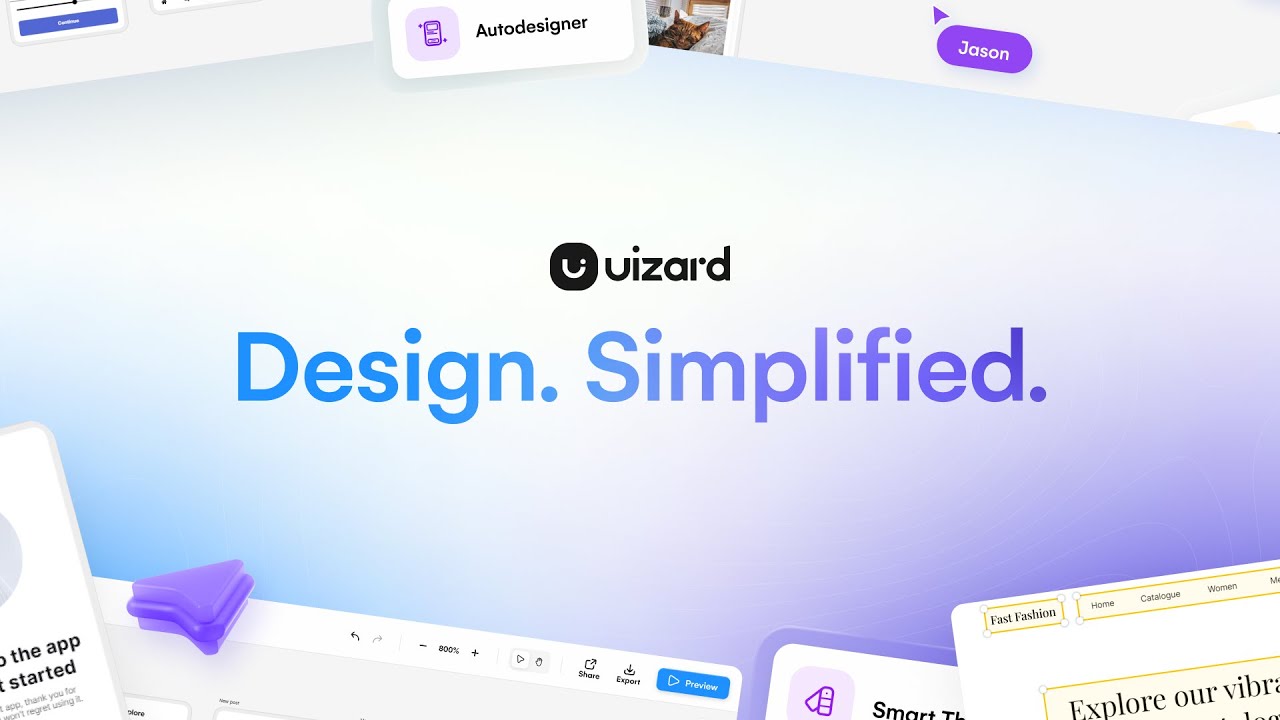
Uizard Homepage
Categories Design Generation
Generates editable UI prototypes from text prompts and sketches in minutes.

Uizard

Uizard is made to turn ideas into tangible designs with ease. Heck, you can use it to turn hand-drawn sketches or verbal descriptions into interactive prototypes — allowing just about anyone to quickly visualize their concepts.

The tool interprets user inputs — suggesting design elements, layouts, and color schemes that align with best practices. As a result, you get to design entire layouts much, much faster.

Uizard also supports collaboration, enabling multiple members of the team to work jointly on UI design projects.

Whether you need a sketch for a landing page, a website wireframe, or an app design – Uizard can help and make the process that much faster.

Unsurprisingly, its clients include many of the world’s biggest companies — including IBM, Tesla, Google, Adidas, Samsung, Greenpeace, Pinterest, and Atlassian, among others. So, perhaps it can also work for you.

Uizard Homepage
Categories Design Generation

Video Overview ▶️

Uizard - Video Overview

What are the key features? ⭐

  • Autodesigner 2.0: Generates complete multi-screen prototypes from text prompts using generative AI for quick ideation.
  • Screenshot Scanner: Converts uploaded images of interfaces into editable vector mockups for easy iteration.
  • Wireframe Scanner: Digitizes hand-drawn sketches into digital wireframes, supporting rapid digital transition.
  • Design Assistant: Provides AI-driven suggestions like heatmaps and component modifications to enhance usability.
  • Real-time Collaboration: Enables team editing and commenting on projects simultaneously for efficient teamwork.

Who is it for? 🤔

Uizard proves especially helpful for product managers juggling ideas without design backgrounds, startup founders racing to build MVPs, marketers needing quick visual pitches, and UX teams aiming to accelerate brainstorming. It empowers non-designers to contribute meaningfully while aiding pros in slashing iteration times, making it a versatile pick for anyone prioritizing speed over intricate manual crafting in early design stages.

Examples of what you can use it for 💭

  • Product Manager: Quickly generates app prototypes from feature lists to align stakeholders on user flows.
  • Startup Founder: Turns napkin sketches into investor-ready mockups to validate concepts pre-development.
  • UX Designer: Scans competitor screenshots for editable references, speeding up competitive analysis.
  • Marketer: Creates themed landing page variants via prompts to test campaign visuals rapidly.
  • Developer: Exports AI-generated designs as CSS snippets to kickstart front-end implementation.

Pros & Cons ⚖️

  • The sketch upload feature is pretty cool
  • Ready-to-go templates make life much easier
  • Collaborative design process is included
  • Limited export options

FAQs 💬

What makes Uizard different from traditional design tools?
Uizard uses AI to generate designs from text or images, unlike manual tools like Figma that require more hands-on creation from scratch.
Can beginners use Uizard without design experience?
Yes, its intuitive prompts and drag-and-drop editor make it accessible for non-designers to produce professional results quickly.
How does Autodesigner 2.0 work?
It takes text descriptions and builds editable multi-screen prototypes, allowing iterative refinements via follow-up prompts.
What file types can I export from Uizard?
Exports include PNG, JPG, PDF, and code snippets like CSS or React for developer handoff.
Is there a free version of Uizard?
The free plan includes limited projects and AI generations, ideal for testing before upgrading.
How does Uizard handle collaboration?
Real-time multiplayer editing and commenting let teams work together seamlessly on prototypes.
Can Uizard integrate with other tools?
It offers a Figma plugin for importing designs and smooth workflow transitions.
What if the AI output doesn't match my vision?
Refine with detailed prompts or manual edits in the drag-and-drop editor to customize results.
Is Uizard suitable for mobile app design?
Yes, it supports mobile, web, and tablet templates with responsive previews.
How recent are Uizard's updates?
Autodesigner 2.0 launched in 2025, improving prompt accuracy based on user feedback.
Visit Uizard

Related tools ↙️

  1. MyArchitectAI MyArchitectAI Transforms architectural designs and sketches into photorealistic renders in seconds using AI
  2. Typeset Typeset Automates design and writing for ebooks, presentations, and social graphics quickly
  3. Architect Render Architect Render Generates photorealistic architectural renderings from sketches, photos, or designs in seconds
  4. Flowstep Flowstep Generates user flows, wireframes, and UI designs from simple text prompts
  5. MenuGen MenuGen Transforms menu photos into AI-generated dish images.
  6. Bugfree.ai Bugfree.ai Prepares users for system design and behavioral interviews with AI mocks and practice
Last update: December 22, 2025
Share
Promote Uizard
light badge
Copy Embed Code
dark badge
Copy Embed Code
neutral badge
Copy Embed Code
About Us | Contact Us | Suggest an AI Tool | Privacy Policy | Terms of Service

Copyright © 2026 Best AI Tools
415 Mission Street, 37th Floor, San Francisco, CA 94105