
GPTExcel by excelbrew

AI spreadsheet tool that generates and explains Excel formulas

GPTExcel lets you generate spreadsheet formulas with AI. As such, it is an ideal solution for individuals and businesses looking to streamline their spreadsheet processes.
Then, when you get the formula, you can ask the tool for explanations. This will help you really master your spreadsheet software — whether it’s Excel, Google Spreadsheet or Airtable.
You can do the same with SQL queries, with GPTExcel supporting a variety of database systems. It simplifies the process, making it easier than ever to generate, debug, and modify complex SQL queries.
Finally, GPTExcel will also help you create advanced formulas to automate many tasks in your spreadsheets.
As of October 2023, GPTExcel was used to generate 845K+ formulas by over 130K+ users.
Categories Spreadsheet
Video Overview ▶️
What are the key features? ⭐
- Generate spreadsheet formulas with ease: Whether you're working in Excel, Google Sheets, or Airtable - GPTExcel empowers you to effortlessly create and automate complex calculations and analyses. Bid farewell to manual formula writing - streamline your workflow with AI Excel, VBA automation, Apps Script automation, and SQL queries.
- Explain spreadsheet formulas: GPTExcel offers comprehensive explanations, providing users with a better understanding of how to perform calculations and data analysis within these platforms. Simplify complex formulaic expressions and master the art of spreadsheet wizardry.
- Generate SQL queries with AI: Effortlessly craft, troubleshoot, and fine-tune intricate SQL queries for a variety of database systems with the power of AI. GPTExcel simplifies the process, making it easier than ever to generate, debug, and modify complex SQL queries.
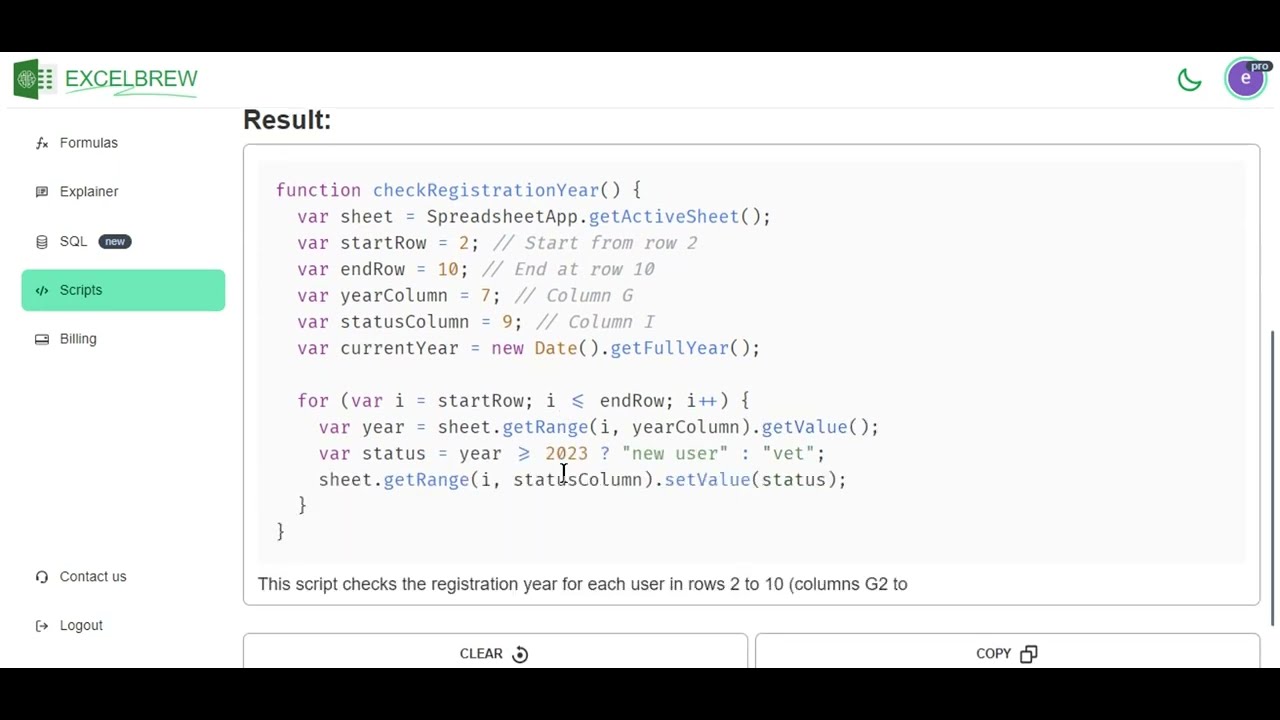
- Automate tasks with generated scripts: Simplify your workflow by generating VBA scripts for Excel, Apps Scripts for Google Workspace, and Airtable scripts. These automation scripts empower you to streamline and automate repetitive tasks, boosting productivity within these platforms.
Who is it for? 🤔
GPTExcel is made for those just starting out with spreadsheets and would like to use more powerful functions of Excel and Google Sheets. It will help them create advanced formulas with ease and even provide explanations for everything. And so, before you know it - you'll become an Excel or Google Sheets expert. Similarly, GPTExcel offers similar help with SQL queries, though that part is reserved for Pro plan users.
Examples of what you can use it for 💭
- Get help from AI to easily generate spreadsheet formulas
- Get explanations for Google Sheets and Excel formulas
- Generate SQL queries with AI
- Automate tasks with generated scripts
Pros & Cons ⚖️
- Not trying to compete with Excel and Google Sheets
- Turns spreadsheet newbies into experts
- Helps you automate tasks in your spreadsheets
- The free plan is somewhat limited
FAQs 💬
What is GPTExcel mainly used for?
GPTExcel helps generate Excel, Google Sheets, and Airtable formulas, plus VBA/Apps Scripts, SQL queries, regex patterns, and table templates using simple natural language descriptions.
Does GPTExcel support Google Sheets and Airtable?
Yes, it fully supports formula generation and explanations for Google Sheets and Airtable, along with Apps Script and Airtable scripting automation.
Can I upload my own Excel or CSV files?
Yes, you can upload Excel or CSV files to chat with your data, ask questions, get insights, or request charts and analysis reports.
Does it convert images of tables into spreadsheets?
Yes, GPTExcel uses AI and OCR to transform tables from uploaded images (screenshots, photos) into editable Excel-compatible spreadsheets.
Can it generate charts or graphs automatically?
Yes, the tool can create visual charts and graphs directly from your uploaded data or described requirements.
Does GPTExcel explain the formulas it creates?
Yes, it usually provides clear explanations of how each generated formula or script works, helping users understand and learn.
Is multi-language support available?
Yes, it understands and responds in over 50 languages, so you can describe problems in your native language.
What kind of automation can it handle?
It generates VBA macros for Excel, Apps Scripts for Google Workspace, and scripts for Airtable to automate repetitive spreadsheet tasks.
Can it help with SQL queries?
Yes, it writes, troubleshoots, and optimizes SQL queries for various database systems based on your description.
Who is GPTExcel best suited for?
It's ideal for professionals, analysts, students, or anyone who works frequently with spreadsheets and wants to save time on formulas, scripts, queries, and data analysis.
Related tools ↙️
Last update:
February 2, 2026
Promote GPTExcel


