
SheetAI
Automates tasks and generates insights in Google Sheets using AI
If you’ve ever stared at a Google Sheet, drowning in repetitive tasks or wrestling with formulas, SheetAI might just be the lifeboat you need. This Google Sheets add-on, powered by advanced AI models like GPT-4, Claude, and Gemini, brings a surprising level of intelligence to your spreadsheets. It’s not just about crunching numbers — it’s about letting you talk to your data in plain English and getting answers that make sense. I think it’s a clever tool, one that feels like a glimpse into the future of productivity, but it’s not without its quirks.
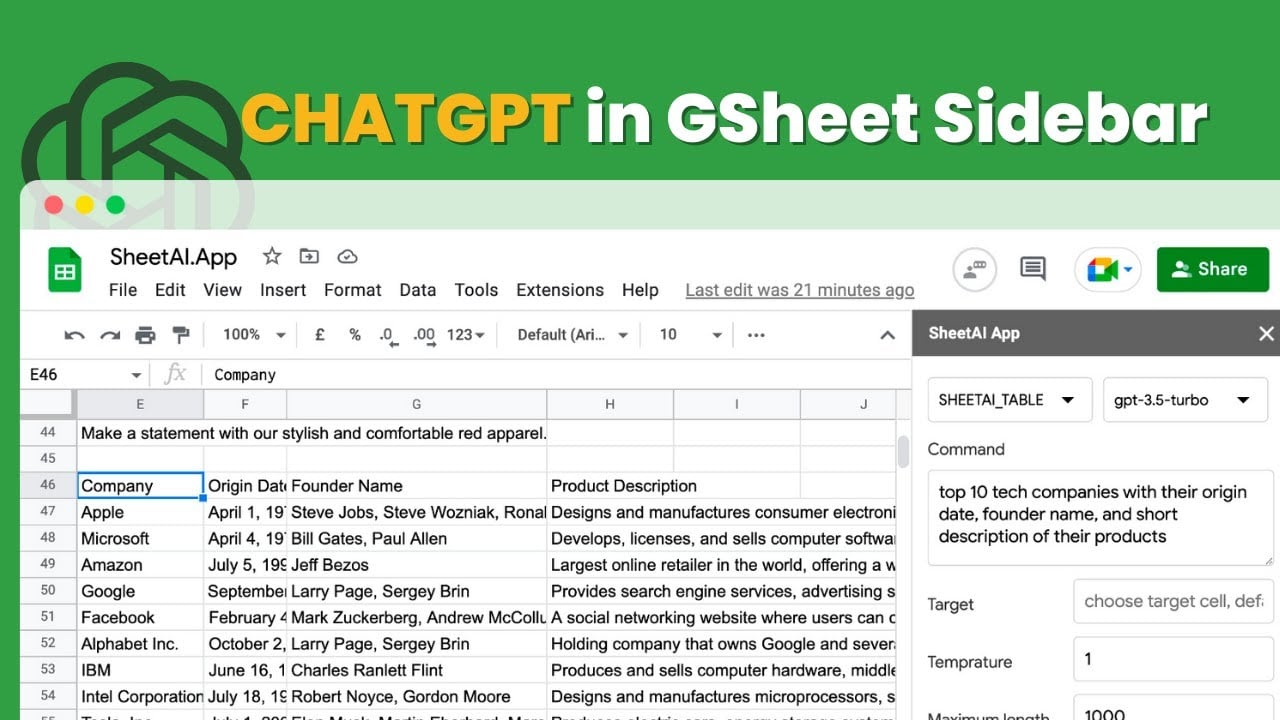
The magic starts with SheetAI’s core functions. The SHEETAI function lets you type a prompt in a cell — like “summarize this feedback” or “generate a tagline” — and it spits out a response faster than you can brew coffee. Need a table of product descriptions? SHEETAI_TABLE builds one from scratch, pulling context from your data. SHEETAI_FILL is a standout, autopopulating fields like email lists or product specs with uncanny accuracy. For visual folks, SHEETAI_IMAGE even generates images from text descriptions, which is wild for a spreadsheet tool. You can tweak settings like temperature or maxTokens to control the AI’s creativity or verbosity, giving you flexibility without needing a PhD in coding.
What’s delightful is how SheetAI fits into Google Sheets like a glove. You don’t need to install extra software or learn a new platform, it’s all there in your familiar spreadsheet interface. Businesses, marketers, and analysts will love how it automates tedious tasks, from cleaning email lists to categorizing customer reviews. I was impressed by its ability to analyze data patterns and suggest insights, saving hours of manual work. Compared to competitors like Flowshot or Numerous.ai, SheetAI feels more intuitive, especially for non-techies, though Flowshot’s image generation and autocomplete features give it an edge in some scenarios.
But it’s not all smooth sailing. Some users report bugs, like permission errors or formula credit issues, which can be frustrating if you’re on a deadline. Customer support, while responsive within 24-48 hours, has been called out for being less than stellar in some cases. The tool’s desktop-only limitation might also irk mobile users. And, while the free tier is generous for testing, heavy users will need to invest in token packages or subscriptions, which may feel pricier than alternatives like Flowshot’s budget-friendly plans.
The surprise? SheetAI’s ability to generate formulas from plain English instructions. Describe what you want — like “sum column A and B” — and the Formula Generator in the sidebar writes the code for you. It’s a small but brilliant touch. If you’re looking to supercharge your Google Sheets, start with the free trial, play with the functions, and see if it fits your workflow. Just be patient with occasional hiccups.
Homepage Screenshot 📸

Video Overview 🎬
What are the key features? ✨
- SHEETAI: Generates AI responses from text prompts in spreadsheet cells.
- SHEETAI_FILL: Automates data entry for fields like product descriptions or email lists.
- SHEETAI_TABLE: Creates structured tables based on user prompts.
- SHEETAI_IMAGE: Generates images from text descriptions within Google Sheets.
- Formula Generator: Converts plain English instructions into Google Sheets formulas.
Who is it for? 🤔
Examples of what you can use it for 💡
- Marketer: Uses SHEETAI_BRAIN to generate SEO-optimized product descriptions for e-commerce listings.
- Data Analyst: Employs SHEETAI_RANGE to summarize customer feedback and categorize sentiments.
- Small Business Owner: Leverages SHEETAI_FILL to populate inventory lists with standardized data.
- Content Creator: Utilizes SHEETAI_LIST to generate multiple blog post ideas or taglines.
- Researcher: Applies SHEETAI_TABLE to organize qualitative data into structured tables for analysis.
Pros & Cons ⚖️
- Intuitive Google Sheets integration.
- Supports multiple AI models.
- Free trial available.
- Occasional bugs reported.
- Token limits in free tier.
FAQs 💬
Ready to try SheetAI?
Automates tasks and generates insights in Google Sheets using AI
Visit SheetAISheetAI alternatives 🔗