logo-darklogo-darklogo-darklogo-dark
  • Tool Categories
    • 🎨Art & Creative Design505
    • 🏢Business Management644
    • 💻Coding & Development515
    • 👮Detection83
    • 🧠General Use727
    • 🏥Health & Wellness55
    • 📷Image & Photo Analysis100
    • 🖼️Image Generation & Editing618
    • 📐Interior & Architectural Design37
    • 🎓Learning & Education483
    • ⚖️Legal & Finance90
    • 🎭Lifestyle & Entertainment236
    • 📢Marketing & Advertising627
    • 🎧Music & Audio138
    • 👔Office & Workplace1,014
    • 🔬Research & Data Analysis372
    • 👥Social Media245
    • 🎥Video Generation & Editing426
    • 👧🏻Virtual Companion135
    • 🎤Voice Generation & Editing381
    • ✍️Writing & Editing808
    • All Categories
    • AI Use Cases
  • News
  • Events
    • Academic Conferences
    • Developer Conferences
    • Expos / Trade Shows
    • Industry Summits
    • Workshops / Training
    • All Events
    • Past Events
  • Saved Tools
  • Suggest a Tool
✕
Home › Office & Workplace › Work Productivity› GPT for Work
GPT for Work

GPT for Work by Talarian Sàrl

A productivity add-on for Google Sheets and Docs that assists you with tasks

GPT for Work is a set of AI plugins for Google Sheets, Docs and Excel that works with GPT-3.5, GPT-4, Claude, and more.

It provides users with extra intelligence to more easily prepare their data. For instance, it could be used to clean lists, extract entities, and normalize formats.

Moreover, the tool could be used for analyzing data, summarizing, classifying, and categorizing different data sets, writing, re-writing, editing, and translating.

According to GPT for Work’s creators, their software is perfect for bulk operations in Sheets and Excel, while the Docs integration is great for long-form content generation.

All in all, this is one of those plugins every Google Docs, Sheets and Excel user would want on their side as it will help them be that much more productive.

Visit GPT for Work ↗
Categories
👔 Work
⚡ Work Productivity 📋 Spreadsheet 📗 Excel 💼 Workplace Assistant 📄 Document Generation 🤖 Copilot
✍️ Writing
🤖 Writing Assistant
🔬 Research
📊 Data Analytics

Homepage Screenshot 📸

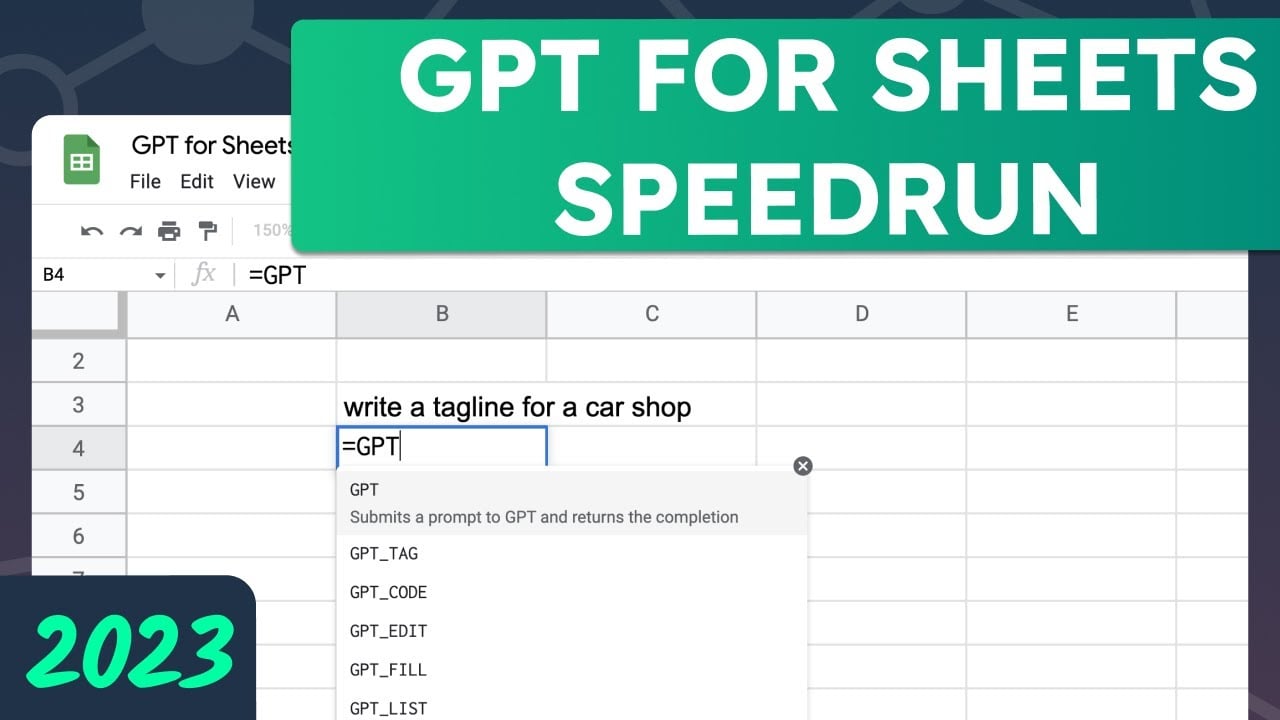
GPT for Work screenshot

Video Overview 🎬

What are the key features? ✨

  • Clean lists: The GPT_FILL function for Sheets and Excel offers an easy solution to quickly clean and standardize any list of data. You only need to show it a few examples of what you want, and it will replicate the same format throughout your data set.
  • Generate tags: GPT for Sheets and GPT in Excel help you generate product tags quickly to power your product tag library. Dynamically create custom tags for your products, saving you time in making your products easier to find.
  • Generate ad copy, taglines, and titles: It can also help you create eye-catching, on-brand ad copy, taglines, and subject lines that will engage your customers. Unlock the power of GPT to conveniently and quickly generate compelling marketing content for your business.
  • Generate a description: GPT for Work can help you create high-quality, compelling product descriptions quickly and easily for your entire catalog directly in your spreadsheet.
  • Generate an outline: GPT for Docs can help you quickly generate an outline, saving you time and energy to focus on crafting an engaging, captivating story. Let GPT provide you with the structure and you provide the creativity to create a blog post outline that will captivate and engage your readers.
  • Generate a blog post, email, or speech: GPT for Docs can generate any kind of copy, short or long, on any topic, in any style, very quickly. 1000 blog posts of 1000 words will cost you roughly $27 in API calls.
  • Recap a meeting and summarize notes: The tool can also help you save time by automatically creating summaries for your meetings so you can quickly recap important points and action items with your team in efficient and understandable ways.

Who is it for? 🤔

We would think that GPT for Work is primarily made for folks living and breathing spreadsheets. It could make their lives that much easier, especially if they need to clean the data set from time to time. In addition, it also works with Google Docs, where it can act as a ghostwriter for articles, blog posts, and longer copies. As such, we would think of it as an essential tool for all "cloud warriors" - and that includes a lot of people.

Examples of what you can use it for 💡

  • Clean all kinds of lists in Google Spreadsheets and Excel
  • Generate product tags for e-commerce websites and beyond
  • Generate ad copies, taglines, titles, and entire descriptions
  • Create a blog post, email, speech and everything else with ease
  • Recap a meeting and/or summarize notes

Pros & Cons ⚖️

  • Works with GPT and Claude
  • Especially useful for heavy spreadsheet users
  • It is also cool for folks writing blogs and articles
  • Will this tool survive the built-in AI features of Excel and Google Sheets?

FAQs 💬

What exactly does GPT for Work do?
It integrates AI models into Google Sheets, Docs, Microsoft Excel, and Word so you can run bulk tasks like generating content, translating text, categorizing data, web research per cell, image analysis, and formula creation across thousands of rows at once.
Which platforms does it support?
It works natively in Google Workspace (Sheets and Docs) and Microsoft 365 (Excel and Word), turning your existing spreadsheet and document environment into an AI powerhouse.
Do I need to be good at writing AI prompts?
No, not really. You write plain instructions for each column or use the Agent chat interface to describe what you want, and it handles the heavy lifting without requiring advanced prompt engineering.
How fast is the bulk processing?
It can handle up to several hundred prompts per minute and process very large datasets (up to around 200,000 rows in one run), much faster than manual methods or copy-pasting to external chats.
Can I choose which AI model to use?
Yes, you select from leading models including ChatGPT, Claude, Gemini, Perplexity, Grok, Mistral, and others, so you pick based on speed, quality, or cost.
Is it secure for business or sensitive data?
Yes, it follows strong practices with encryption, no data used for model training, GDPR compliance, and ISO 27001 certification.
What kinds of tasks work best with it?
Bulk content generation, translation, feedback analysis, market research, lead enrichment, SEO optimization, e-commerce data cleanup, product description creation, and automatic formula writing.
Does it work for small projects too?
Absolutely, it scales down fine for smaller jobs, though its biggest advantage shows up when you need to handle hundreds or thousands of cells quickly.
How does it compare to using ChatGPT or Gemini directly?
General chat tools excel at one-off questions, but GPT for Work specializes in reliable, high-volume processing inside your actual spreadsheet or document without constant copy-paste cycles.
Is there a free way to try it?
A free tier or trial exists with limited usage so you can test core features before committing to higher volumes.

Ready to try GPT for Work?

A productivity add-on for Google Sheets and Docs that assists you with tasks

Visit GPT for Work ↗

GPT for Work alternatives 🔗

  1. Claude Claude Assists users in reasoning, coding, writing, and analyzing data with advanced AI models
  2. GitHub Copilot GitHub Copilot Enhances coding with AI-driven completions and chat assistance
  3. Brave Leo Brave Leo Assists with web queries, content creation, and document analysis in-browser
  4. Slack AI Slack AI Search smarter, summarize conversations instantly, and be at your most productive
  5. Microsoft Copilot Microsoft Copilot Boosts productivity with AI-driven answers, writing, and image creation
  6. FigJam AI FigJam AI Instantly visualize ideas, suggest best practices, and automate tedious tasks
Share
GPT for Work screenshot enlarged
Promote GPT for Work
light badge
Copy Embed Code
dark badge
Copy Embed Code
neutral badge
Copy Embed Code
Best AI Tools

Discover the best AI tools for any use case

Explore
  • Tool Categories
  • AI Use Cases
  • AI Events
  • AI News
  • Saved Tools
Company
  • About Us
  • Contact Us
  • Media & Partnerships
  • Suggest a Tool
Legal
  • Privacy Policy
  • Terms of Service
Copyright © 2026 Best AI Tools 415 Mission Street, 37th Floor, San Francisco, CA 94105