logo-darklogo-darklogo-darklogo-dark
  • Home
  • Browse
    • Assistant
    • Coding
    • Image
    • Productivity
    • Video
    • Voice
    • Writing
    • All Categories
    • AI Use Cases
  • My Favorites
  • Suggest a Tool
✕
Home › Meeting Assistant›
Published by Dusan Belic on July 10, 2023

Krisp

Krisp
Krisp Homepage
Categories Meeting Assistant
An AI tool that removes background noises and voices that includes a transcriber

Krisp

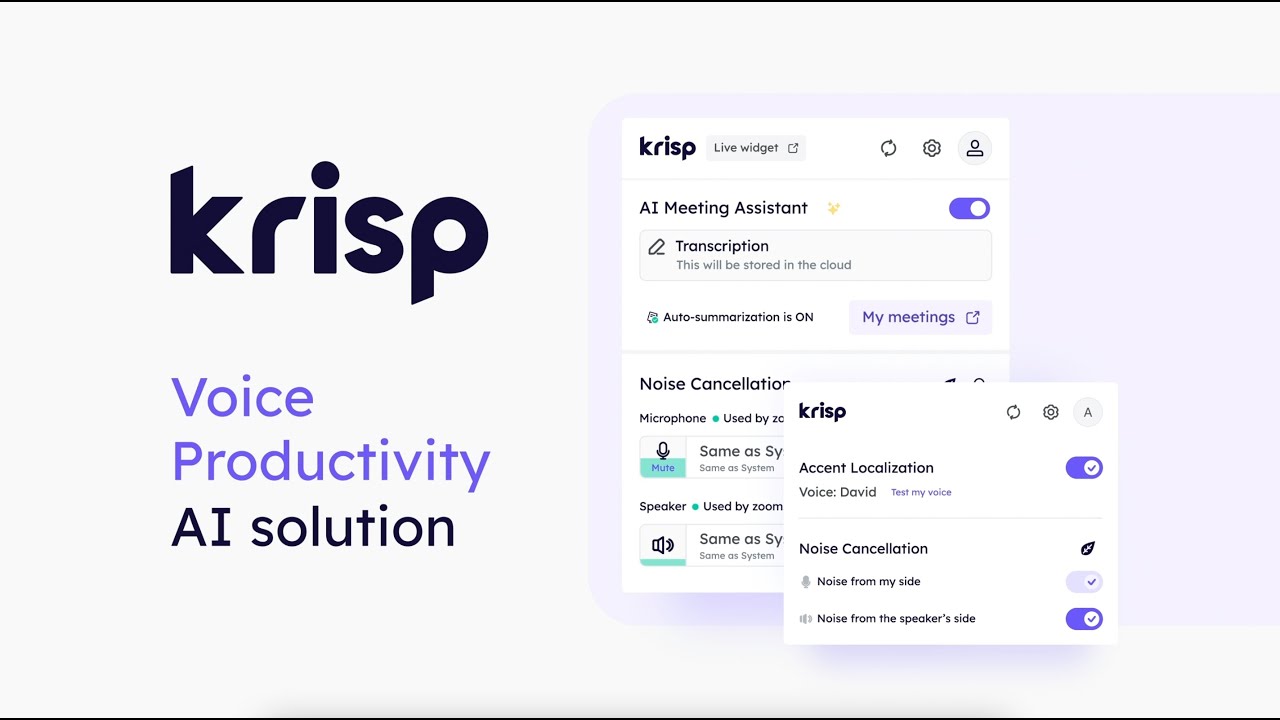
Krisp is an AI tool designed to enhance online communication by canceling out background noise, making virtual meetings more professional and less distracting. Founded in 2017, Krisp introduced the world’s first AI-powered Voice Productivity software.

The company’s technology is capable of removing various types of background noises, including voices from other individuals in the room, ensuring that the speaker’s voice remains clear and undisturbed​​​​.

The application boasts compatibility with over 50 video call platforms — including popular ones like Zoom, Skype, and Microsoft Teams — making it versatile for various users’ needs. Krisp also works on both Mac and Windows operating systems and supports any built-in or external microphone.

The tool offers features beyond basic noise cancellation, such as echo cancellation, accent localization for clearer communication across different accents, real-time meeting transcription, and AI-powered meeting summaries. These additional features aim to enhance voice clarity and provide valuable tools for meeting documentation, which is beneficial for remote workers, podcasters, customer support agents, and educators​​.

Also worth adding is Krisp’s commitment to user privacy, as it processes the noise locally on the user’s device — preventing any audio data from being sent to the cloud​​.

In summary, Krisp offers a valuable solution for improving the quality of online communication in various professional and personal contexts, making it a game-changer for remote work and virtual collaboration.

Krisp Homepage
Categories Meeting Assistant

Video Overview ▶️

Krisp - Video Overview

What are the key features? ⭐

  • Noise cancellation: Krisp uses advanced AI to filter out background noise from your calls, allowing users to speak and listen without distractions like traffic noise, construction, or even loud typing.
  • Echo cancellation: It removes echo from your audio, making your voice clearer and more professional during calls.
  • Voice and accent enhancement: Krisp is capable of recognizing and enhancing your voice while also adapting to different accents.
  • Meeting transcription: The tool can transcribe your meetings in real time, which is great for keeping records of what was discussed.
  • Privacy comes included: Krisp does all audio processing locally on your device, meaning that your conversations aren't sent to a server for noise cancellation.

Who is it for? 🤔

Krisp targets professionals and organizations who rely on clear and effective communication in their daily operations. This includes remote workers, who need to ensure their online meetings are free from background noise, and educators and students engaged in online learning, where clarity of speech is essential. Moreover, customer support centers and podcasters also benefit from Krisp's noise-canceling capabilities to deliver high-quality audio experiences. Essentially, Krisp is designed for anyone looking to enhance the professionalism and quality of their online audio interactions.

Examples of what you can use it for 💭

  • Conduct professional online meetings by removing background noises
  • Teachers and students can benefit greatly from using Krisp during online classes
  • Podcasters can use Krisp to ensure their recordings are crisp and clear, free from unwanted background noise
  • Customer support agents working in noisy environments can use Krisp to ensure that their communications with customers are clear and professional
  • When presenting online, especially in large, noisy environments, Krisp can help keep your audience focused on your voice, not the noise

Pros & Cons ⚖️

  • Works like magic for noise cancellation
  • Helps you minimize distractions and maintain focus
  • Supports a wide range of communication apps
  • Its Chrome extension could be better

FAQs 💬

What is Krisp AI?
Krisp AI is a voice AI platform that cancels background noise in real-time during calls and meetings. It also offers transcription, summaries, and accent conversion to make conversations clearer. I think it's especially handy for remote workers dealing with everyday distractions.
How does Krisp's noise cancellation work?
It uses AI to separate your voice from background sounds like barking dogs or keyboard clicks on both sides of the call. This happens locally on your device for privacy, so no data gets sent to servers unless you choose transcription features. Users often say it makes calls feel professional right away.
What meeting apps does Krisp integrate with?
Krisp works with over 800 apps including Zoom, Microsoft Teams, Google Meet, and Slack Huddles. It plugs in at the audio level, so no bots join your calls. That keeps things smooth and natural, probably the best part for quick setups.
Does Krisp support multilingual transcription?
Yes, it handles transcripts and summaries in 16 languages with on-device English processing for speed. You can add custom vocabulary up to 750 words for industry terms. This might really help global teams stay accurate without extra hassle.
What is accent conversion in Krisp?
It's an AI feature that re-voices your speech in a different accent, like converting an Indian accent to American English live during calls. It keeps your natural tone while boosting clarity. Reviews suggest it builds confidence for international pros, though it's still rolling out more voices.
Can Krisp be used for in-person meetings?
Absolutely, the mobile app lets you transcribe and record face-to-face talks offline. Noise cancellation works on desktop too for hybrid setups. Folks in noisy offices probably love this for capturing details without fumbling notes.
Is Krisp suitable for contact centers?
Yes, the AI Call Center tool adds real-time translation in 80+ languages and agent assist features. It cuts handle times by cleaning audio on both ends. Teams say it scales well for high-volume calls, making customer chats more productive.
How accurate is Krisp's transcription in noisy environments?
It achieves about 96% accuracy thanks to pre-filtering noise before transcription. Custom vocab helps with jargon, and it's better than many standalone tools. You might notice even higher rates in quieter spots, but it holds up well overall.
What security features does Krisp offer?
It's SOC 2 Type 2, GDPR, HIPAA, and PCI-DSS compliant, with on-device processing to keep data private. No recordings unless you opt in, and enterprise controls let admins manage access. This reassures users handling sensitive info, I suppose.
Does Krisp have a free version?
The free tier gives 60 minutes of daily noise cancellation and unlimited diarized transcription. It's great for testing basics without commitment. Many start here and upgrade for unlimited use, finding it empowering from day one.
Visit Krisp

Related tools ↙️

  1. Sidekick AI Sidekick AI Automates meeting bookings via email forwarding and smart pages
  2. Noty.ai Noty.ai Transcribes meetings, summarizes key points, and creates actionable to-do lists
  3. Skej Skej Streamlines scheduling by automating meeting coordination across platforms
  4. NoteGPT NoteGPT Summarizes content, creates notes, and boosts learning with AI-powered tools
  5. JotMe JotMe Transcribes, translates, and summarizes meetings in real-time across 100+ languages
  6. timeOS timeOS Automates meeting notes, summaries, and task delegation with AI precision
Last update: December 9, 2025
Share
Promote Krisp
light badge
Copy Embed Code
dark badge
Copy Embed Code
neutral badge
Copy Embed Code
About Us | Contact Us | Suggest an AI Tool | Privacy Policy | Terms of Service

Copyright © 2026 Best AI Tools
415 Mission Street, 37th Floor, San Francisco, CA 94105