logo-darklogo-darklogo-darklogo-dark
  • Tool Categories
    • 🎨Art & Creative Design505
    • 🏢Business Management644
    • 💻Coding & Development515
    • 👮Detection83
    • 🧠General Use727
    • 🏥Health & Wellness55
    • 📷Image & Photo Analysis100
    • 🖼️Image Generation & Editing618
    • 📐Interior & Architectural Design37
    • 🎓Learning & Education483
    • ⚖️Legal & Finance90
    • 🎭Lifestyle & Entertainment236
    • 📢Marketing & Advertising627
    • 🎧Music & Audio138
    • 👔Office & Workplace1,014
    • 🔬Research & Data Analysis372
    • 👥Social Media245
    • 🎥Video Generation & Editing426
    • 👧🏻Virtual Companion135
    • 🎤Voice Generation & Editing381
    • ✍️Writing & Editing808
    • All Categories
    • AI Use Cases
  • News
  • Events
    • Academic Conferences
    • Developer Conferences
    • Expos / Trade Shows
    • Industry Summits
    • Workshops / Training
    • All Events
    • Past Events
  • Saved Tools
  • Suggest a Tool
✕
Home › Office & Workplace › Meeting Assistant› Noty.ai
Noty.ai

Noty.ai

Transcribes meetings, summarizes key points, and creates actionable to-do lists

Noty.ai is an AI-powered meeting assistant that transcribes, summarizes, and generates to-do lists for Zoom and Google Meet calls. It integrates with tools like Google Calendar, Slack, and Zapier to streamline workflows for professionals and teams. The tool offers real-time transcription, AI-driven summaries, and automated task assignment, making meetings more actionable. It supports 90 languages and includes end-to-end encryption for security.

The transcription feature captures conversations in real-time with speaker attribution, allowing users to highlight key points with one click. Summaries condense meetings into concise overviews, focusing on decisions and action items. The task generation tool identifies deadlines and assignees, sending to-do lists via email or integrating them into workspaces. Noty.ai’s compatibility with Google Meet and Zoom ensures easy setup for virtual meetings, while custom vocabulary recognition improves transcription accuracy for industry-specific terms.

Compared to Fireflies and Otter, Noty.ai emphasizes task automation over advanced analytics. Its free plan covers basic transcription, while paid plans unlock additional features like extended storage and integrations. The tool’s 90-language support makes it ideal for global teams, though transcription accuracy can falter with accents or background noise, requiring manual edits.

Setup may take time for less tech-savvy users, and offline functionality is limited. User reviews on G2 and Product Hunt praise the time savings but note occasional issues with task assignment accuracy. Noty.ai’s security features, including user-level permissions, ensure data protection for sensitive discussions.

For best results, use Noty.ai with a stable internet connection. Start with the free trial to test transcription and task features. Ensure your team’s jargon is added to the custom vocabulary for better accuracy. Integrate with your existing tools to maximize workflow efficiency.

Visit Noty.ai ↗
Categories
👔 Work
🤝 Meeting Assistant 🗒️ Note Taking 📝 Note Generation ✅ Task Management
🎤 Voice
📝 Transcriber
✍️ Writing
📝 Summarizer

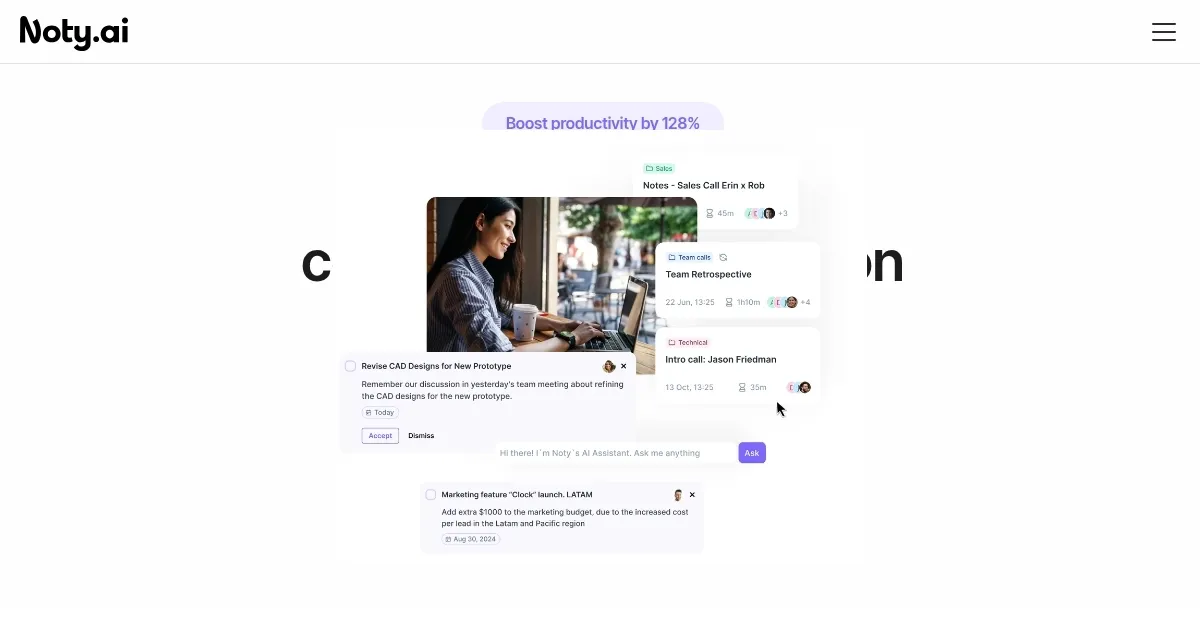
Homepage Screenshot 📸

Noty.ai screenshot

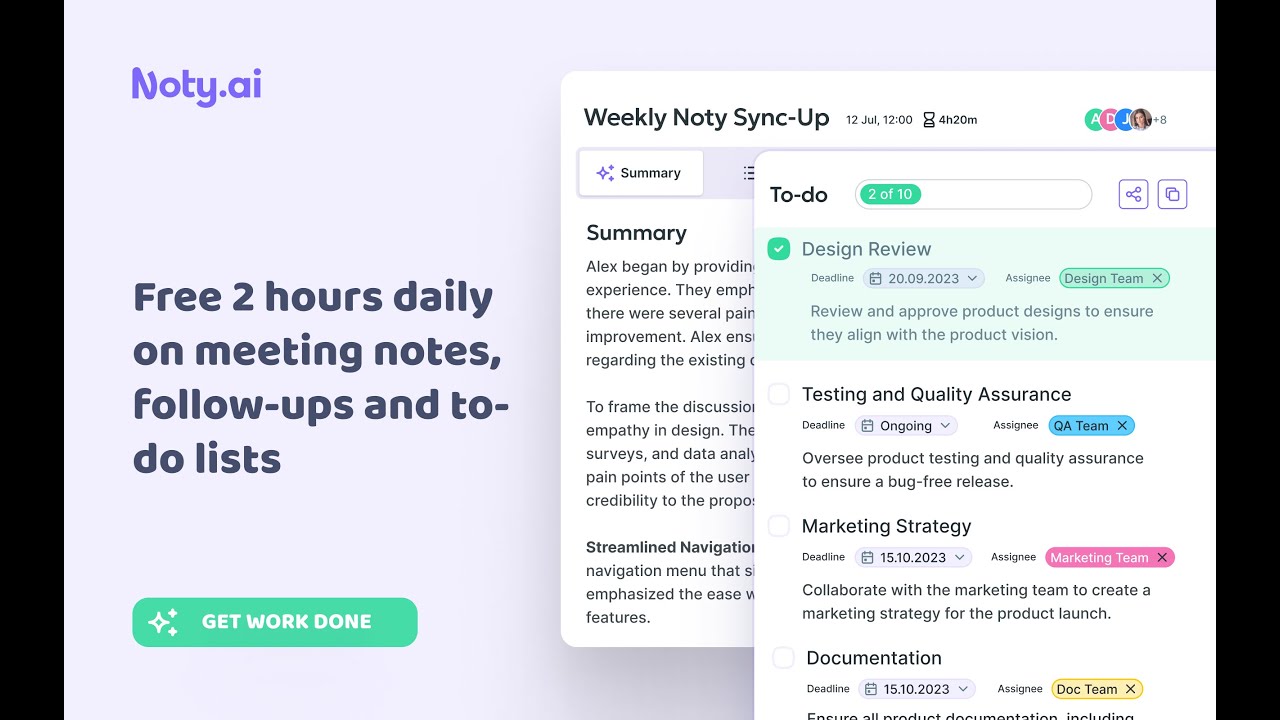
Video Overview 🎬

Noty.ai - Video Overview

What are the key features? ✨

  • Real-Time Transcription: Captures Zoom and Google Meet conversations with speaker attribution.
  • AI Summaries: Generates concise meeting summaries with key decisions and action points.
  • Task Automation: Creates to-do lists from meetings, assigning tasks and deadlines.
  • Integration: Syncs with Google Calendar, Slack, and Zapier for seamless workflows.
  • Multi-Language Support: Transcribes in 90 languages for global team compatibility.

Who is it for? 🤔

Noty.ai is designed for professionals and teams who rely on virtual meetings, such as project managers, sales teams, HR professionals, and UX researchers. It benefits those who need to capture meeting details, automate follow-ups, and streamline task management without manual note-taking. Small to medium-sized businesses, remote workers, and global teams find its multi-language support and integrations particularly valuable for enhancing productivity and collaboration.

Examples of what you can use it for 💡

  • Project Manager: Uses Noty.ai to transcribe meetings and assign tasks to keep projects on track.
  • Sales Professional: Automates follow-up emails with clients based on meeting action items.
  • HR Specialist: Tracks candidate discussions and prepares structured one-on-one notes.
  • UX Researcher: Saves meeting transcripts for reference to minimize design revisions.
  • Engineering Team Lead: Generates to-do lists from sprint planning to boost team efficiency.

Pros & Cons ⚖️

  • Saves time on meeting admin tasks
  • Seamless Google Meet integration
  • Supports 90 languages
  • Free plan available
  • Transcription falters with accents
  • Occasional task assignment errors

FAQs 💬

What platforms does Noty.ai integrate with?
Noty.ai integrates with Google Meet, Zoom, Google Calendar, Slack, and Zapier for seamless workflows.
Is there a free trial available?
Yes, Noty.ai offers a 7-day free trial with no credit card required.
How accurate is the transcription?
Transcription is highly accurate but may struggle with heavy accents or noisy environments.
Can Noty.ai handle multiple languages?
Yes, it supports transcription in 90 languages, ideal for global teams.
Does Noty.ai offer data security?
It uses end-to-end encryption and user-level permissions to protect meeting data.
Can I share meeting summaries with my team?
Yes, summaries and transcripts can be shared via email, Google Docs, or PDF.
Does it work offline?
Noty.ai requires an internet connection for transcription and summarization.
Can I customize the AI for specific terms?
Yes, custom vocabulary recognition allows training for industry-specific jargon.
How does Noty.ai compare to Otter?
Noty.ai focuses more on task automation, while Otter offers advanced voice analytics.
Is customer support available?
Yes, Noty.ai provides customer support for setup and troubleshooting.

Ready to try Noty.ai?

Transcribes meetings, summarizes key points, and creates actionable to-do lists

Visit Noty.ai ↗

Noty.ai alternatives 🔗

  1. Slack AI Slack AI Search smarter, summarize conversations instantly, and be at your most productive
  2. FigJam AI FigJam AI Instantly visualize ideas, suggest best practices, and automate tedious tasks
  3. ClickUp Brain ClickUp Brain Automates workflows with contextual AI for tasks, meetings, and content creation
  4. Miro AI Miro AI Visual collaboration platform that lets you build the next big thing with a prompt and a chat
  5. Zoom AI Companion Zoom AI Companion Get high-quality results when drafting emails and chat messages, summarizing meetings and chat threads
  6. TurboScribe TurboScribe Transcribes audio and video files to accurate text instantly
Share
Noty.ai screenshot enlarged
Promote Noty.ai
light badge
Copy Embed Code
dark badge
Copy Embed Code
neutral badge
Copy Embed Code
Best AI Tools

Discover the best AI tools for any use case

Explore
  • Tool Categories
  • AI Use Cases
  • AI Events
  • AI News
  • Saved Tools
Company
  • About Us
  • Contact Us
  • Media & Partnerships
  • Suggest a Tool
Legal
  • Privacy Policy
  • Terms of Service
Copyright © 2026 Best AI Tools 415 Mission Street, 37th Floor, San Francisco, CA 94105