logo-darklogo-darklogo-darklogo-dark
  • Tool Categories
    • 🎨Art & Creative Design505
    • 🏢Business Management644
    • 💻Coding & Development515
    • 👮Detection83
    • 🧠General Use727
    • 🏥Health & Wellness55
    • 📷Image & Photo Analysis100
    • 🖼️Image Generation & Editing618
    • 📐Interior & Architectural Design37
    • 🎓Learning & Education483
    • ⚖️Legal & Finance90
    • 🎭Lifestyle & Entertainment236
    • 📢Marketing & Advertising627
    • 🎧Music & Audio138
    • 👔Office & Workplace1,014
    • 🔬Research & Data Analysis372
    • 👥Social Media245
    • 🎥Video Generation & Editing426
    • 👧🏻Virtual Companion135
    • 🎤Voice Generation & Editing381
    • ✍️Writing & Editing808
    • All Categories
    • AI Use Cases
  • News
  • Events
    • Academic Conferences
    • Developer Conferences
    • Expos / Trade Shows
    • Industry Summits
    • Workshops / Training
    • All Events
    • Past Events
  • Saved Tools
  • Suggest a Tool
✕
Home › Coding & Development › Website Building› WebWave
WebWave

WebWave

An AI-powered drag-and-drop website builder that makes creating websites easy

WebWave is a drag-and-drop website builder that makes creating websites easy — enabling users to design websites like they are in a graphic design program. Nothing special, you may think – but wait.

WebWave also includes the AI Website Builder feature, which lets you describe your business to the AI and it will create an entire website in just three minutes. Naturally, you can change anything you want afterward to make it truly yours. Still, this will save you a lot of time and effort.

WebWave also offers the White Label Agency option, which is amazing news for freelancers and agencies who build websites for others. You can create websites under your own brand, giving your clients a professional experience. In other words, this provides you with your own website-building company without starting from scratch.

The best part is that WebWave ensures all websites it creates look good on computers, tablets, and phones. There are also options to adjust websites’ appearance on different devices, so it always looks just right.

Lastly, WebWave comes with SEO tools to help your website show up on search engines. As you probably know, this is important because it helps people find your website (and your company) more easily.

In summary, WebWave offers a comprehensive platform for creating websites with ease. Its combo of AI tech, user-friendly design, and versatile features makes it a solid candidate for individuals and businesses alike. Check it out.

Visit WebWave ↗
Categories
💻 Coding
🏗️ Website Building 🚀 Landing Page Building 👨‍💻 Development
🎨 Art
🧑‍🎨 Design Assistant
📢 Advertising
💻 Digital Marketing

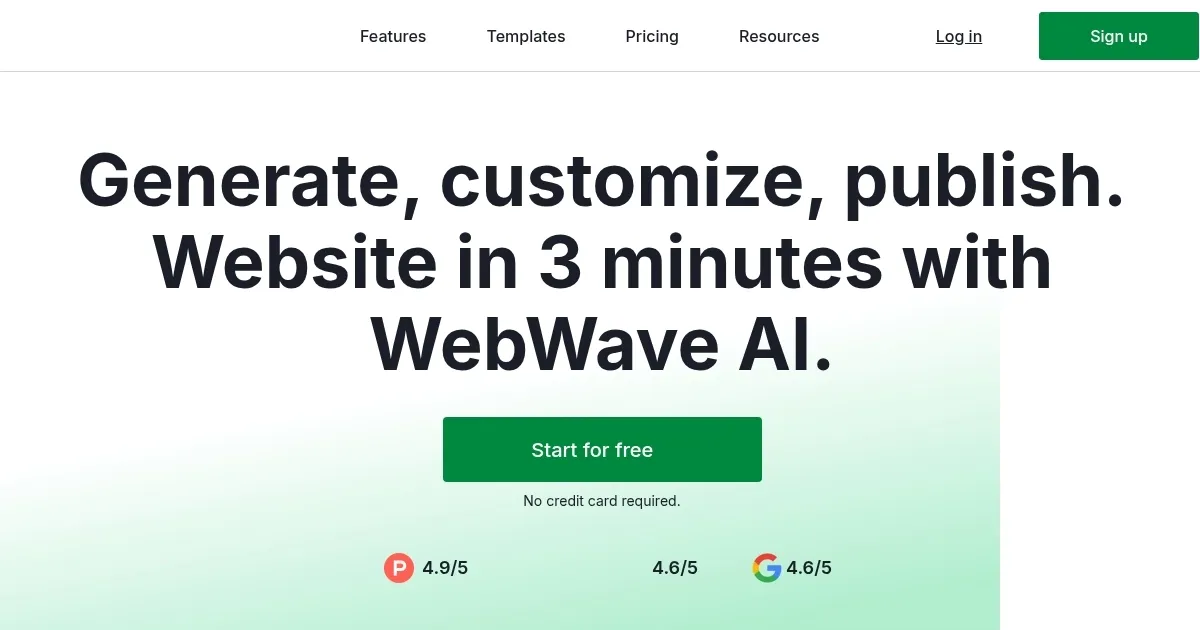
Homepage Screenshot 📸

WebWave screenshot

Video Overview 🎬

What are the key features? ✨

  • Drag-and-drop interface: Easily move elements around your page without any coding. It's as simple as dragging items where you want them.
  • AI Website Builder: Generate a complete website in just three minutes by describing your business. The AI does the rest.
  • White label agency: Build and manage websites for clients under your own brand, which is perfect for freelancers and agencies.
  • Responsive design: Ensure your website looks great on all devices, from desktops to smartphones.
  • SEO tools: Optimize your website to rank higher on search engines, making it easier for people to find you online.

Who is it for? 🤔

WebWave is designed for a broad range of users. Small business owners will find it helpful for establishing an online presence without technical skills. Freelancers and agencies can benefit from the White Label feature, allowing them to create and manage client websites under their own brand. In addition, bloggers, artists, and entrepreneurs looking to showcase their work or sell products online will find WebWave's tools accommodating and user-friendly.

Examples of what you can use it for 💡

  • Create a professional website without hiring a developer
  • Offer clients custom websites with the White Label feature
  • Start a blog and share your thoughts with the world
  • Sell products directly from your website
  • Display your work in a stylish portfolio

Pros & Cons ⚖️

  • Drag-and-drop makes website creation accessible to everyone
  • Quick website generation with AI assistance
  • White Label options enables personalized client experiences
  • The selection of templates could be broader (to fit more industries)

FAQs 💬

What is WebWave?
WebWave is an AI-powered website builder that lets users create and customize professional websites without coding, using a drag-and-drop interface and AI generation for quick setups.
How does the AI website generation work?
You describe your business or idea in a prompt, and the AI creates a complete, customizable website in about 3 minutes, including layout, content, and images tailored to your input.
Do I need design or coding experience to use WebWave?
No, it's built for beginners and pros alike, the AI handles the starting point, and the intuitive editor makes adjustments easy even without prior skills.
Can I customize the AI-generated website?
Yes, fully, you can change anything from text and images to layouts, add elements, or start from blank or templates for complete control.
What kinds of websites can I build with WebWave?
It supports landing pages, portfolios, blogs, business sites, small online stores, link-in-bio pages, and more, all responsive for mobile and desktop.
Does WebWave include SEO features?
Yes, it has a built-in SEO analyzer that checks pages and gives tips to improve rankings on search engines like Google.
Is WebWave suitable for e-commerce?
It supports basic online stores with product listings and sales tools, ideal for small shops, though larger setups might need additional integrations.
Can agencies or freelancers use WebWave?
Absolutely, it offers white-label options, agency accounts with discounts, and client management features for professional use.
How does WebWave compare to other builders like Wix?
It provides more freeform design freedom with its canvas-style editor versus section-based systems, plus strong AI for faster starts.
What support does WebWave offer?
It includes 24/7 chat support on weekdays, email help, a knowledge base, tutorials, and a YouTube channel for guidance.

Ready to try WebWave?

An AI-powered drag-and-drop website builder that makes creating websites easy

Visit WebWave ↗

WebWave alternatives 🔗

  1. Lovable Lovable Builds apps and websites via AI chat prompts.
  2. Replit AI Replit AI Transforms natural language prompts into fully deployable apps using AI agents
  3. v0.dev v0.dev Generates React UI components from text prompts using AI
  4. Hostinger AI Website Builder Hostinger AI Website Builder An AI-powered website builder that lets you launch a brand new website in under one hour
  5. Gamma Gamma An AI tool for creating presentations, documents, or webpages.
  6. Beacons.ai Beacons.ai An AI platform that helps creators manage their online presence and monetize their content
Share
WebWave screenshot enlarged
Promote WebWave
light badge
Copy Embed Code
dark badge
Copy Embed Code
neutral badge
Copy Embed Code
Best AI Tools

Discover the best AI tools for any use case

Explore
  • Tool Categories
  • AI Use Cases
  • AI Events
  • AI News
  • Saved Tools
Company
  • About Us
  • Contact Us
  • Media & Partnerships
  • Suggest a Tool
Legal
  • Privacy Policy
  • Terms of Service
Copyright © 2026 Best AI Tools 415 Mission Street, 37th Floor, San Francisco, CA 94105