logo-darklogo-darklogo-darklogo-dark
  • Tool Categories
    • ๐ŸŽจArt & Creative Design505
    • ๐ŸขBusiness Management644
    • ๐Ÿ’ปCoding & Development515
    • ๐Ÿ‘ฎDetection83
    • ๐Ÿง General Use727
    • ๐ŸฅHealth & Wellness55
    • ๐Ÿ“ทImage & Photo Analysis100
    • ๐Ÿ–ผ๏ธImage Generation & Editing618
    • ๐Ÿ“Interior & Architectural Design37
    • ๐ŸŽ“Learning & Education483
    • โš–๏ธLegal & Finance90
    • ๐ŸŽญLifestyle & Entertainment236
    • ๐Ÿ“ขMarketing & Advertising627
    • ๐ŸŽงMusic & Audio138
    • ๐Ÿ‘”Office & Workplace1,014
    • ๐Ÿ”ฌResearch & Data Analysis372
    • ๐Ÿ‘ฅSocial Media245
    • ๐ŸŽฅVideo Generation & Editing426
    • ๐Ÿ‘ง๐ŸปVirtual Companion135
    • ๐ŸŽคVoice Generation & Editing381
    • โœ๏ธWriting & Editing808
    • All Categories
    • AI Use Cases
  • News
  • Events
    • Academic Conferences
    • Developer Conferences
    • Expos / Trade Shows
    • Industry Summits
    • Workshops / Training
    • All Events
    • Past Events
  • Saved Tools
  • Suggest a Tool
โœ•
Home › Learning & Education › Teacher› Flint
Flint

Flint

Personalizes learning for K-12 students with AI-driven tutoring and teacher tools

Flint is an AI-driven platform designed for K-12 education, enabling teachers to create personalized learning experiences with tools like AI tutoring, real-time feedback, and content customization. It supports over 50 languages, offers robust math and science capabilities, and ensures data privacy by not using user data for AI training. Teachers can upload materials like PDFs or Word documents, set learning objectives, and generate activities such as quizzes or worksheets in seconds. The platform uses Claude 3.7 Sonnet for accurate tutoring, with features like LaTeX equation formatting and 2D/3D graphing for math visualization.

Key features include real-time monitoring of student-AI interactions, allowing teachers to track progress and identify struggles. The platform’s analytics provide summaries of student performance, suggesting follow-up objectives. For world language instruction, Flint supports live speaking practice with immediate feedback, aligning with ACTFL or CEFR standards. It also includes a code editor with syntax highlighting for computer science education and an interactive whiteboard for collaborative tasks. Community templates let teachers share and use pre-built AI tutors, streamlining lesson planning.

Compared to competitors like Khan Academy and Classcraft, Flint emphasizes personalization over broad content libraries or gamification. Its free plan supports up to 80 users, with paid plans for larger groups, offering unlimited professional development. Pricing is tailored to schools, making it competitive but dependent on institutional budgets.

Drawbacks include a learning curve for setting up custom tutors and potential challenges in schools with limited tech infrastructure. Some users report occasional technical glitches, though updates like the January 2025 UI refresh have improved usability. The platform’s reliance on internet connectivity could be a hurdle for some.

For educators considering Flint, begin with the free trial to test its fit for your classroom. Focus on one subject, like math or language, to explore features like the formula editor or speaking practice. Check the website’s tutorials for setup guidance and reach out to support for integration help.

Visit Flint ↗
Categories
๐ŸŽ“ Education
๐Ÿ‘ฉโ€๐Ÿซ Teacher ๐Ÿ“‹ Lesson Plan Generation ๐ŸŽ“ Course ๐Ÿ“บ Tutorial ๐Ÿ“ Quiz Generation โœ๏ธ Homework Helper

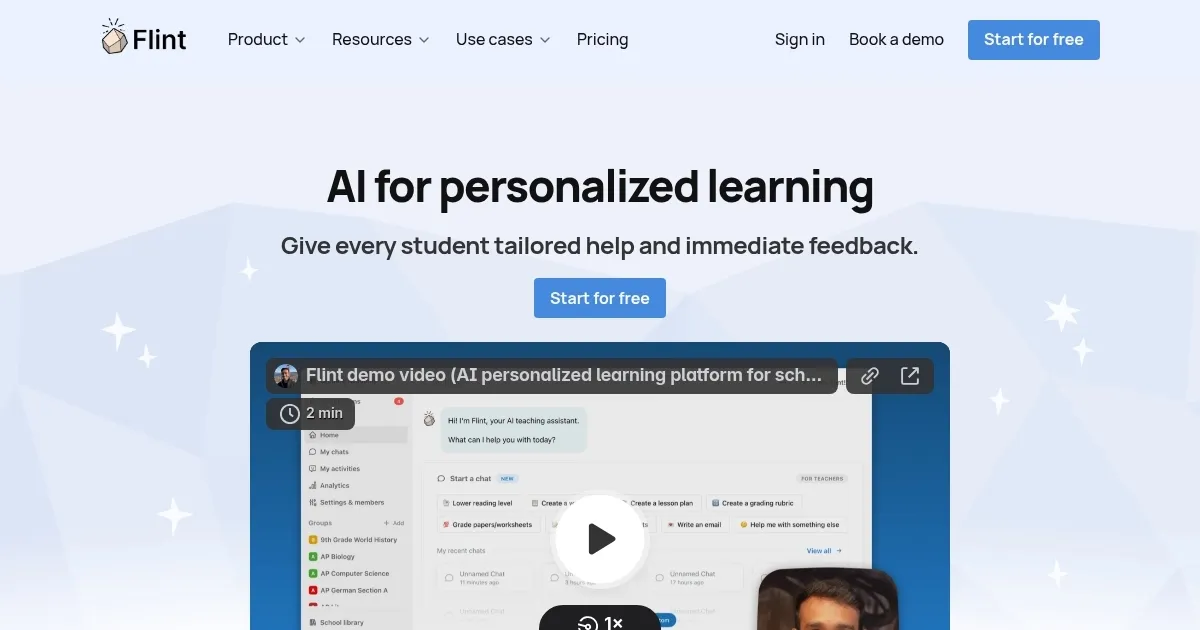
Homepage Screenshot 📸

Flint screenshot

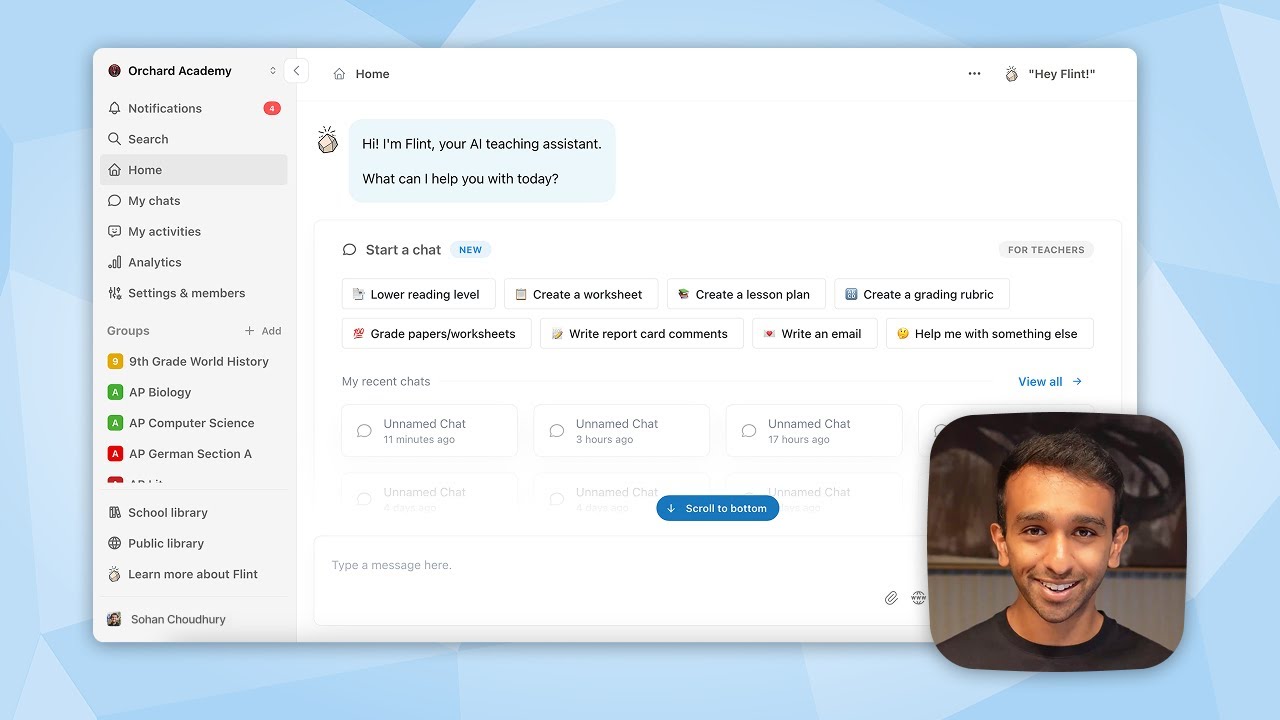
Video Overview 🎬

Flint - Video Overview

What are the key features? ✨

  • AI-Powered Tutoring: Delivers personalized one-on-one tutoring tailored to student needs and pace.
  • Content Customization: Allows teachers to upload materials and create tailored activities like quizzes or worksheets.
  • Real-Time Monitoring: Tracks student-AI interactions, providing performance insights and summaries.
  • Multi-Language Support: Supports 50+ languages for live speaking practice and feedback.
  • Math and Code Tools: Includes LaTeX formatting, graphing, and a code editor with syntax highlighting.

Who is it for? 🤔

Flint is ideal for K-12 teachers seeking to personalize learning, especially in subjects like math, science, languages, and computer science, as well as administrators looking to streamline professional development. It suits schools with moderate tech infrastructure aiming to enhance student engagement and reduce teacher workload through AI-driven tools.

Examples of what you can use it for 💡

  • Math Teacher: Uses Flint to generate personalized problem sets and visualize equations with 2D/3D graphs.
  • Language Instructor: Employs Flint for live speaking practice in Spanish, with real-time feedback on proficiency.
  • History Teacher: Creates AI-driven debates on historical topics using uploaded source materials.
  • Computer Science Educator: Leverages Flintโ€™s code editor for tailored coding challenges with syntax support.
  • Administrator: Uses Flint for faculty training with AI-generated professional development materials.

Pros & Cons ⚖️

  • Saves teachers 10+ hours weekly.
  • Personalizes learning for students.
  • Supports 50+ languages.
  • Initial setup takes time.

FAQs 💬

What is Flint designed for?
Flint helps K-12 teachers personalize learning with AI-driven tutoring and content creation.
Is Flint free to use?
Itโ€™s free for up to 80 users, with paid plans for larger groups.
Does Flint support multiple languages?
Yes, it supports 50+ languages for tutoring and speaking practice.
Is Flint safe for student data?
Flint doesnโ€™t use user data to train AI, ensuring privacy.
Can students under 13 use Flint?
Yes, with school technology waivers for COPPA compliance.
Does Flint work for math and science?
It offers LaTeX formatting, graphing, and accurate calculations.
How do teachers monitor progress?
Real-time analytics track student interactions and performance.
Can Flint integrate with other tools?
It integrates with platforms like Google and Microsoft accounts.
Is Flint GDPR compliant?
Yes, it complies with GDPR; see the privacy policy for details.
What devices does Flint support?
It works on various devices, no extensive tech setup needed.

Ready to try Flint?

Personalizes learning for K-12 students with AI-driven tutoring and teacher tools

Visit Flint ↗

Flint alternatives 🔗

  1. Duolingo Max Duolingo Max An AI-enabled language learning experience from Duolingo powered by GPT-4
  2. Britannica Chatbot Britannica Chatbot A digital librarian drawing from over 130,000 meticulously fact-checked articles
  3. Turnitin Turnitin An educational platform that uses advanced AI to ensure academic integrity by detecting plagiarism
  4. Gauth Gauth A useful mobile app designed to assist students in solving complex math problems
  5. Brainly Brainly Provides instant homework help and AI-powered tutoring for students
  6. AI Homework Help AI Homework Help Supercharge your study doc with instant answers and explanations and recommended resources
Share
Flint screenshot enlarged
Promote Flint
light badge
Copy Embed Code
dark badge
Copy Embed Code
neutral badge
Copy Embed Code
Best AI Tools

Discover the best AI tools for any use case

Explore
  • Tool Categories
  • AI Use Cases
  • AI Events
  • AI News
  • Saved Tools
Company
  • About Us
  • Contact Us
  • Media & Partnerships
  • Suggest a Tool
Legal
  • Privacy Policy
  • Terms of Service
Copyright © 2026 Best AI Tools 415 Mission Street, 37th Floor, San Francisco, CA 94105