logo-darklogo-darklogo-darklogo-dark
  • Tool Categories
    • ๐ŸŽจArt & Creative Design505
    • ๐ŸขBusiness Management644
    • ๐Ÿ’ปCoding & Development515
    • ๐Ÿ‘ฎDetection83
    • ๐Ÿง General Use727
    • ๐ŸฅHealth & Wellness55
    • ๐Ÿ“ทImage & Photo Analysis100
    • ๐Ÿ–ผ๏ธImage Generation & Editing618
    • ๐Ÿ“Interior & Architectural Design37
    • ๐ŸŽ“Learning & Education483
    • โš–๏ธLegal & Finance90
    • ๐ŸŽญLifestyle & Entertainment236
    • ๐Ÿ“ขMarketing & Advertising627
    • ๐ŸŽงMusic & Audio138
    • ๐Ÿ‘”Office & Workplace1,014
    • ๐Ÿ”ฌResearch & Data Analysis372
    • ๐Ÿ‘ฅSocial Media245
    • ๐ŸŽฅVideo Generation & Editing426
    • ๐Ÿ‘ง๐ŸปVirtual Companion135
    • ๐ŸŽคVoice Generation & Editing381
    • โœ๏ธWriting & Editing808
    • All Categories
    • AI Use Cases
  • News
  • Events
    • Academic Conferences
    • Developer Conferences
    • Expos / Trade Shows
    • Industry Summits
    • Workshops / Training
    • All Events
    • Past Events
  • Saved Tools
  • Suggest a Tool
โœ•
Home › Learning & Education › Teacher› To teach
To teach

To teach

Creates personalized lesson plans and exercises for teachers using AI

To teach is an AI-powered platform that helps teachers create personalized lesson plans, worksheets, and exercises for students aged 6 to 18 across various subjects. It offers tools to streamline lesson preparation and adapt content to individual student needs.

The platform provides a Lesson Planner tool that generates standards-aligned lesson plans based on user inputs like subject, grade level, and specific topics. Teachers can customize these plans by incorporating their own texts, images, or videos from sources like YouTube. The exercise generator creates tailored worksheets, offering over 800 pre-made exercises in subjects such as English, Math, Biology, and Geography. These can be exported as PDFs or interactive H5P formats for integration with learning management systems like Moodle. The platform also includes unique formats, such as WhatsApp-style chats or emails, to make exercises engaging.

To teach offers both free and paid plans (Starter and Pro), with paid tiers unlocking advanced customization and gamification features. Compared to competitors like Magic School and TeacherMatic, it focuses heavily on personalization but lacks direct student-facing features like those in Khanmigo. User feedback from sources like Reddit highlights the platform’s time-saving capabilities, though some note that generated content can occasionally be too generic, requiring manual edits.

The platform’s interface is user-friendly, though less tech-savvy users may find the customization options complex. Its gamification features, which turn exercises into game-like activities, are a notable strength. Pricing appears competitive within the education AI market, with student discounts available for paid plans. The tool supports multiple languages and integrates with tools like Google Classroom, enhancing its versatility.

Teachers could start with the free plan to test core features like the Lesson Planner and exercise generator. Focus on integrating your own materials to maximize personalization, and review outputs to ensure they align with your curriculum. Regular use can significantly reduce planning time, especially for differentiated instruction.

Visit To teach ↗
Categories
๐ŸŽ“ Education
๐Ÿ‘ฉโ€๐Ÿซ Teacher ๐Ÿ“‹ Lesson Plan Generation ๐Ÿ“ Quiz Generation ๐Ÿค” Question Generation ๐ŸŽ“ Course ๐ŸŽฏ Quiz
๐Ÿ‘” Work
โšก Work Productivity

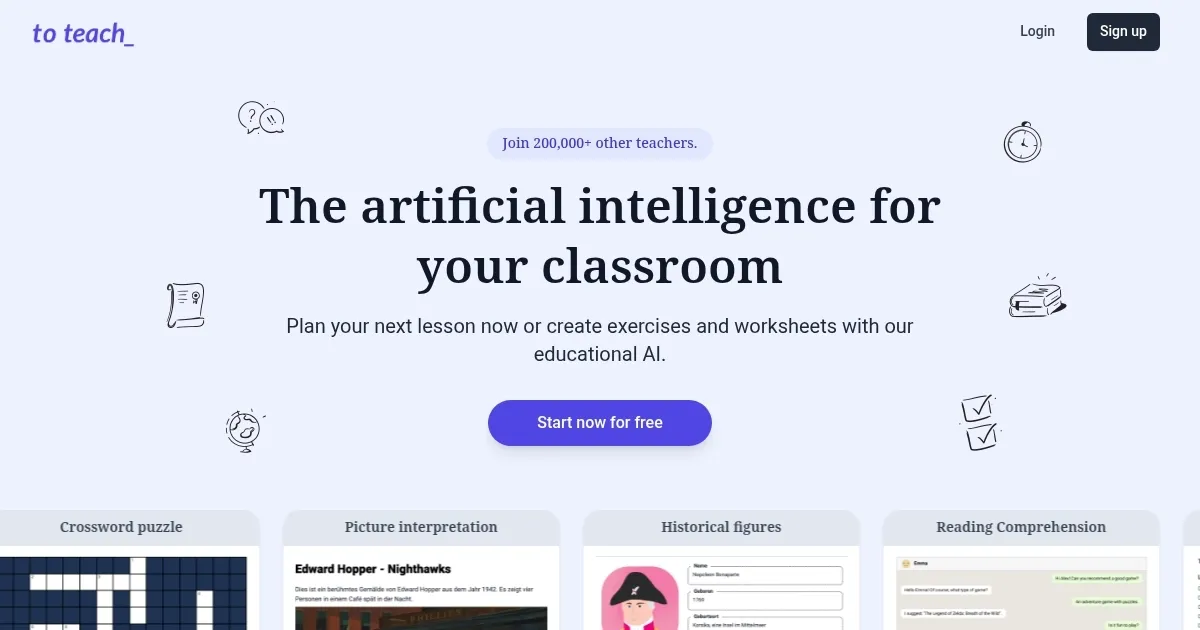
Homepage Screenshot 📸

To teach screenshot

What are the key features? ✨

  • Lesson Planner: Generates standards-aligned lesson plans based on subject and grade inputs.
  • Exercise Generator: Creates customized worksheets with over 800 pre-made exercises.
  • Content Customization: Allows teachers to incorporate texts, images, or videos into materials.
  • Gamification Options: Turns exercises into engaging formats like games or chats.
  • Export Flexibility: Supports PDF and H5P formats for integration with learning systems.

Who is it for? 🤔

To teach is ideal for K-12 teachers, especially those handling multiple subjects or diverse classrooms, who need to create personalized, engaging lesson plans and exercises quickly. It suits educators seeking to save time on planning while tailoring content to studentsโ€™ needs, as well as tech-savvy teachers comfortable with digital tools. The platform is also valuable for homeschooling parents and educational content creators looking for flexible, curriculum-aligned resources.

Examples of what you can use it for 💡

  • Elementary Teacher: Creates engaging Math worksheets with game-like formats for 3rd graders.
  • High School English Teacher: Designs comprehension exercises using uploaded short stories.
  • Homeschooling Parent: Generates customized Biology lesson plans for a 10th-grade student.
  • Language Instructor: Crafts WhatsApp-style chat exercises to practice Spanish vocabulary.
  • Special Education Teacher: Adapts reading worksheets to match studentsโ€™ skill levels.

Pros & Cons ⚖️

  • Saves time on lesson planning.
  • Integrates with LMS platforms.
  • Supports multiple subjects.
  • Interface may confuse novices.
  • Limited student-facing tools.

FAQs 💬

What subjects does To teach support?
To-teach.ai supports subjects like English, Math, Biology, Geography, and Arts for students aged 6 to 18.
Is there a free version of To teach?
Yes, a free plan is available, but it has limited access to advanced features like gamification.
Can I integrate To teach with Google Classroom?
Yes, it supports integration with Google Classroom and other LMS platforms via PDF or H5P exports.
Does To teach offer student discounts?
Students and trainees receive a 30% discount on Starter and Pro plans with valid enrollment proof.
How customizable are the lesson plans?
Teachers can upload texts, images, or videos to tailor lesson plans to specific student needs.
Is To teach suitable for homeschooling?
Yes, itโ€™s ideal for homeschooling parents creating curriculum-aligned materials for various subjects.
Can I use my own materials in To teach?
Yes, you can incorporate your own documents, videos, or web articles into exercises and plans.
Does To teach support multiple languages?
Yes, it supports content creation in multiple languages, ideal for language instructors.
How long does it take to generate a lesson plan?
Lesson plans are typically generated in under a minute, depending on input complexity.
Is To teach secure for classroom use?
The platform prioritizes data privacy, offering secure content creation, though specific certifications are not detailed.

Ready to try To teach?

Creates personalized lesson plans and exercises for teachers using AI

Visit To teach ↗

To teach alternatives 🔗

  1. Duolingo Max Duolingo Max An AI-enabled language learning experience from Duolingo powered by GPT-4
  2. Britannica Chatbot Britannica Chatbot A digital librarian drawing from over 130,000 meticulously fact-checked articles
  3. Turnitin Turnitin An educational platform that uses advanced AI to ensure academic integrity by detecting plagiarism
  4. Gauth Gauth A useful mobile app designed to assist students in solving complex math problems
  5. Brainly Brainly Provides instant homework help and AI-powered tutoring for students
  6. AI Homework Help AI Homework Help Supercharge your study doc with instant answers and explanations and recommended resources
Share
To teach screenshot enlarged
Promote To teach
light badge
Copy Embed Code
dark badge
Copy Embed Code
neutral badge
Copy Embed Code
Best AI Tools

Discover the best AI tools for any use case

Explore
  • Tool Categories
  • AI Use Cases
  • AI Events
  • AI News
  • Saved Tools
Company
  • About Us
  • Contact Us
  • Media & Partnerships
  • Suggest a Tool
Legal
  • Privacy Policy
  • Terms of Service
Copyright © 2026 Best AI Tools 415 Mission Street, 37th Floor, San Francisco, CA 94105