logo-darklogo-darklogo-darklogo-dark
  • Home
  • Browse
    • Assistant
    • Coding
    • Image
    • Productivity
    • Video
    • Voice
    • Writing
    • All Categories
    • AI Use Cases
  • My Favorites
  • Suggest a Tool
✕
Home › Music & Audio / Video Generation & Editing›
Published by Dusan Belic on September 18, 2025

Framedrop

Framedrop
Framedrop Homepage
Categories Music & AudioVideo Generation & Editing
Transforms video and audio into multi-platform content with AI automation

Framedrop

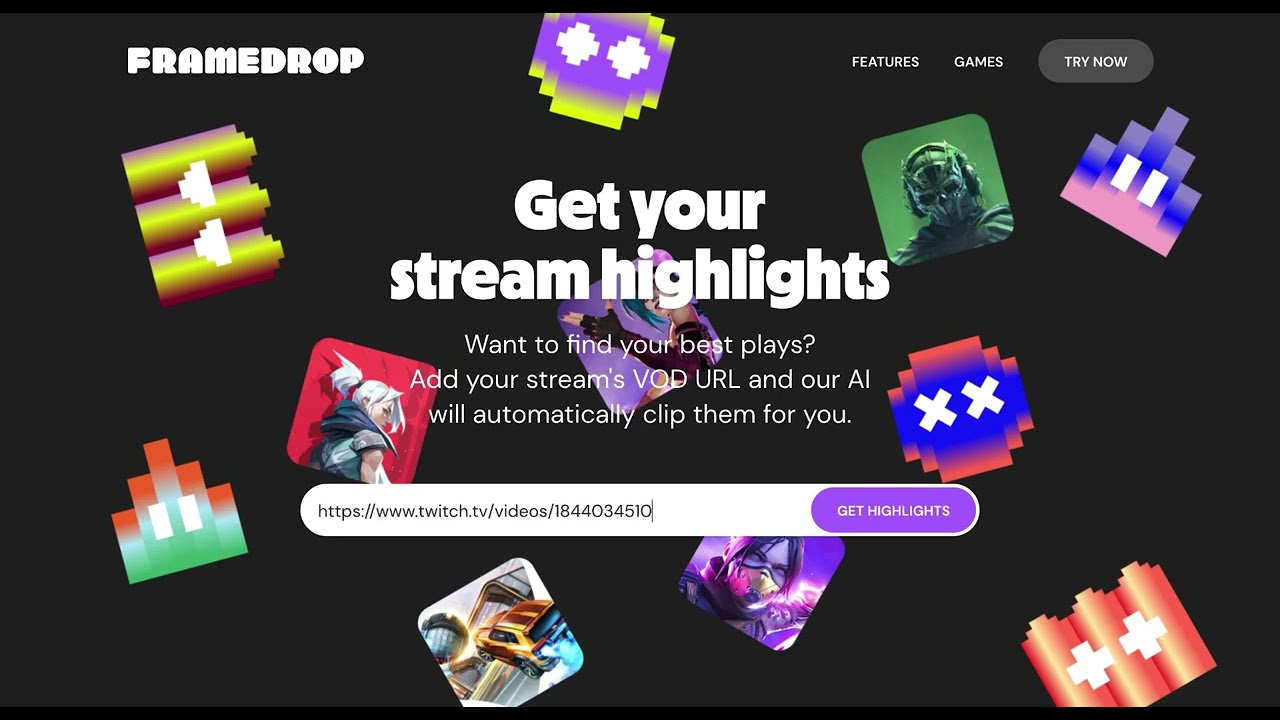
Framedrop is an AI-powered platform that repurposes video and audio content into clips, articles, and social posts for media teams. It automates highlight detection, content creation, and CMS integration to streamline workflows. The tool supports TV networks, radio stations, and streaming services, focusing on scalability and brand consistency.

Key features include Auto-Clip, which identifies standout moments in live or recorded footage, producing clips in seconds. Instant Article Creation generates SEO-optimized articles with headlines and summaries from video or audio. One Video, Multiple Outputs creates platform-specific content, like TikTok or Instagram Reels, from a single upload. Live Transcript Search allows users to find specific quotes in footage quickly. The platform integrates with CMS systems, ensuring content flows directly to publication.

Compared to Opus Clip and Descript, Framedrop offers stronger article generation than Opus Clip and broader multi-platform support than Descript. Its pricing is mid-range, more affordable than premium tools but above free alternatives. Users on X praise its speed but note occasional AI errors in niche content detection.

Framedrop excels for teams needing fast, multi-format content. Auto-Clip saves hours of manual editing, and the Clip Dashboard organizes highlights efficiently. However, the AI may misinterpret complex audio, requiring manual corrections. The interface is user-friendly but lacks advanced customization for some users.

To use Framedrop effectively, upload high-quality footage for best AI performance. Test its integration with your CMS early. Adjust Auto-Clip settings to match your content’s tone. It’s a solid choice for media teams aiming to scale output without extra staff.

Framedrop Homepage
Categories Music & AudioVideo Generation & Editing

Video Overview ▶️

Framedrop - Video Overview

What are the key features? ⭐

  • Auto-Clip: Detects and creates highlight clips from live or recorded footage in seconds.
  • Instant Article Creation: Generates SEO-optimized articles with headlines from video or audio.
  • One Video, Multiple Outputs: Produces platform-specific content from a single upload.
  • Live Transcript Search: Finds specific quotes in footage for quick editing.
  • CMS Integration: Connects with existing systems for seamless content publishing.

Who is it for? 🤔

Framedrop is made for media professionals, including TV network producers, radio show hosts, and streaming service content managers, who need to repurpose long-form video or audio into engaging, platform-specific content quickly. It suits teams aiming to scale output without expanding staff, especially those with established CMS workflows seeking automation to boost efficiency while maintaining brand consistency.

Examples of what you can use it for 💭

  • TV Producer: Creates social media clips from news broadcasts to engage online audiences.
  • Radio Host: Turns podcast episodes into SEO-optimized blog posts for wider reach.
  • Streaming Manager: Generates promotional clips from live streams for YouTube Shorts.
  • Content Marketer: Produces platform-specific posts from webinars to boost engagement.
  • Sports Broadcaster: Clips highlight plays from games for instant social media sharing.

Pros & Cons ⚖️

  • Seamless CMS integration
  • Strong SEO article output
  • Brand-consistent content
  • AI misses niche moments
  • Limited customization

FAQs 💬

What types of content can Framedrop process?
Framedrop handles video and audio, including live streams, podcasts, and broadcasts.
Does Framedrop support social media platforms?
Yes, it creates clips for TikTok, Instagram Reels, YouTube Shorts, and more.
Is CMS integration mandatory?
No, but it enhances workflow efficiency for publishing.
Can Framedrop handle live footage?
Yes, Auto-Clip works with both live and recorded content.
How accurate is the AI for highlight detection?
It’s highly accurate but may miss niche or complex moments.
Does it support multiple languages?
Yes, though accuracy varies with accents and dialects.
Is there a free version?
Framedrop offers a free tier with optional paid features.
How long does setup take?
Basic setup takes minutes, but CMS integration may take longer.
Can it maintain my brand’s voice?
Yes, the AI learns your editorial style for consistent outputs.
What games does Framedrop support for clipping?
It supports Valorant, Apex Legends, Call of Duty, and more.
Visit Framedrop

Related tools ↙️

  1. Tango Tango Creates interactive how-to guides from screen captures in minutes.
  2. Cloudinary Cloudinary Manages, transforms, optimizes, and delivers images and videos with AI-powered features
  3. Nullface Nullface Generates AI-powered faceless videos for TikTok and YouTube effortlessly
  4. LANDR LANDR Offers AI mastering, music distribution, samples, plugins, and courses for creators
  5. PodLM PodLM Transforms URLs, texts, and documents into professional podcasts using AI
  6. Verbalate Verbalate Translates and dubs videos into multiple languages using voice cloning and lip sync for global reach
Last update: October 24, 2025
Share
Promote Framedrop
light badge
Copy Embed Code
dark badge
Copy Embed Code
neutral badge
Copy Embed Code
About Us | Contact Us | Suggest an AI Tool | Privacy Policy | Terms of Service

Copyright © 2026 Best AI Tools
415 Mission Street, 37th Floor, San Francisco, CA 94105