Skip to content
logo-darklogo-darklogo-darklogo-dark
  • Tool Categories
    • 🎨Art & Creative Design505
    • 🏢Business Management644
    • 💻Coding & Development514
    • 👮Detection83
    • 🧠General Use728
    • 🏥Health & Wellness55
    • 📷Image & Photo Analysis100
    • 🖼️Image Generation & Editing618
    • 📐Interior & Architectural Design37
    • 🎓Learning & Education483
    • ⚖️Legal & Finance90
    • 🎭Lifestyle & Entertainment236
    • 📢Marketing & Advertising627
    • 🎧Music & Audio138
    • 👔Office & Workplace1,014
    • 🔬Research & Data Analysis373
    • 👥Social Media245
    • 🎥Video Generation & Editing426
    • 👧🏻Virtual Companion135
    • 🎤Voice Generation & Editing381
    • ✍️Writing & Editing808
    • All Categories
    • AI Use Cases
  • News
  • Events
    • Academic Conferences
    • Developer Conferences
    • Expos / Trade Shows
    • Industry Summits
    • Workshops / Training
    • All Events
    • Past Events
  • Saved Tools
  • Suggest a Tool
    ✕
    Home › Music & Audio › Music Generation› Mureka
    Mureka

    Mureka

    Transforms text, melodies, or prompts into studio-quality, royalty-free songs in minutes

    Mureka AI is an advanced music generation platform that transforms text prompts, lyrics, or melodies into royalty-free, studio-quality songs using the SkyMusic 2.0 model. Powered by MusiCoT (Music Chain-of-Thought) technology, it plans song structures before generating audio, resulting in coherent tracks across genres like pop, hip-hop, and jazz.

    Users can input lyrics, upload reference tracks, or record melodies, customizing aspects like vocal tone, tempo, and mood. The platform supports both web and mobile access, with a user-friendly interface requiring no music theory knowledge. Songs, up to five minutes long, are generated in approximately 45 seconds and can be exported as MP3, WAV, or stems.

    Key features include Style Reference Generation, which mimics the style of uploaded tracks, and voice cloning for premium users to personalize vocals. Mureka also offers a marketplace for selling songs with exclusive or non-exclusive licenses, alongside API integration for developers. The free plan allows up to six songs daily, while paid plans, starting at approximately $10 monthly, provide more credits and advanced features like voice cloning.

    Compared to competitors like Suno and Udio, Mureka excels in structural coherence but lags in vocal realism, with occasional mispronunciations reported. Some users note issues with paywalls and unclear subscription terms, particularly credit loss upon non-renewal.

    The platform suits musicians, content creators, and hobbyists seeking quick, customizable music. Its ability to generate royalty-free tracks makes it ideal for commercial use in videos, podcasts, or ads. However, lyric accuracy and interface clarity need improvement, as users report truncated lyrics and confusing subscription prompts. To maximize value, explore the free plan first, use advanced mode for precise control, and export in high-quality formats for professional projects.

    Visit Mureka ↗
    Categories
    🎧 Music
    🎶 Music Generation 🎙️ Song Generation 🎤 Lyrics Generation 🎼 Text-to-Music 🎸 Instrumental Generation
    🎤 Voice
    👯 Voice Cloning

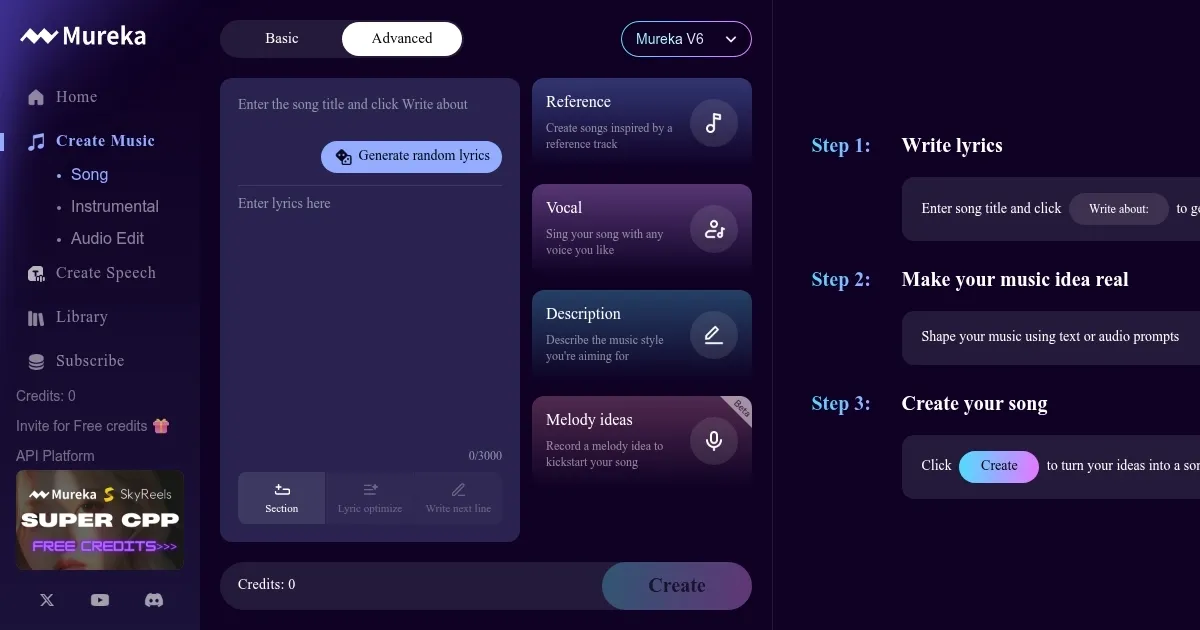
    Homepage Screenshot 📸

    Mureka screenshot

    Video Overview 🎬

    Mureka - Video Overview

    What are the key features? ✨

    • Style Reference Generation: Upload a track to create a song mimicking its style.
    • Voice Cloning: Premium users can clone a voice or customize vocal tone.
    • MusiCoT Technology: Plans song structure for coherent, polished tracks.
    • Marketplace: Sell songs with exclusive or non-exclusive licenses.
    • API Integration: Allows developers to embed Mureka’s tech in other apps.

    Who is it for? 🤔

    Mureka AI is ideal for musicians, content creators, and hobbyists who want to produce professional-grade music without technical expertise. It’s perfect for YouTubers needing unique intros, podcasters seeking custom background tracks, or songwriters prototyping ideas. Developers can leverage its API for innovative audio applications, while entrepreneurs can use the marketplace to monetize creations. Its accessibility suits beginners, yet its advanced features appeal to seasoned producers.

    Examples of what you can use it for 💡

    • YouTuber: Creates a custom intro song for a vlog using a pop-style reference track.
    • Podcaster: Generates royalty-free background music for episodes with a jazz vibe.
    • Songwriter: Prototypes a demo by inputting lyrics and cloning their voice.
    • Advertiser: Produces a short, upbeat track for a commercial using a text prompt.
    • Developer: Integrates Mureka’s API into an app for real-time music generation.

    Pros & Cons ⚖️

    • Easy-to-use interface for all skill levels.
    • Royalty-free tracks for commercial use.
    • Advanced customization of vocals and style.
    • Marketplace for monetizing creations.
    • Vocal pronunciation can be inaccurate.
    • Limited free plan song quota.

    FAQs 💬

    What is Mureka AI?
    Mureka AI is a platform that generates studio-quality songs from text, lyrics, or melodies.
    Is Mureka free to use?
    Yes, it offers a free plan with up to six songs daily; paid plans unlock more features.
    Can I sell my Mureka-created songs?
    Yes, the marketplace allows selling songs with exclusive or non-exclusive licenses.
    What genres can I create with Mureka?
    You can create any genre, from pop to jazz, based on your input.
    Does Mureka support collaboration?
    Yes, you can collaborate with others on the platform.
    Can I use my own voice?
    Premium users can clone their voice for personalized vocals.
    What file formats are available?
    Songs can be exported as MP3, WAV, or stems.
    How fast does Mureka generate songs?
    It generates songs in about 45 seconds, up to five minutes long.
    Can I use reference tracks?
    Yes, upload a track to guide the AI in mimicking its style.
    Is Mureka available on mobile?
    Yes, it’s available on Android and iOS with a user-friendly app.

    Ready to try Mureka?

    Transforms text, melodies, or prompts into studio-quality, royalty-free songs in minutes

    Visit Mureka ↗

    Mureka alternatives 🔗

    1. Suno Suno Music creation tool blending AI with the artistry of music composition to offer a personalized musical experience
    2. MakeSong MakeSong Creates royalty-free songs from text or lyrics in seconds
    3. AI Song Maker AI Song Maker Generate royalty-free songs from text or lyrics using AI
    4. MusicHero.ai MusicHero.ai Generate original music tracks using simple text prompts
    5. MakeBestMusic MakeBestMusic An AI-powered music production suite that enables users to create music using text prompts
    6. Suno AI Music Suno AI Music Creates unique, professional-quality music from text prompts in seconds
    Share
    Mureka screenshot enlarged
    Best AI Tools

    Discover the best AI tools for any use case

    Explore
    • Tool Categories
    • AI Use Cases
    • AI Events
    • AI News
    • Saved Tools
    Company
    • About Us
    • Contact Us
    • Media & Partnerships
    • Suggest a Tool
    Legal
    • Privacy Policy
    • Terms of Service
    Copyright © 2026 Best AI Tools 415 Mission Street, 37th Floor, San Francisco, CA 94105