An AI-powered platform designed to enhance the online retail experience
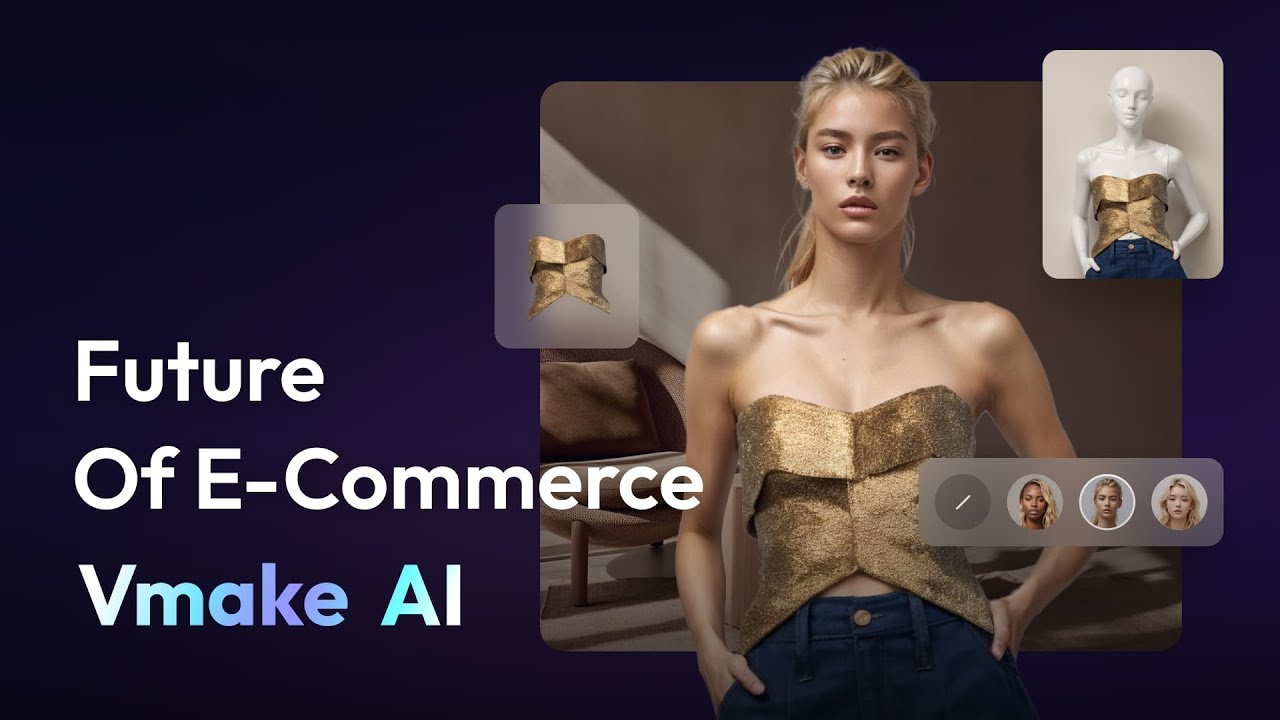
Vmake AI is an AI-powered platform designed to enhance the online retail experience. Its key feature, AI Fashion Model Studio, allows retailers to create realistic fashion models that bring products to life with different poses and styles. As such, it elevates the visual appeal of e-commerce sites, helping businesses showcase their products more effectively.
In addition, Vmake provides a suite of AI-enhanced tools for product photography. These photos are meant to enrich the customer’s online shopping experience and optimize conversion rates, helping e-retailers differentiate themselves through personalized and fancy visuals.
In addition to visuals, Vmake incorporates a workflow automation system that streamlines the creative process for content creators and marketing teams. By simplifying tasks like editing and managing product imagery, the platform frees up time for businesses to focus on other things, like strategy and innovation.
Vmake works for small and big retailers alike, enabling them to deliver consistent and sophisticated product imagery that attracts repeat customers. Overall, it serves as a comprehensive e-commerce solution that empowers brands to elevate their online presence with high-quality visuals and optimized workflows. Check it out.
FAQs
💬
What is Vmake AI, and who is it for?
Vmake AI is an all-in-one AI tool that helps you make studio-quality talking videos quickly, without needing fancy equipment or pro skills. It targets content creators, small business owners, marketers, and coaches who want to turn simple clips into engaging stuff for social media or ads. I think it's especially great for folks just starting out, since it handles the heavy lifting with AI.
What are the main features of Vmake AI?
Key features include one-click auto captions with stylish designs, AI video enhancement for clearer visuals and audio, watermark and text removal, background swapping, and transcription from video to text. Plus, there's an AI teleprompter in the mobile app for natural script reading, and tools like visual hooks for viral intros. Recent updates in 2025 added support for advanced models like Google Veo 3.1 for text-to-video generation.
How does Vmake AI work for beginners?
You upload a video or start from text, pick a feature like enhancement or captions, and the AI does the rest in seconds or minutes. For example, drop in a clip, hit "enhance," and it upscales quality automatically. It's browser-based for desktop and has apps for iOS and Android, so no downloads needed upfront. Users on Reddit say it's intuitive, but you might play with prompts for the best results in generation tools.
Is there a free version or trial for Vmake AI?
Yes, new users get 50 free credits to test basic features like limited auto captions and transcription for up to three files. Exports come with watermarks and cap at 720p or 1080p. It's a solid way to try without committing, though pro features need an upgrade. Reviews from G2 in 2025 note it's generous for quick tests.
What file formats does Vmake AI support for uploads?
It handles common video formats like MP4, MOV, and AVI, plus audio files for transcription. Upload sizes go up to several gigabytes depending on your plan, but free users might hit limits faster. Background removal works best on high-contrast clips, per user feedback on Trustpilot.
Can Vmake AI generate videos from text or images?
Absolutely, the AI Video Generator lets you create clips from text prompts or images, using models like Seedance 1.0, Kling 2.0, or the new Veo 3.1 for realistic motion. It's handy for ads or explainers. X posts from creators in late 2025 rave about how it keeps character consistency across scenes.
How does Vmake AI compare to tools like CapCut or Synthesia?
Unlike CapCut's manual editing, Vmake AI automates more with AI hooks and enhancers for faster results, ideal for talking-head videos. Compared to Synthesia, which shines in avatar-based training vids, Vmake AI is broader for editing existing footage and cheaper for casual use. Pictory focuses on text-to-video summaries, but Vmake adds enhancement tools. Reddit threads from 2025 call it a strong all-rounder for social content.
Is Vmake AI available on mobile, and what's the app like?
Yes, there's a free app for iOS and Android with core features like the AI teleprompter, captions, and quick edits. It's praised for on-the-go use, though some X users mention occasional glitches with large files. Desktop via browser covers everything else, making it flexible.
What kinds of videos works best with Vmake AI?
It excels at short talking videos, like YouTube Shorts, TikToks, or Reels, up to a few minutes. Enhancement shines on blurry or noisy clips, and auto-captions boost engagement for educational or marketing content. Users on Product Hunt in 2025 say it's less ideal for complex VFX but perfect for polished, viral hooks.
Are there any limitations I should know about before trying Vmake AI?
Free tier limits exports to lower resolutions with watermarks, and processing can queue during peaks. Some reviews mention credit usage feels opaque at times, so track them. It's ethical for owned content, but avoid removing watermarks from unlicensed videos to stay legal. Overall, it's reliable for most, but test with your style first.