logo-darklogo-darklogo-darklogo-dark
  • Tool Categories
    • ๐ŸŽจArt & Creative Design505
    • ๐ŸขBusiness Management644
    • ๐Ÿ’ปCoding & Development515
    • ๐Ÿ‘ฎDetection83
    • ๐Ÿง General Use727
    • ๐ŸฅHealth & Wellness55
    • ๐Ÿ“ทImage & Photo Analysis100
    • ๐Ÿ–ผ๏ธImage Generation & Editing618
    • ๐Ÿ“Interior & Architectural Design37
    • ๐ŸŽ“Learning & Education483
    • โš–๏ธLegal & Finance90
    • ๐ŸŽญLifestyle & Entertainment236
    • ๐Ÿ“ขMarketing & Advertising627
    • ๐ŸŽงMusic & Audio138
    • ๐Ÿ‘”Office & Workplace1,014
    • ๐Ÿ”ฌResearch & Data Analysis372
    • ๐Ÿ‘ฅSocial Media245
    • ๐ŸŽฅVideo Generation & Editing426
    • ๐Ÿ‘ง๐ŸปVirtual Companion135
    • ๐ŸŽคVoice Generation & Editing381
    • โœ๏ธWriting & Editing808
    • All Categories
    • AI Use Cases
  • News
  • Events
    • Academic Conferences
    • Developer Conferences
    • Expos / Trade Shows
    • Industry Summits
    • Workshops / Training
    • All Events
    • Past Events
  • Saved Tools
  • Suggest a Tool
โœ•
Home › Interior & Architectural Design › Landscape Generation› Neighborbrite
Neighborbrite

Neighborbrite

Generates AI-powered landscape designs from yard photos.

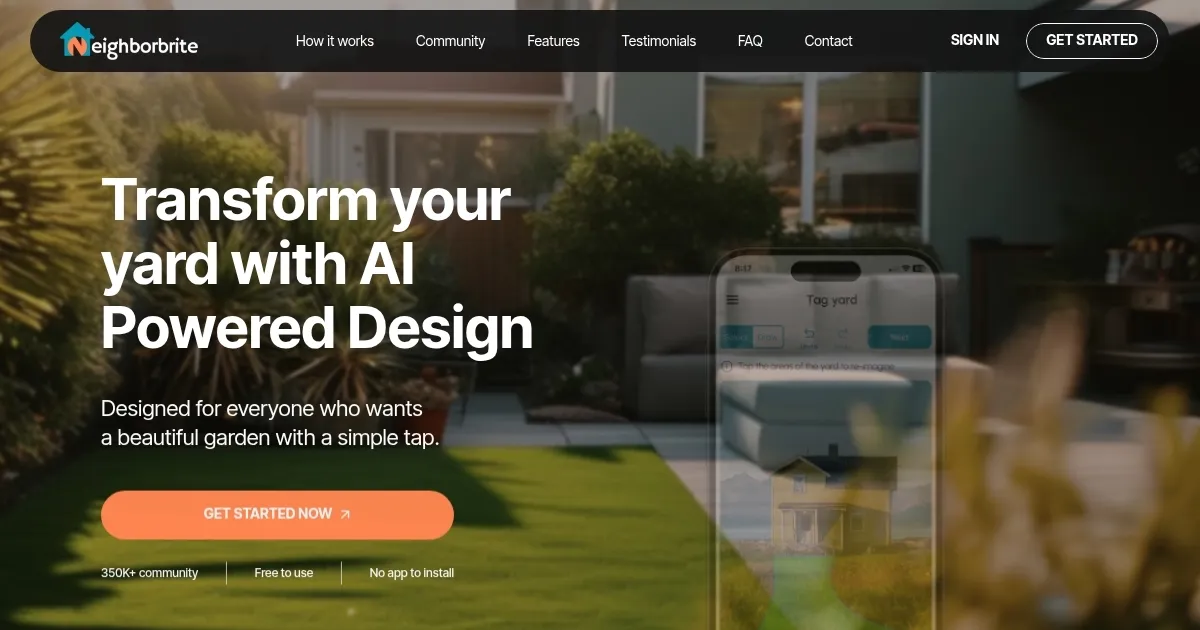
I spent some time playing around with Neighborbrite, and let me tell you, it’s like doodling with your yard — fun, fast, and surprisingly clever. I uploaded a photo of my scruffy backyard, picked a modern style, and in seconds, the AI spit out a sleek design with clean lines, a fire pit, and some snazzy shrubs. It’s not perfect, but it’s a thrill to see your space transformed without breaking a sweat. Neighborbrite feels like a friend who’s really good at gardening, nudging you toward ideas you’d never dream up alone.

The tool’s core is its AI, which analyzes your yard photo and generates designs based on your chosen style — cottage, desert, or modern, to name a few. I tried the desert vibe, and it suggested cacti and gravel paths that matched my dry climate. The location-based plant recommendations are a standout, ensuring your garden won’t wilt in a month. The interface is dead simple: upload, select, visualize. No app needed, just a browser. The “More Like This” button let me refine the design, though I wished I could drag elements around for more control. Compared to DreamzAR, which offers a 2D editor with over 2,000 plants, Neighborbrite feels lighter but more user-friendly for beginners.

What I liked? The speed. Designs load faster than my coffee brews. The community feature is a gem — sharing my mock-up got me tips from other users, like adding a pergola for shade. But there are quirks. The AI sometimes gets overzealous, landscaping my neighbor’s fence by mistake. The free version, while generous, skips advanced features like sunlight exposure filters, which I really wanted for my sunny yard. The Pro subscription, which I didn’t try, unlocks these, but I’d need more than a day’s tinkering to justify it. Compared to RescapeAI, Neighborbrite’s AR is less refined but doesn’t require a hefty subscription.

The surprise was how inspiring it felt. Seeing my yard reimagined as a cozy retreat sparked ideas I hadn’t considered, like a small herb garden. Pricing is a win — free to start, with a budget-friendly Pro tier versus Yardzen‘s pricier plans. But pros might find it lacking compared to SketchUp‘s depth. For now, it’s perfect for homeowners like me who want a quick, creative boost.

Give Neighborbrite a spin. Upload a photo, try a few styles, and share your design with the community for feedback. If you’re hooked, the Pro subscription or a flat-fee Pro Design can take it further. It’s a low-stakes way to dream big for your yard.

Visit Neighborbrite ↗
Categories
๐Ÿ“ Architecture
๐ŸŒณ Landscape Generation ๐Ÿ“ Room Planner
๐ŸŽจ Art
๐Ÿ–ผ๏ธ Design Generation
๐Ÿ–ผ๏ธ Image
๐Ÿ–ผ๏ธ Image Generation

Homepage Screenshot 📸

Neighborbrite screenshot

What are the key features? ✨

  • AI Design Generator: Creates instant landscape designs from uploaded yard photos.
  • Location-Based Plant Suggestions: Recommends plants suited to the userโ€™s climate and region.
  • Custom Garden Styles: Offers styles like desert, cottage, and modern for personalized designs.
  • Community Engagement: Allows users to share designs and gain inspiration from others.
  • AR Visualization: Overlays designs on real-world views for realistic previews.

Who is it for? 🤔

Neighborbrite is ideal for homeowners and DIY enthusiasts looking to reimagine their outdoor spaces without professional design experience. It suits those who want quick, personalized landscape ideas that match their climate and aesthetic preferences. Casual gardeners, busy professionals, and budget-conscious users benefit from its free tier and intuitive interface, while its community feature appeals to those seeking collaborative inspiration.

Examples of what you can use it for 💡

  • Homeowner: Uses Neighborbrite to visualize a modern backyard with a fire pit for entertaining.
  • DIY Gardener: Designs a cottage-style front yard with climate-appropriate flowers.
  • New Home Buyer: Plans a desert-style landscape to enhance curb appeal on a budget.
  • Renter: Tests temporary garden designs to personalize a leased outdoor space.
  • Community Member: Shares a design to get feedback on a pergola layout.

Pros & Cons ⚖️

  • Free to use with unlimited designs.
  • Climate-optimized plant suggestions.
  • Affordable Pro subscription option.
  • AI may misread photo elements.
  • Free version lacks advanced tools.

FAQs 💬

Is Neighborbrite free to use?
Neighborbrite offers a free tier with unlimited design ideas, with a Pro subscription for advanced features.
Do I need to install an app?
No, Neighborbrite is web-based and accessible via any browser without downloads.
Can I customize design elements?
Yes, the Pro version allows customization of over 60 elements like trees and pergolas.
Does it recommend plants for my climate?
Yes, it suggests plants based on your location and climate for sustainable designs.
Can I share my designs?
Users can share designs with friends or the Neighborbrite community for feedback.
Is it suitable for professional landscapers?
Itโ€™s designed for homeowners but can inspire professionals, though it lacks advanced tools.
Does it support sustainable gardening?
Yes, it recommends native and drought-resistant plants for eco-friendly designs.
Can I use it for sloped yards?
Yes, but scaling issues may occur in complex landscapes, requiring manual tweaks.
What styles can I choose from?
Options include desert, cottage, modern, and more to match your aesthetic.
Does it offer professional design services?
Yes, flat-fee Pro Designs provide shovel-ready plans with revisions.

Ready to try Neighborbrite?

Generates AI-powered landscape designs from yard photos.

Visit Neighborbrite ↗

Neighborbrite alternatives 🔗

  1. Homestyler AI Designer Homestyler AI Designer Choose design style and room type, and let AI design the room for you
  2. mnml.ai mnml.ai An AI design assistant for architects and interior designers for creating high-quality renders
  3. HomeDesignsAI HomeDesignsAI Transforms photos of rooms, houses, or outdoor spaces into AI-redesigned photorealistic versions
  4. RoomGPT RoomGPT An AI-powered tool that allows users to easily redesign their living spaces
  5. Rendair Rendair Transforms sketches and images into photorealistic architectural renders in seconds
  6. NewArc NewArc Transforms sketches into realistic images and 3D renders in seconds
Share
Neighborbrite screenshot enlarged
Promote Neighborbrite
light badge
Copy Embed Code
dark badge
Copy Embed Code
neutral badge
Copy Embed Code
Best AI Tools

Discover the best AI tools for any use case

Explore
  • Tool Categories
  • AI Use Cases
  • AI Events
  • AI News
  • Saved Tools
Company
  • About Us
  • Contact Us
  • Media & Partnerships
  • Suggest a Tool
Legal
  • Privacy Policy
  • Terms of Service
Copyright © 2026 Best AI Tools 415 Mission Street, 37th Floor, San Francisco, CA 94105