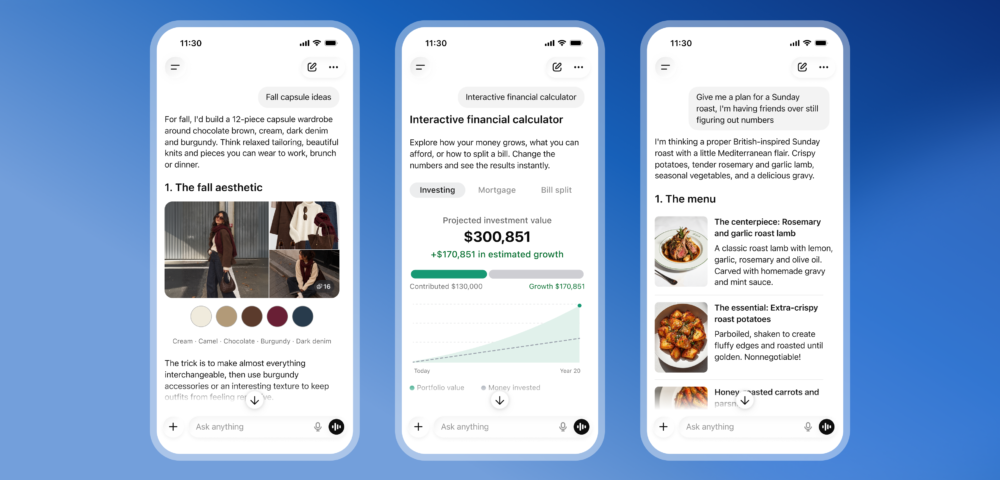
Text-only AI interfaces may be reaching their expiration date. OpenAI is launching a feature called Intelligent UI alongside the new GPT-6 model, and the core idea is straightforward: stop answering every question with a wall of text and start responding with things people can actually interact with. Tappable buttons, editable graphs, custom calculators, interactive charts. Not decoration. Functional UI elements built on the fly, inside the chat window.
This matters because it repositions ChatGPT as something closer to an operating environment than a search box. OpenAI’s stated goal is making complex topics easier to learn, but the practical effect goes further. When a user asks how an airplane wing generates lift and gets back a set of interactive diagrams instead of four paragraphs, the experience is qualitatively different. That’s not a chatbot anymore. That’s closer to a tutoring tool or a lightweight app builder that responds to natural language.
Product manager Aarush Selvan framed it simply during a press demo: the most helpful answers aren’t always text. He’s right, and it’s somewhat surprising this took as long as it did. Google has been pushing multimodal experiences across its Gemini products. Anthropic’s Claude remains largely text-focused. Microsoft’s Copilot has leaned into document and spreadsheet integration but hasn’t gone this far with generative UI inside a chat context. If Intelligent UI works as shown, OpenAI is pulling ahead on the product experience side in a way that’s harder to copy quickly.
The feature includes things like recipe visuals, bicycle mechanics diagrams, hiking maps, and savings calculators, based on examples OpenAI shared. That range is deliberate. It signals that the target isn’t just developers or researchers. OpenAI wants everyday users, the people who might currently reach for Google, YouTube tutorials, or a dedicated app instead of ChatGPT. Making the interface more visual and interactive is a direct play for that broader audience.
- Interactive charts and editable graphs inside chat responses
- Custom calculators built for specific user tasks
- Diagrams, maps, and visual explainers generated on demand
- User-controlled settings to reduce visuals if preferred
Rollout starts Wednesday for Pro, Plus, Business, and Enterprise subscribers, with free and Go tier users getting access Thursday. The feature is also customizable, so users who prefer plain text can dial the visuals back. That’s a smart call. Not every use case benefits from a diagram, and giving users control avoids the interface becoming noise.
So the question isn’t whether this is a meaningful product update. It is. The question is whether OpenAI can maintain this kind of product velocity as competition from Google, Anthropic, and a growing list of specialized tools keeps intensifying. Intelligent UI is a strong move. Sustaining that pace is the harder part.