logo-darklogo-darklogo-darklogo-dark
  • Tool Categories
    • ๐ŸŽจArt & Creative Design505
    • ๐ŸขBusiness Management644
    • ๐Ÿ’ปCoding & Development514
    • ๐Ÿ‘ฎDetection83
    • ๐Ÿง General Use728
    • ๐ŸฅHealth & Wellness55
    • ๐Ÿ“ทImage & Photo Analysis100
    • ๐Ÿ–ผ๏ธImage Generation & Editing618
    • ๐Ÿ“Interior & Architectural Design37
    • ๐ŸŽ“Learning & Education483
    • โš–๏ธLegal & Finance90
    • ๐ŸŽญLifestyle & Entertainment236
    • ๐Ÿ“ขMarketing & Advertising627
    • ๐ŸŽงMusic & Audio138
    • ๐Ÿ‘”Office & Workplace1,014
    • ๐Ÿ”ฌResearch & Data Analysis373
    • ๐Ÿ‘ฅSocial Media245
    • ๐ŸŽฅVideo Generation & Editing426
    • ๐Ÿ‘ง๐ŸปVirtual Companion135
    • ๐ŸŽคVoice Generation & Editing381
    • โœ๏ธWriting & Editing808
    • All Categories
    • AI Use Cases
  • News
  • Events
    • Academic Conferences
    • Developer Conferences
    • Expos / Trade Shows
    • Industry Summits
    • Workshops / Training
    • All Events
    • Past Events
  • Saved Tools
  • Suggest a Tool
โœ•
Home › Image Generation & Editing › Face Swap› Crazy Face AI
Crazy Face AI

Crazy Face AI

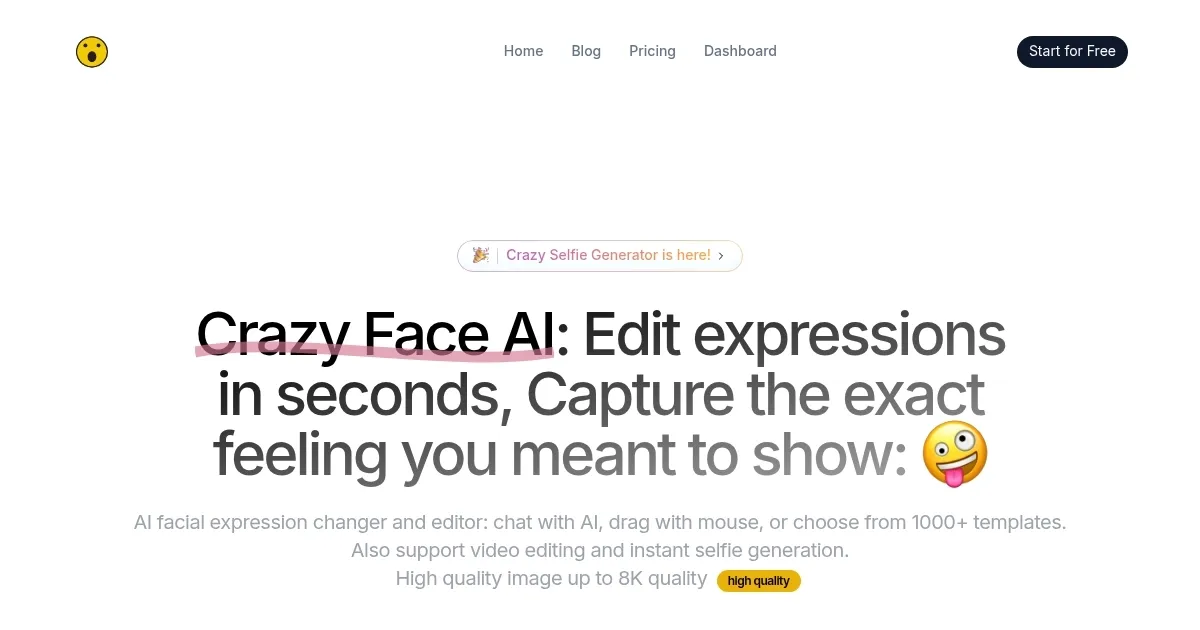
Transforms facial expressions in photos/videos using AI, templates, or manual tweaks

I spent a few hours checking out Crazy Face AI, and I kinda like it — it’s like stepping into a funhouse mirror with a tech twist. Upload a photo, and suddenly you’re sculpting expressions like a digital artist, turning a neutral selfie into a wide-eyed, exaggerated gasp that screams “YouTube thumbnail gold.” As someone who’s dabbled in content creation, I was curious to see if this tool could really deliver. Spoiler: it’s pretty slick, though it’s got a learning curve that might catch you off guard.

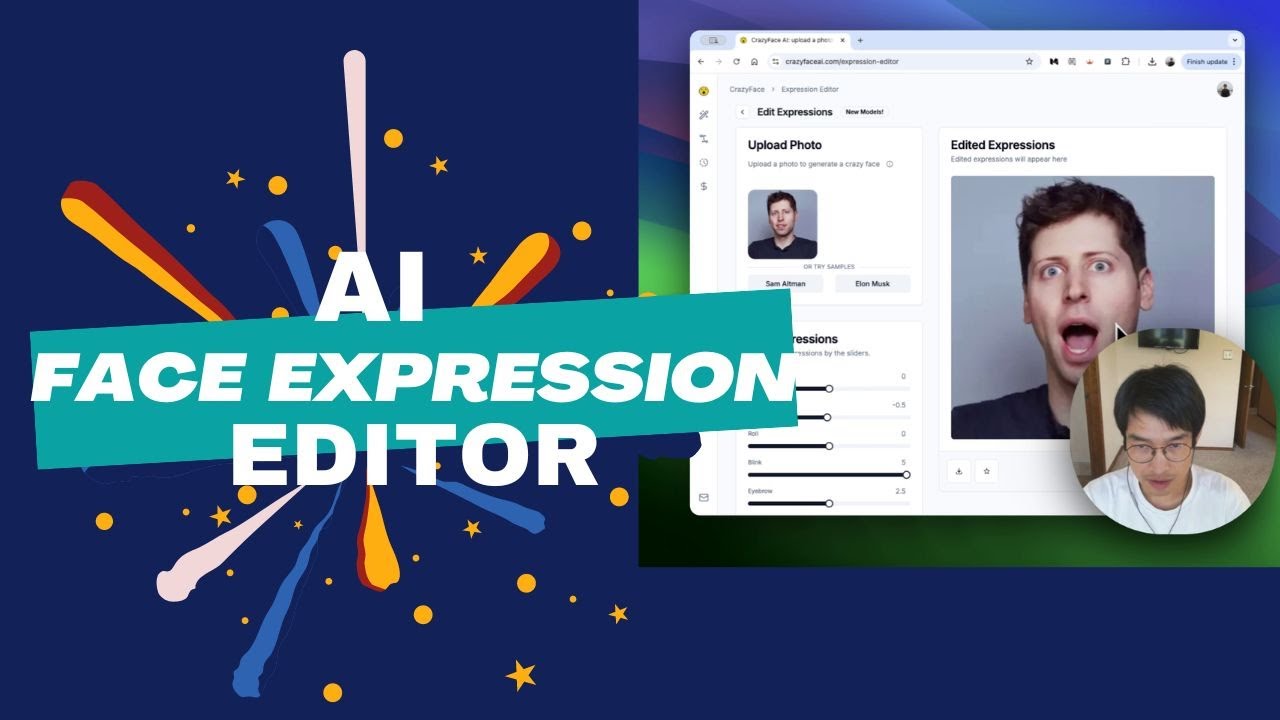
The interface feels snappy, with options to tweak expressions via AI prompts, a drag-and-drop editor, or a massive library of over 1000 templates. I tried the Face Detailerโ„ข feature, which is as cool as it sounds, zooming in on tiny details like skin pores to keep edits realistic. I uploaded a selfie and used the “surprised” template — within seconds, my face looked like I’d just seen a ghost, and the 8K resolution meant every detail was sharp enough for a billboard. The Animal Expression Editor was a highlight. I tossed in a photo of my friend’s dog, and with a few clicks, it went from sleepy to smirking, ready for a meme that could dominate Reddit. The video editing feature, which supports 10-second clips, was fun too — I made a quick TikTok where my face shifted from calm to dramatic mid-sentence.

What I liked most was how fast it is. The AI processes changes in seconds, which is a lifesaver when you’re brainstorming thumbnails under a deadline. Compared to FaceSwapper, which I’ve also tried, Crazy Face AI feels more tailored for creators with its viral-focused templates. But, and this is a big but, the web-only platform is a pain. I kept wishing for a mobile app to tweak things on my phone. Also, when I got too ambitious with the drag-and-drop editor, my edits started looking a bit cartoonish — not the vibe I was going for. Some X posts mentioned similar issues, where pushing the AI too far can make faces look “off.”

The surprise element? The “viral score” predictor. It’s like a little coach telling you how likely your thumbnail is to grab attention, based on patterns from top YouTubers. It’s not perfect, but it’s a clever touch. If you’re dipping your toes in, stick to the templates for quick wins, and use the free trial to test the video features. You’ll probably have as much fun as I did, but don’t expect to master it in one go.

Visit Crazy Face AI ↗
Categories
๐Ÿ–ผ๏ธ Image
๐ŸŽญ Face Swap ๐Ÿ–ผ๏ธ Image Generation โœ๏ธ Photo Editing ๐Ÿง‘โ€๐ŸŽค Avatar Generation
๐ŸŽฅ Video
๐ŸŽญ Face Swap Video
๐ŸŽญ Lifestyle
๐ŸŽฎ Game
๐ŸŽจ Art
๐Ÿฆธ Cartoon Generation

Homepage Screenshot 📸

Crazy Face AI screenshot

Video Overview 🎬

Crazy Face AI - Video Overview

What are the key features? ✨

  • Face Detailer: Enhances facial details like hair and skin for realistic edits.
  • Template Library: Offers over 1000 viral-inspired templates for quick edits.
  • Animal Expression Editor: Transforms pet facial expressions for memes or portraits.
  • Viral Score Predictor: Estimates thumbnail to performance based on YouTube trends.
  • Video Expression Editor: Edits expressions in videos up to 10 seconds long.

Who is it for? 🤔

Crazy Face AI is ideal for content creators, influencers, photographers, and casual users looking to enhance photos and videos with dynamic facial expressions. YouTubers benefit from its viral thumbnail templates, while social media enthusiasts and pet owners enjoy creating engaging selfies and memes. Professionals seeking polished headshots and marketers aiming for eye-catching visuals also find value in its high-resolution output and intuitive interface.

Examples of what you can use it for 💡

  • YouTuber: Creates high-conversion thumbnails with viral-inspired facial expressions.
  • Influencer: Edits selfies for Instagram with trendy poses and expressions.
  • Pet Owner: Transforms pet photos into funny memes with expressive faces.
  • Photographer: Refines professional headshots by adjusting subtle facial nuances.
  • Video Editor: Animates facial expressions in short TikTok videos for dynamic content.

Pros & Cons ⚖️

  • Extensive 1000+ template library
  • High-quality 8K resolution support
  • Viral score boosts engagement
  • Over-editing may look unnatural
  • Limited video length (10s)

FAQs 💬

What file formats does Crazy Face AI support?
Supports JPEG, PNG, and GIF for photo uploads.
Is my uploaded photo stored permanently?
No, Crazy Face AI prioritizes privacy and does not store images permanently.
Do I need an account to use Crazy Face AI?
You can use it without an account, but signing up unlocks more features.
How long does it take to edit an expression?
The process typically takes just a few seconds.
Can I share edited images directly?
Yes, images can be shared directly to social media platforms.
Is Crazy Face AI available on mobile?
No, itโ€™s currently only available on the web platform.
What can I use the edited images for?
Use them for social media, marketing, or personal enjoyment.
Can I edit pet photos with Crazy Face AI?
Yes, the Animal Expression Editor lets you transform pet facial expressions.
Does it support video editing?
Yes, it supports editing facial expressions in videos up to 10 seconds.
How accurate are the viral score predictions?
Predictions are based on viral YouTube patterns but may vary in accuracy.

Ready to try Crazy Face AI?

Transforms facial expressions in photos/videos using AI, templates, or manual tweaks

Visit Crazy Face AI ↗

Crazy Face AI alternatives 🔗

  1. AI Face Swap AI Face Swap An online tool designed for easy and fun face-swapping experiences
  2. Remaker AI Remaker AI Online platform offering media manipulation, such as face swapping, AI portraits, and video enhancements
  3. Vidnoz AI Vidnoz AI An AI-powered text-to-video platform, made for marketers, businesses, educators, and more
  4. Pica AI Pica AI Discover and generate AI art masterpieces in seconds
  5. Artguru Artguru Transforms text or photos into unique AI-generated artwork in seconds
  6. AIEASE AIEASE An AI-powered platform offering a suite of free photo editing tools
Share
Crazy Face AI screenshot enlarged
Best AI Tools

Discover the best AI tools for any use case

Explore
  • Tool Categories
  • AI Use Cases
  • AI Events
  • AI News
  • Saved Tools
Company
  • About Us
  • Contact Us
  • Media & Partnerships
  • Suggest a Tool
Legal
  • Privacy Policy
  • Terms of Service
Copyright © 2026 Best AI Tools 415 Mission Street, 37th Floor, San Francisco, CA 94105