logo-darklogo-darklogo-darklogo-dark
  • Home
  • Browse
    • Assistant
    • Coding
    • Image
    • Productivity
    • Video
    • Voice
    • Writing
    • All Categories
    • AI Use Cases
  • Events
  • My Favorites
  • Suggest a Tool
✕
Home › Marketing & Advertising / Productivity›
Published by Dusan Belic on May 19, 2024

Flowpoint

Flowpoint
Flowpoint Homepage
Categories Marketing & AdvertisingProductivity

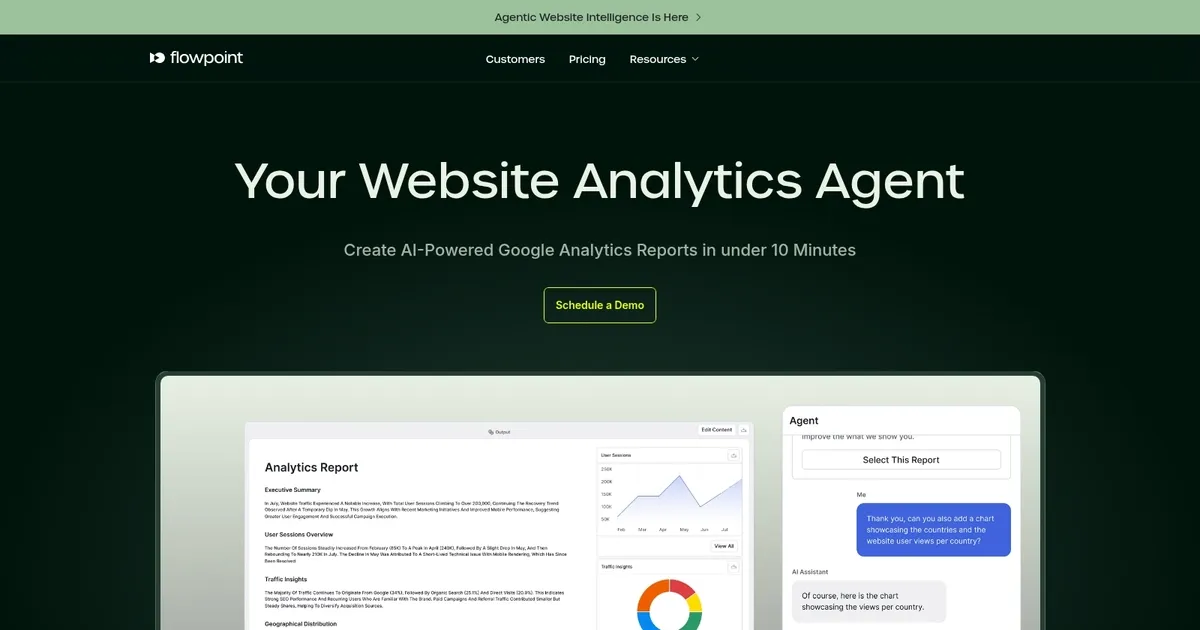
Flowpoint - screenshot

An AI-powered website analytics that helps businesses understand why users drop off their websites

Flowpoint

Flowpoint is an AI-powered website analytics tool designed to help businesses understand why users drop off their websites. By tracking user behavior and identifying friction points, Flowpoint provides actionable insights to optimize user experience and increase conversions. The platform’s AI capabilities allow for real-time data analysis, ensuring that businesses can quickly adapt to user needs and improve overall website performance.

The tool offers features like heatmaps, session recordings, and conversion funnels to give a comprehensive view of user interactions. These insights help businesses identify specific areas for improvement, such as page load times, navigation issues, or content engagement. Additionally, Flowpoint integrates seamlessly with various website platforms, making it easy to implement and start gaining valuable insights without significant technical expertise.

Flowpoint also includes a user-friendly dashboard that presents data in an easily digestible format, enabling teams to make data-driven decisions efficiently. With its robust analytics and intuitive interface, Flowpoint is an essential tool for any business looking to enhance their website’s user experience and boost engagement metrics.

Flowpoint Homepage
Categories Marketing & AdvertisingProductivity

What are the key features? ⭐

  • Simple Dashboard: Provides a clean, single-panel view of essential analytics without unnecessary complexity.
  • AI-Powered Insights: Uses AI models to analyze behavior, detect issues, and suggest conversion optimizations automatically.
  • Funnels & Sessions: Tracks user journeys step-by-step and details individual sessions with event timelines.
  • Real-Time Audience: Shows live geographic distribution of visitors by country, region, and city.
  • Conversational AI Assistant: Enables natural-language questions to query data and receive reasoned explanations.

Who is it for? 🤔

This tool helps marketing teams, website owners, small business operators, CRO specialists, and digital agencies that want fast, actionable insights into visitor behavior without needing deep technical expertise or enterprise-level complexity. It suits people focused on improving conversions through AI suggestions and automated workflows rather than running exhaustive product data labs.

Examples of what you can use it for 💭

  • Marketing teams: Use it to quickly identify conversion drop-offs and get AI suggestions to improve campaign performance.
  • Website owners: Rely on session details and funnels to understand user pain points and optimize pages for better engagement.
  • Small business operators: Leverage the simple dashboard and AI insights without needing a dedicated analytics expert.
  • CRO specialists: Automate audits and behavior analysis to test hypotheses faster and lift conversion rates.
  • Digital agencies: Monitor client sites with privacy-focused tracking and generate actionable reports efficiently.

Pros & Cons ⚖️

  • Easy-to-use interface
  • Strong AI recommendations
  • Clear funnel insights
  • Privacy emphasis
  • Limited deep replays
  • Agentic setup time

FAQs 💬

What does Flowpoint.ai actually track on my website?
It tracks traffic sources, page views, user events, conversion funnels, full session timelines with ordered interactions, and real-time visitor locations using a client-side script.
How does the AI in Flowpoint.ai help with optimization?
The AI analyzes patterns to spot drop-offs or issues, then provides suggestions like page tweaks or tests, and the assistant answers questions in plain language with data support.
Is Flowpoint.ai privacy-friendly compared to Google Analytics?
Yes, it emphasizes lighter, privacy-focused tracking and positions itself as an easier alternative with less heavy cookie reliance.
Can I use Flowpoint.ai without technical skills?
Mostly yes, the dashboard stays intuitive and the AI assistant handles queries naturally, though custom agentic workflows may need some trial and error to set up well.
What makes Flowpoint.ai different from Mixpanel or Amplitude?
It prioritizes simpler marketing-focused views, proactive AI optimization suggestions, and agentic automation over broad, complex product event tracking.
Does Flowpoint.ai offer session replays?
It provides detailed session timelines with ordered events and interactions, though not full video-style replays like some specialized tools.
Who is the main target user for Flowpoint.ai?
Marketing teams, website owners, and CRO-focused professionals who want fast, AI-assisted insights without enterprise-level complexity.
How quick is setup for Flowpoint.ai?
Installation involves adding a tracking script to your site, and basic analytics appear shortly after, with AI features ready soon after data flows.
Visit Flowpoint

Related tools ↙️

  1. Rankscale Rankscale Tracks and analyzes brand visibility across AI search engines with insights and optimization tips
  2. Profound Profound Tracks and optimizes brand visibility in AI answer engines like ChatGPT and Perplexity
  3. CopyMonkey CopyMonkey Generates keyword-optimized Amazon listings in seconds
  4. Goodcall Goodcall Deploys AI agents to handle business phone calls for scheduling and customer support
  5. Optmyzr Optmyzr Automates PPC optimizations and reporting to boost ad performance
  6. Pineify Pineify Generates error-free Pine Script indicators and strategies without coding
Last update: February 23, 2026
Share
Promote Flowpoint
light badge
Copy Embed Code
dark badge
Copy Embed Code
neutral badge
Copy Embed Code
About Us | Contact Us | Suggest an AI Tool | Privacy Policy | Terms of Service

Copyright © 2026 Best AI Tools
415 Mission Street, 37th Floor, San Francisco, CA 94105