labml.ai
Monitors ML model training and hardware from mobile with easy experiment tracking
labml.ai is a fancy AI tool designed to significantly enhance the workflow of researchers and developers working with deep learning models.
At its core, labml.ai provides annotated PyTorch paper implementations, allowing users to see and understand the practical applications of theoretical concepts detailed in scholarly articles. This aspect is particularly beneficial for those looking to deepen their understanding of complex machine learning algorithms by providing them with hands-on, code-level illustrations.
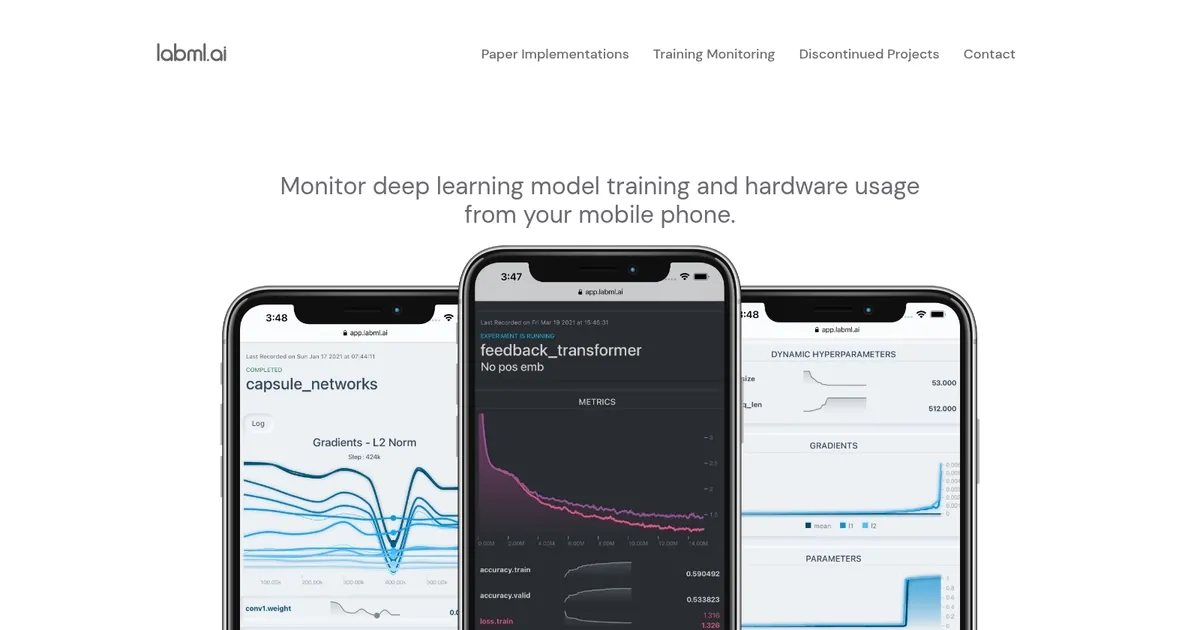
In addition, labml.ai offers users the ability to monitor their model training and hardware usage efficiently from their mobile phones — ensuring that they can keep track of their experiments’ performance and resource consumption in real time.
Apart from its core functionalities, labml.ai also addresses the need to keep up with the rapidly evolving landscape of machine learning research and development. It guides users towards the latest and trending machine learning papers, aiding in discovering cutting-edge advancements in the field.
Lastly, if you’re interested in delving deeper into what labml.ai has to offer or in contacting the team behind it, the platform provides direct links and references.
Homepage Screenshot 📸
What are the key features? ✨
- Real-time mobile monitoring: Track experiment progress, metrics, and hardware stats from any mobile device or laptop.
- Easy experiment tracking: Automatically log parameters, metrics, console output, and git info with minimal code changes.
- Hardware usage monitoring: View GPU/CPU utilization, memory, temperature across local or remote machines via one command.
- PyTorch integration: Seamless tracker hooks designed for PyTorch training loops, plus annotated paper code examples.
- Organized dashboard: Centralized view of all runs with graphs, tables, and comparisons for quick analysis.
Who is it for? 🤔
Examples of what you can use it for 💡
- PhD student: Tracks multiple hyperparameter variants of a vision model overnight and checks progress on phone between classes.
- Independent researcher: Monitors GPU usage on cloud instances while comparing runs locally without switching tabs constantly.
- Small ML team: Logs experiments locally across members' machines and shares dashboard links for quick peer reviews.
- Hobbyist developer: Experiments with transformers in a notebook and watches loss curves live while doing other tasks.
- Paper reproducer: Uses annotated implementations with built-in tracking to verify results and tweak configurations easily.
Pros & Cons ⚖️
- Free and open-source
- Mobile monitoring convenience
- Minimal code integration
- Hardware tracking included
- Basic dashboard visuals
- Limited advanced features
FAQs 💬
Ready to try labml.ai?
Monitors ML model training and hardware from mobile with easy experiment tracking
Visit labml.ailabml.ai alternatives 🔗