MixAudio
Generates AI-powered music tracks, remixes, and radio from text or audio inputs
MixAudio is an AI-powered music creation platform that generates background music, remixes, and radio streams from text or audio inputs. Accessible at mix.audio, it offers three core features: BGM Maker, Remix Maker, and Radio Maker. Users input text prompts, like “upbeat jazz for a cafe,” or upload audio, such as a hummed melody, and the AI produces tracks in seconds. The platform supports MP3 and WAV formats, with export options tied to pricing tiers. The free plan allows limited generations, while paid plans unlock more features and higher-quality outputs.
The BGM Maker creates custom background music based on genre, mood, or instrument preferences. Remix Maker transforms uploaded audio into new genres, like turning a folk tune into techno. Radio Maker generates continuous audio streams for podcasts or events. The interface is user-friendly, requiring no technical skills, making it ideal for beginners. Compared to Soundful, which focuses on royalty-free music, MixAudio offers more creative flexibility.
The tool excels in speed and ease, delivering tracks in under a minute. Multimodal Input, which converts voice or audio into full compositions, is a standout feature. However, generic outputs can occur with vague prompts, and the free plan’s limits may frustrate users. Paid plans, while competitively priced, are necessary for frequent use or high-quality exports. The AI sometimes struggles with complex audio inputs, like intricate melodies.
MixAudio suits content creators, podcasters, and small businesses needing quick, custom audio. Professional musicians may find the lack of advanced editing tools limiting. The platform’s cloud-based processing ensures compatibility across devices, and no software installation is required.
For best results, use specific prompts to guide the AI. Experiment with Multimodal Input for unique creations. Start with the free plan to test functionality, and upgrade if you need more generations or better export options.
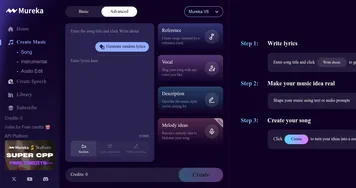
Homepage Screenshot 📸

Video Overview 🎬
What are the key features? ✨
- BGM Maker: Generates custom background music from text prompts.
- Remix Maker: Transforms uploaded audio into new genres or styles.
- Radio Maker: Creates continuous audio streams for podcasts or events.
- Multimodal Input: Converts voice or audio inputs into full tracks.
- Customization Options: Allows tweaking of genres, moods, and instruments.
Who is it for? 🤔
Examples of what you can use it for 💡
- Podcaster: Crafts unique intro music for episodes using text prompts.
- YouTuber: Creates background tracks for vlogs with specific moods.
- Indie Game Developer: Generates atmospheric music for game levels.
- Small Business Owner: Produces audio for social media ads quickly.
- Content Creator: Remixes a vocal clip into a new genre for TikTok.
Pros & Cons ⚖️
- Intuitive interface for beginners.
- Supports voice and text inputs.
- Competitive pricing for paid plans.
- Free plan has limited generations.
FAQs 💬
Ready to try MixAudio?
Generates AI-powered music tracks, remixes, and radio from text or audio inputs
Visit MixAudioMixAudio alternatives 🔗