Poper
Generates smart popups using AI to improve website visitor engagement and conversions
Poper steps into the crowded field of website engagement tools with a fresh twist, leveraging artificial intelligence to craft popups that feel less like interruptions and more like timely helpers. The core idea revolves around its AI engine, which scans page content and generates customized popups on the fly, whether you’re running an e-commerce site or a simple blog. This means a popup on a product page might highlight a discount code, while one on a blog post could nudge visitors toward subscribing. I think this adaptive approach sets it apart from more static competitors like OptinMonster, which relies heavily on manual templates, or OptiMonk, though that one also dips into AI for personalization but focuses more on e-commerce optimization.
Users often praise the ease of setup. You add a script tag to your site, and you’re off, no matter if it’s WordPress, Shopify, or something custom. The dashboard feels intuitive, with drag-and-drop elements for building popups, and the AI credit system lets you generate ideas quickly without starting from scratch. Features like exit-intent triggers detect when a visitor’s mouse heads for the close button and pop up an offer to keep them around. Gamified popups add a fun spin, think spin-the-wheel for discounts, which can boost interaction rates. Geo-targeting stands out too, pulling location data to show region-specific messages, like a local promo in one city versus another. Integrations flow smoothly with tools such as Mailchimp or Klaviyo, syncing leads without hassle. But some might find the free plan restrictive, capping pageviews and AI uses, pushing toward paid tiers for unbranded popups and A/B testing.
On the flip side, not everything shines. The learning curve creeps in when you dive into advanced targeting rules, like combining scroll depth with time on page, and occasional glitches in AI suggestions have been noted in forums, where popups sometimes miss the mark on tone or relevance. Compared to Wisepops, which excels in segmentation but lacks the same AI depth, Poper holds its own in creativity yet might overwhelm beginners with options. Pricing stays general here, free for starters with basics, then scaling to plans that offer more views and features, often seen as value-packed against pricier alternatives. A surprise element comes from how well it handles mobile responsiveness, automatically adjusting popups to avoid annoying overlays on small screens, something not all tools nail.
Technical details weave in organically, the platform uses JavaScript for real-time detection of user behavior, processing events like mouse movements or scrolls to trigger actions. This event-driven architecture ensures low latency, keeping site speed intact, as confirmed by user tests showing minimal impact on load times. Analytics built-in track impressions, clicks, and conversions, feeding back into the AI for refinements. Some users report higher engagement, up to 40 percent in subscriptions, but results vary by implementation. The gamification feature employs random reward algorithms to encourage participation, adding a layer of psychology to the mix.
If you’re eyeing Poper, start small with the free plan to test on one site, focus on high-traffic pages first, and monitor analytics closely to tweak triggers based on real data rather than guesses.
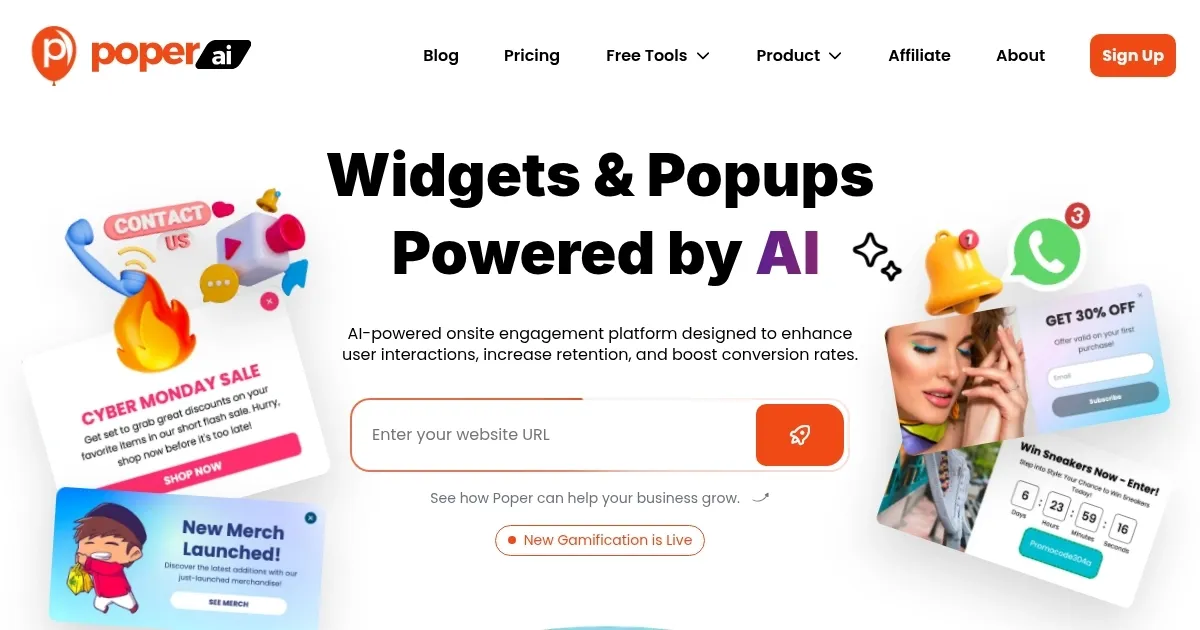
Homepage Screenshot 📸
Video Overview 🎬
What are the key features? ✨
- AI Popup Generation: Uses artificial intelligence to create customized popups based on website content analysis.
- Popup Types: Offers varieties including welcome, exit-intent, scroll-triggered, gamified, and geo-targeted options.
- Integrations: Connects seamlessly with email and CRM tools like Mailchimp, Klaviyo, and ActiveCampaign.
- A/B Testing: Allows comparison of different popup versions to optimize performance in higher plans.
- Analytics: Provides tracking of impressions, clicks, and conversions for data-driven refinements.
Who is it for? 🤔
Examples of what you can use it for 💡
- E-commerce owner: Deploys exit-intent popups to offer discounts and reduce cart abandonment.
- Blogger: Uses scroll-triggered popups to collect emails for newsletter subscriptions.
- Marketer: Applies geo-targeted popups to show location-specific promotions.
- Small business manager: Sets up gamified popups to engage visitors with interactive rewards.
- Website administrator: Integrates with email tools to sync leads for follow-up campaigns.
Pros & Cons ⚖️
- AI-driven customization
- Multiple integrations
- Analytics included
- Free plan is rather limited
FAQs 💬
Ready to try Poper?
Generates smart popups using AI to improve website visitor engagement and conversions
Visit PoperPoper alternatives 🔗